







Question: Part 1: Physical Cabling Cable the devices as shown below: R1 g0/0 -> R2 g0/0 . R1 g0/1 R2 g0/1 Part 2: Basic Configuration
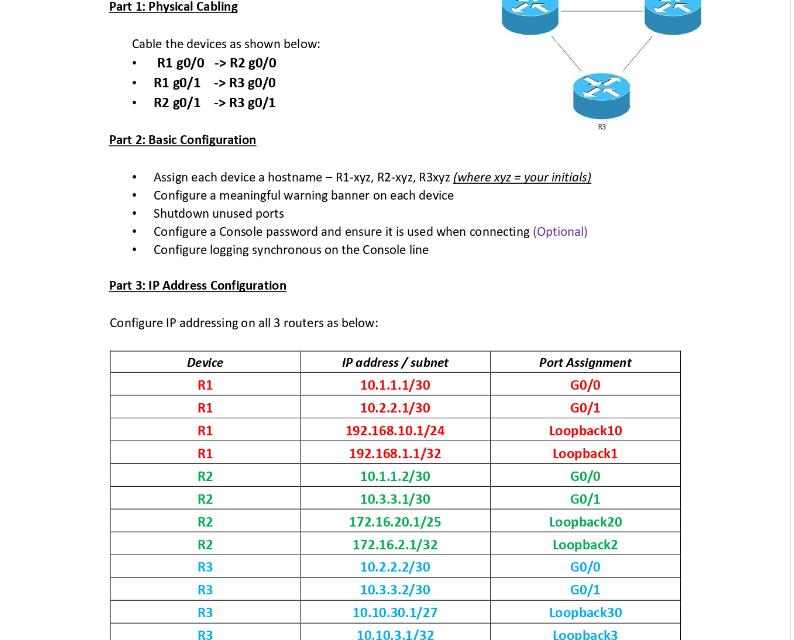
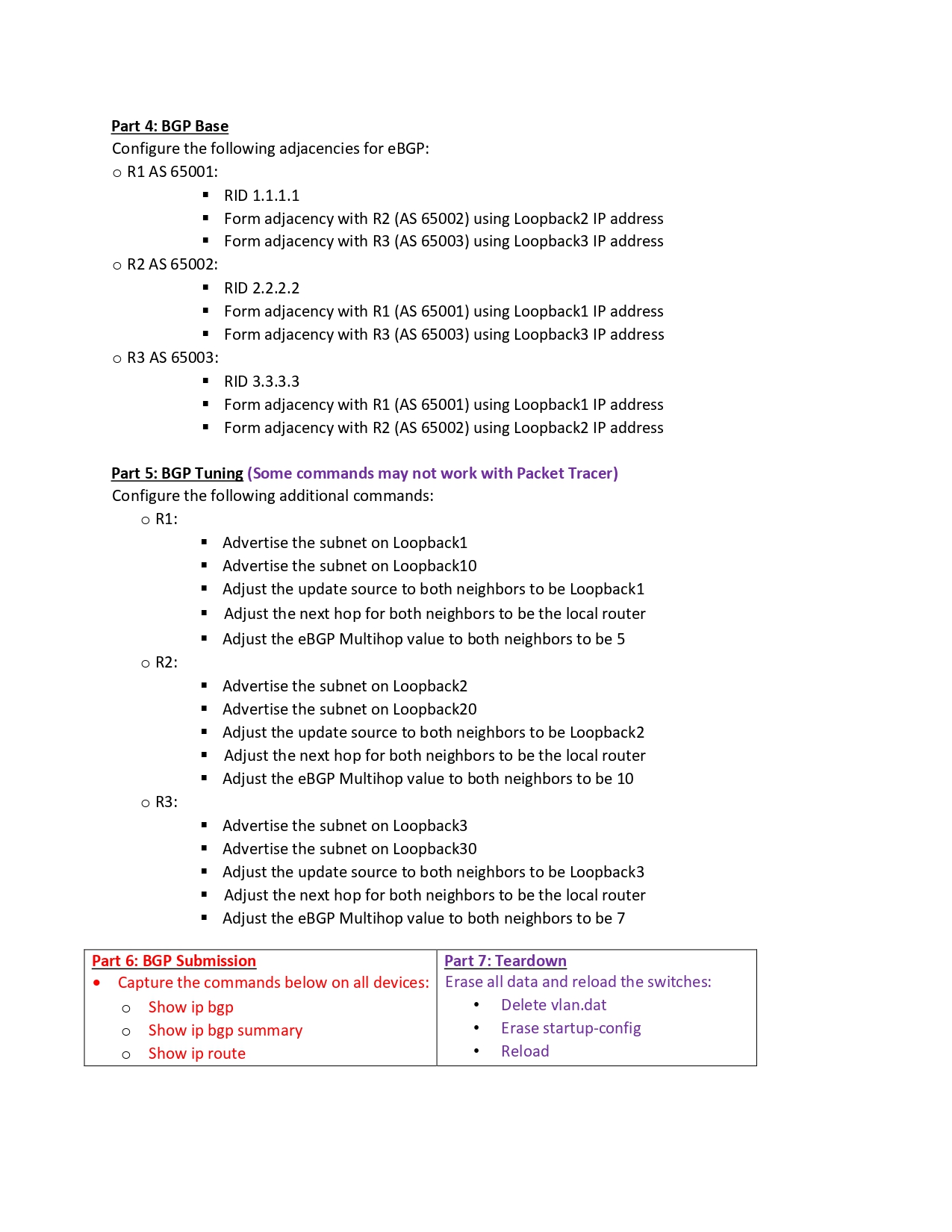
Part 1: Physical Cabling Cable the devices as shown below: R1 g0/0 -> R2 g0/0 . R1 g0/1 R2 g0/1 Part 2: Basic Configuration Assign each device a hostname - R1-xyz, R2-xyz, R3xyz (where xyz = your initials) Configure a meaningful warning banner on each device Shutdown unused ports Configure a Console password and ensure it is used when connecting (Optional) Configure logging synchronous on the Console line . . . . . -> R3 g0/0 -> R3 g0/1 . Part 3: IP Address Configuration Configure IP addressing on all 3 routers as below: Device R1 R1 R1 R1 R2 R2 R2 R2 R3 R3 R3 R3 IP address / subnet 10.1.1.1/30 10.2.2.1/30 192.168.10.1/24 192.168.1.1/32 10.1.1.2/30 10.3.3.1/30 172.16.20.1/25 172.16.2.1/32 10.2.2.2/30 10.3.3.2/30 10.10.30.1/27 10.10.3.1/32 R3 Port Assignment GO/0 GO/1 Loopback10 Loopback1 GO/0 G0/1 Loopback20 Loopback2 GO/0 GO/1 Loopback30 Loopback3 Part 4: BGP Base Configure the following adjacencies for eBGP: o R1 AS 65001: o R2 AS 65002: o R3 AS 65003: o R2: o R3: RID 1.1.1.1 Form adjacency with R2 (AS 65002) using Loopback2 IP address Form adjacency with R3 (AS 65003) using Loopback3 IP address Part 5: BGP Tuning (Some commands may not work with Packet Tracer) Configure the following additional commands: o R1: RID 2.2.2.2 Form adjacency with R1 (AS 65001) using Loopback1 IP address Form adjacency with R3 (AS 65003) using Loopback3 IP address RID 3.3.3.3 Form adjacency with R1 (AS 65001) using Loopback1 IP address Form adjacency with R2 (AS 65002) using Loopback2 IP address Advertise the subnet on Loopback1 Advertise the subnet on Loopback10 Adjust the update source to both neighbors to be Loopback1 Adjust the next hop for both neighbors to be the local router Adjust the eBGP Multihop value to both neighbors to be 5 Advertise the subnet on Loopback2 Advertise the subnet on Loopback20 Adjust the update source to both neighbors to be Loopback2 Adjust the next hop for both neighbors to be the local router Adjust the eBGP Multihop value to both neighbors to be 10 Advertise the subnet on Loopback3 Advertise the subnet on Loopback30 Adjust the update source to both neighbors to be Loopback3 Adjust the next hop for both neighbors to be the local router Adjust the eBGP Multihop value to both neighbors to be 7 art BGP Part 7: Teard Capture the commands below on all devices: Erase all data and reload the switches: O Show ip bgp Delete vlan.dat o Show ip bgp summary O Show ip route Erase startup-config Reload
Step by Step Solution
There are 3 Steps involved in it

Get step-by-step solutions from verified subject matter experts
 Study Help