







Question: Part 1 - True or False TRUE FALSE 1. A Chart of Accounts is a list of the company snapshot accounts. 2. To access Sales
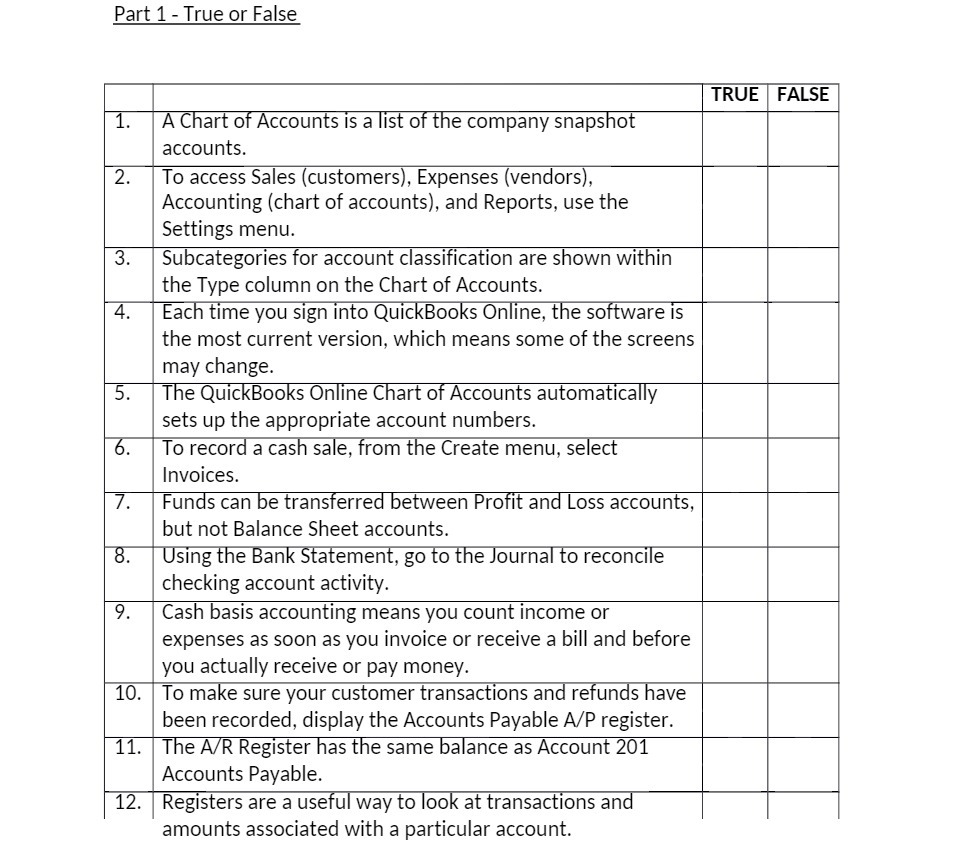
Part 1 - True or False TRUE FALSE 1. A Chart of Accounts is a list of the company snapshot accounts. 2. To access Sales (customers), Expenses (vendors), Accounting (chart of accounts), and Reports, use the Settings menu. 3. Subcategories for account classification are shown within the Type column on the Chart of Accounts. 4 Each time you sign into QuickBooks Online, the software is the most current version, which means some of the screens may change. 5. The QuickBooks Online Chart of Accounts automatically sets up the appropriate account numbers. 6. To record a cash sale, from the Create menu, select Invoices. 7. Funds can be transferred between Profit and Loss accounts, but not Balance Sheet accounts. 8. Using the Bank Statement, go to the Journal to reconcile checking account activity. 9. Cash basis accounting means you count income or expenses as soon as you invoice or receive a bill and before you actually receive or pay money. 10. To make sure your customer transactions and refunds have been recorded, display the Accounts Payable A/P register. 11. The A/R Register has the same balance as Account 201 Accounts Payable. 12. Registers are a useful way to look at transactions and amounts associated with a particular account
Step by Step Solution
There are 3 Steps involved in it

Get step-by-step solutions from verified subject matter experts
 Study Help