







Question: Part 1 Use Excel to create a workbook to perform a cost benefit analysis of the project. The workbook should use fixed and variable cell
Part 1
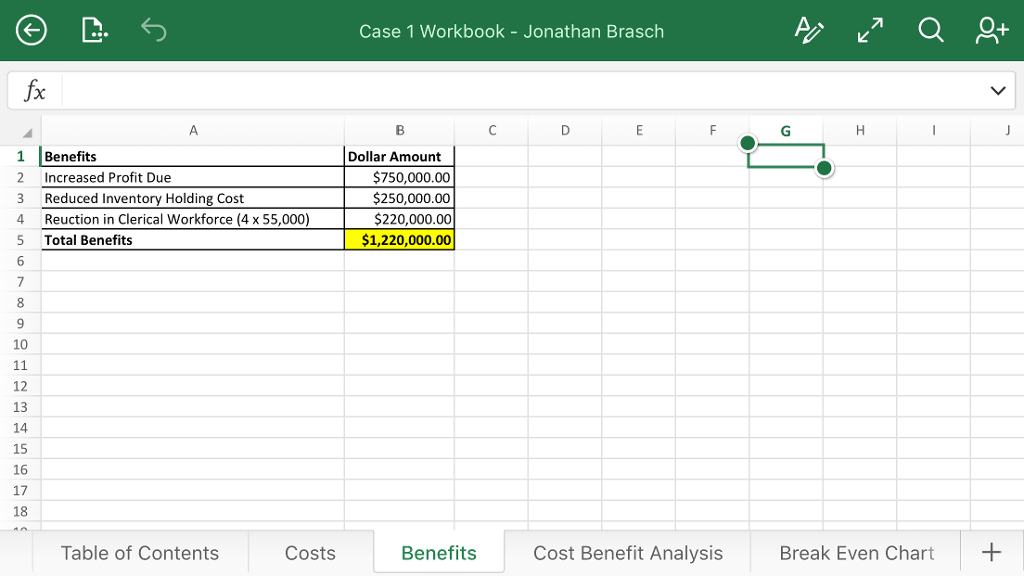
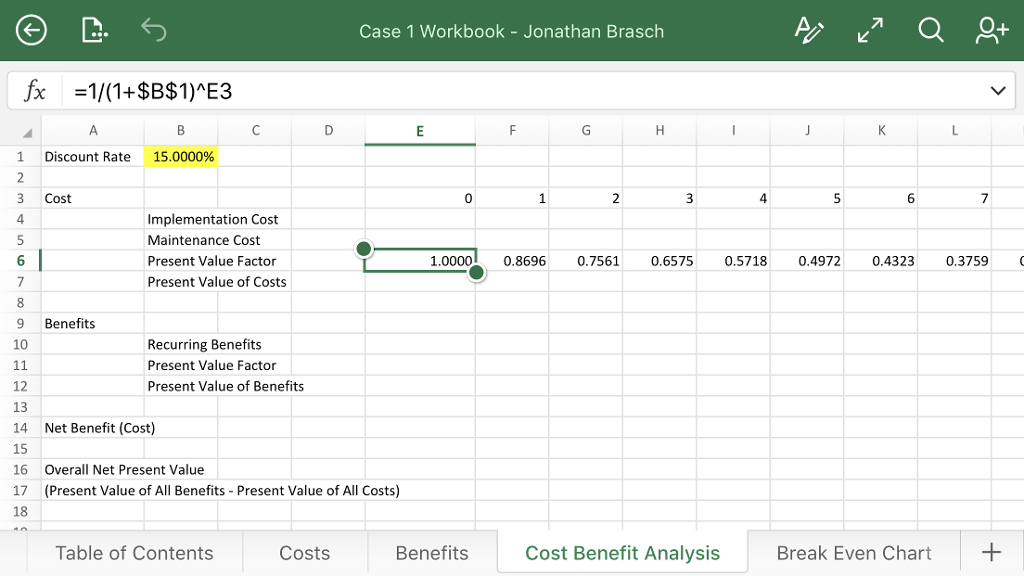
Use Excel to create a workbook to perform a cost benefit analysis of the project. The workbook should use fixed and variable cell references where applicable to support rapid assessment of the business case under different assumptions for interest rates, benefits and costs. The workbook should contain the following worksheets.
Cost Benefit Analysis - Should contain the discount rate, costs, benefits, present value factor, and the present value of costs and benefits for each year of the project. It should also include the Overall Net Present Value (NPV) for the proposed project, which is the net present value of all benefits minus the net present value of all costs.
Part 2
Please answer the following questions using the workbook you created in Part 1.
1. Assume a discount rate of 15%. What is the overall net present value for the project? When will the project break-even?
2. Assume a discount rate of 30%. What is the overall net present value for the project? When will the project break-even?
3. Assume the recurring value of benefits due to increased sales was overly optimistic and net income due to increased sales is only $375,000 instead of $750,000. In addition, assume the benefits due to a reduction in inventory holding costs are only $50,000 instead of $250,000. Assuming a discount rate of 15%, what is the overall net present value for the project? When will the project break-even?
4. Assume the recurring value of benefits due to increased sales was overly optimistic and net income due to increased sales is only $375,000 instead of $750,000. In addition, assume the benefits due to a reduction in inventory holding costs are only $50,000 instead of $250,000. At what discount rate is the project economically feasible? (Please note that the discount rate you calculate must include four decimal places of accuracy e.g. 12.3456%).
Please show what formulas are used and where to input them in order to get the correct values. Thank you!!
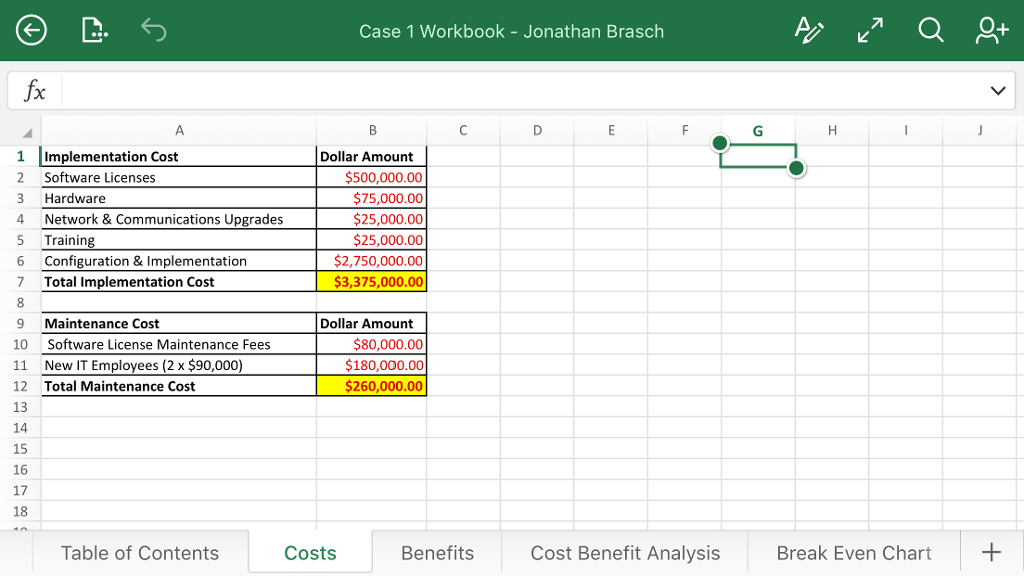
Case 1 Workbook Jonathan Brasch fx 1 implementation Cost Dollar Amount $500,000.00 2 Software Licenses 3 Hardware $75,000.00 4 Network & Communications Upgrades $25,000.00 5 Training $25,000.00 6 Configuration & Implementation $2,750,000.00 7 Total Implementation Cost $3,375,000.00 9 Maintenance Cost Dollar Amount $80,000.00 10 Software License Maintenance Fees 11 New IT Employees (2x$90,000) $180,000.00 $260,000.00 12 Total Maintenance Cost 13 14 16 17 Table of Contents Costs Benefits Cost Benefit Analysis Break Even Chart Case 1 Workbook Jonathan Brasch fx 1 implementation Cost Dollar Amount $500,000.00 2 Software Licenses 3 Hardware $75,000.00 4 Network & Communications Upgrades $25,000.00 5 Training $25,000.00 6 Configuration & Implementation $2,750,000.00 7 Total Implementation Cost $3,375,000.00 9 Maintenance Cost Dollar Amount $80,000.00 10 Software License Maintenance Fees 11 New IT Employees (2x$90,000) $180,000.00 $260,000.00 12 Total Maintenance Cost 13 14 16 17 Table of Contents Costs Benefits Cost Benefit Analysis Break Even Chart
Step by Step Solution
There are 3 Steps involved in it

Get step-by-step solutions from verified subject matter experts
 Study Help