







Question: Part 2: Write a single shell script hello.sh which can finish the list of tasks as below: 1. Greet user. E.g. Welcome to computer science
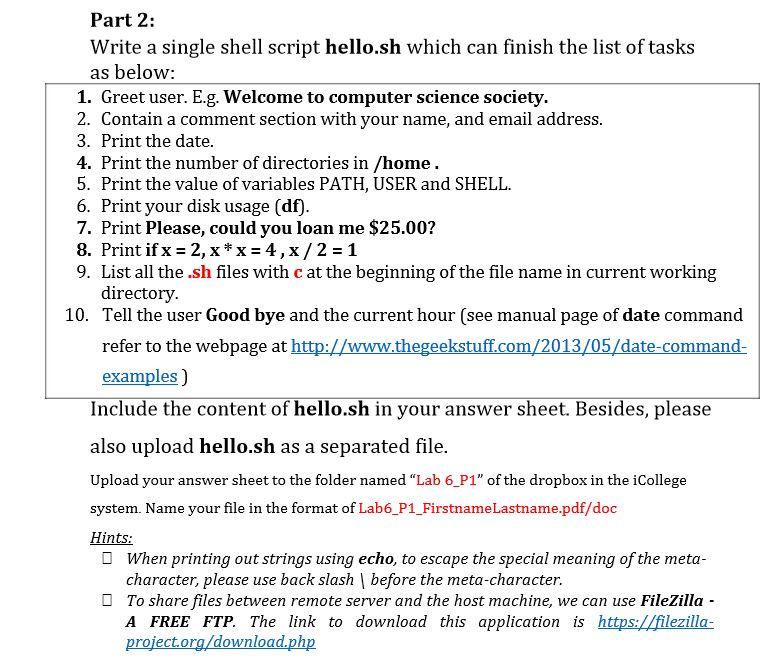
Part 2: Write a single shell script hello.sh which can finish the list of tasks as below: 1. Greet user. E.g. Welcome to computer science society. 2. Contain a comment section with your name, and email address. 3. Print the date. 4. Print the number of directories in /home. 5. Print the value of variables PATH, USER and SHELL. 6. Print your disk usage (df). 7. Print Please, could you loan me $25.00? 8. Print if x = 2, x* x = 4,x/2 = 1 9. List all the .sh files with c at the beginning of the file name in current working directory. 10. Tell the user Good bye and the current hour (see manual page of date command refer to the webpage at http://www.thegeekstuff.com/2013/05/date-command- examples ) Include the content of hello.sh in your answer sheet. Besides, please also upload hello.sh as a separated file. Upload your answer sheet to the folder named "Lab 6_P1" of the dropbox in the College system. Name your file in the format of Lab6_P1_FirstnameLastname.pdf/doc Hints: When printing out strings using echo, to escape the special meaning of the meta- character, please use back slash | before the meta-character. To share files between remote server and the host machine, we can use FileZilla - A FREE FTP. The link to download this application is https://filezilla- project.org/download.php Part 2: Write a single shell script hello.sh which can finish the list of tasks as below: 1. Greet user. E.g. Welcome to computer science society. 2. Contain a comment section with your name, and email address. 3. Print the date. 4. Print the number of directories in /home. 5. Print the value of variables PATH, USER and SHELL. 6. Print your disk usage (df). 7. Print Please, could you loan me $25.00? 8. Print if x = 2, x* x = 4,x/2 = 1 9. List all the .sh files with c at the beginning of the file name in current working directory. 10. Tell the user Good bye and the current hour (see manual page of date command refer to the webpage at http://www.thegeekstuff.com/2013/05/date-command- examples ) Include the content of hello.sh in your answer sheet. Besides, please also upload hello.sh as a separated file. Upload your answer sheet to the folder named "Lab 6_P1" of the dropbox in the College system. Name your file in the format of Lab6_P1_FirstnameLastname.pdf/doc Hints: When printing out strings using echo, to escape the special meaning of the meta- character, please use back slash | before the meta-character. To share files between remote server and the host machine, we can use FileZilla - A FREE FTP. The link to download this application is https://filezilla- project.org/download.php
Step by Step Solution
There are 3 Steps involved in it

Get step-by-step solutions from verified subject matter experts
 Study Help