







Question: Part 3 Header Layout The header elements contains two children, h 1 and ul . You will use flexbox to layout this section. Select the
Part Header Layout
The header elements contains two children, h and ul You will use flexbox to layout this section.
Select the header element,
make it a flex container,
make the items flow vertically
evenly distribute the space along the main axis.
Select the ul inside the nav,
make it a flex container
make the items flow horizontally
make the items pack to the right. Note that there is space among the list items and between
the rightmost item and the edge. This is because we have a rem right padding for each list
item defined in the starting code.
center the items along the cross axis.
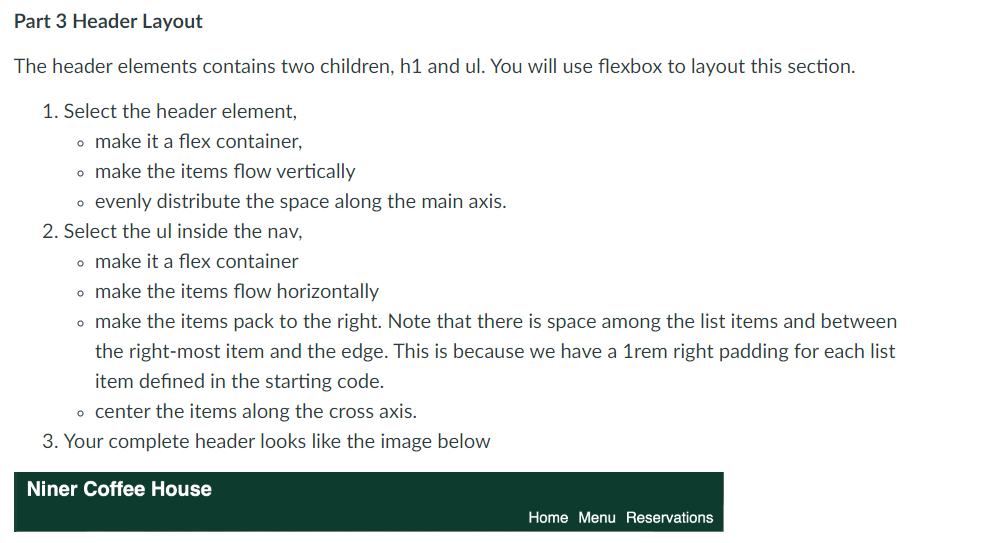
Your complete header looks like the image below
Step by Step Solution
There are 3 Steps involved in it
1 Expert Approved Answer
Step: 1 Unlock

Question Has Been Solved by an Expert!
Get step-by-step solutions from verified subject matter experts
Step: 2 Unlock
Step: 3 Unlock
 Study Help