







Question: Part 3: Processing your data 1. Here is some sample data: 2 rate=1/time (ps 4 5 6 7 Number of partides 10 20 30 40
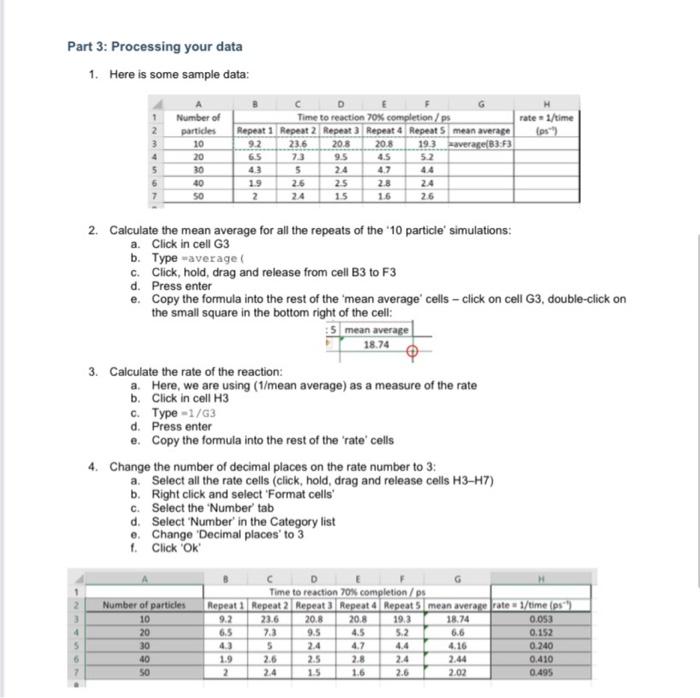
Part 3: Processing your data 1. Here is some sample data: 2 rate=1/time (ps" 4 5 6 7 Number of partides 10 20 30 40 SO Time to reaction 70% completion/ps Repeat 1 Repeat 2 Repeat 3 Repeat 4 Repeat mean average 9.2 23.6 20.8 20.8 193 avera eB3F3 65 73 95 4.5 5.2 43 5 24 47 44 19 2.6 25 28 24 2 15 1.6 26 2. Calculate the mean average for all the repeats of the '10 particle' simulations: a. Click in cell G3 b. Type "average C. Click, hold, drag and release from cell B3 to F3 d. Press enter e Copy the formula into the rest of the 'mean average cells - click on cell G3, double-click on the small square in the bottom right of the cell: 5 mean average 18.74 3. Calculate the rate of the reaction: a. Here, we are using (1/mean average) as a measure of the rate b. Click in cell H3 c. Type - 1/G3 d. Press enter e. Copy the formula into the rest of the rate' cells 4. Change the number of decimal places on the rate number to 3: a. Select all the rate cells (click, hold, drag and release cells H3-H7) b. Right click and select 'Format cells C. Select the "Number' tab d. Select 'Number' in the Category list e. Change 'Decimal places' to 3 1. Click OK 2 3 4 Time to reaction 70% completion/ps Repeat 1 Repeat 2 Repeat Repeat Repeat mean average rates 1/time(s) 9.2 23.6 20.8 20.8 19.3 18.74 0.053 7.3 9.5 4.5 5.2 6.6 0.152 24 4.7 4.16 0.240 2.6 2.5 2.8 2.4 2.44 0.410 24 16 2.6 2.02 0.495 Number of particles 10 20 30 40 50 6.5 6 7
Step by Step Solution
There are 3 Steps involved in it

Get step-by-step solutions from verified subject matter experts
 Study Help