







Question: Part 3: REPORTS AND FORMS Question 1 According to table 2 with title students in annex, create form using form design as follows: Add all
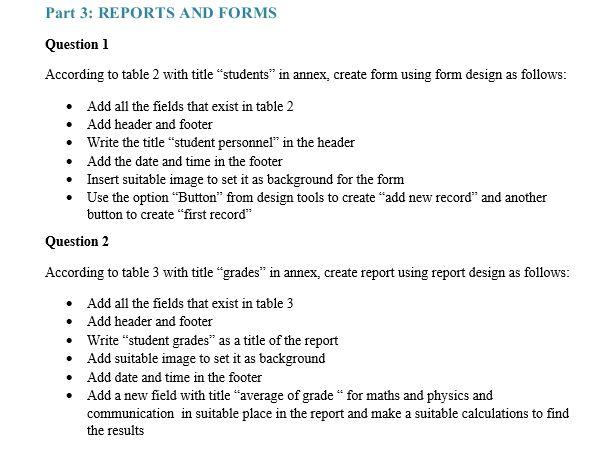
Part 3: REPORTS AND FORMS Question 1 According to table 2 with title students in annex, create form using form design as follows: Add all the fields that exist in table 2 Add header and footer Write the title "student personnel in the header Add the date and time in the footer Insert suitable image to set it as background for the form Use the option "Button" from design tools to create "add new record" and another button to create "first record" Question 2 According to table 3 with title grades" in annex, create report using report design as follows: Add all the fields that exist in table 3 Add header and footer Write "student grades as a title of the report Add suitable image to set it as background Add date and time in the footer Add a new field with title "average of grade " for maths and physics and communication in suitable place in the report and make a suitable calculations to find the results Part 3: REPORTS AND FORMS Question 1 According to table 2 with title students in annex, create form using form design as follows: Add all the fields that exist in table 2 Add header and footer Write the title "student personnel in the header Add the date and time in the footer Insert suitable image to set it as background for the form Use the option "Button" from design tools to create "add new record" and another button to create "first record" Question 2 According to table 3 with title grades" in annex, create report using report design as follows: Add all the fields that exist in table 3 Add header and footer Write "student grades as a title of the report Add suitable image to set it as background Add date and time in the footer Add a new field with title "average of grade " for maths and physics and communication in suitable place in the report and make a suitable calculations to find the results
Step by Step Solution
There are 3 Steps involved in it

Get step-by-step solutions from verified subject matter experts
 Study Help