







Question: Part 3 . Task # 1 . Write a C / C + + program ( myprog l . c or myprog l . cpp
Part
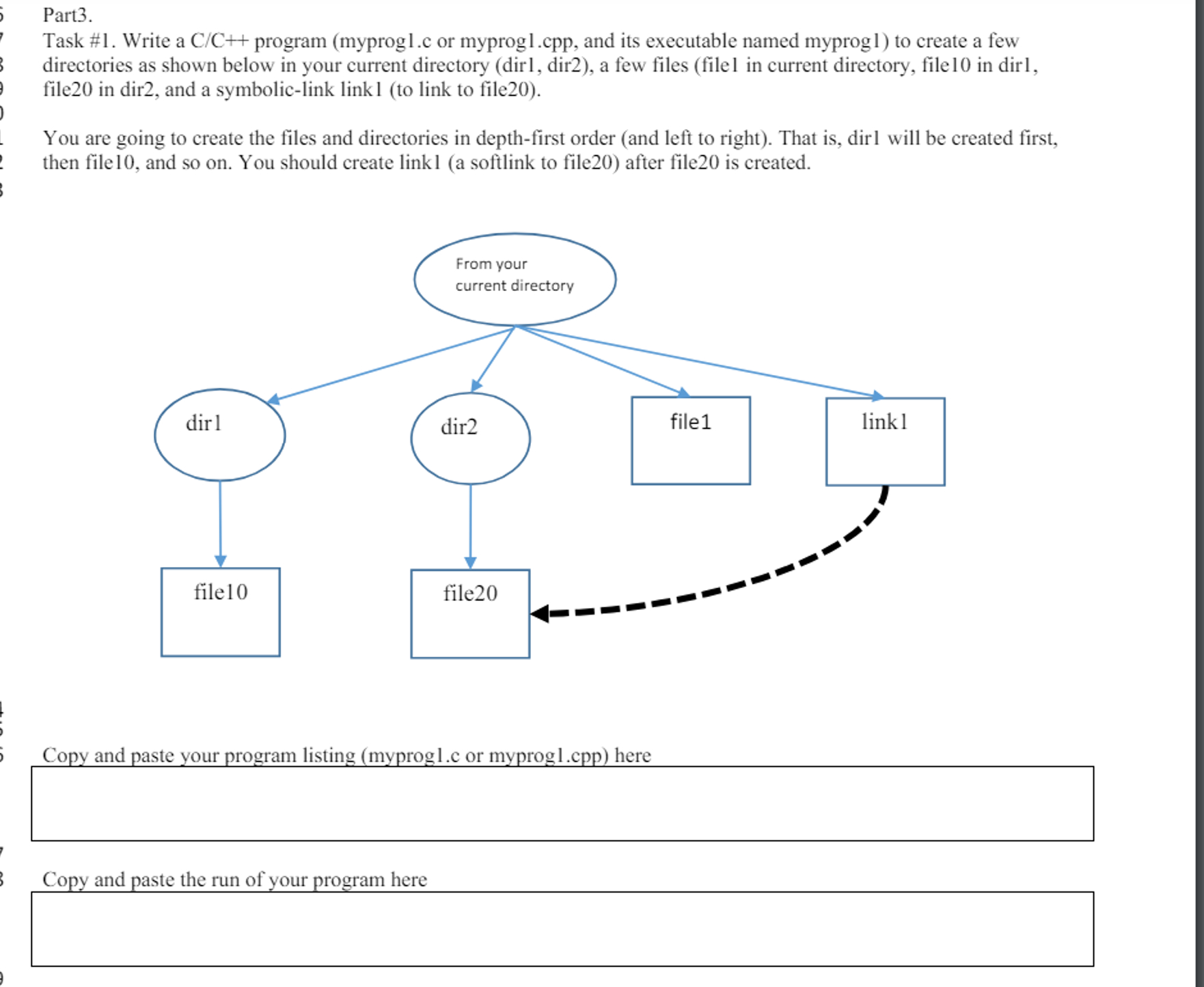
Task # Write a CC program myprog lc or myprog lcpp and its executable named myprog to create a few directories as shown below in your current directory dirl dir a few files filel in current directory, file in dirl, file in dir and a symboliclink link to link to file
You are going to create the files and directories in depthfirst order and left to right That is dirl will be created first, then file and so on You should create linka softlink to file after file is created.
Copy and paste your program listing myproglc or myprog lcpp here Task # Write cc program myprogc or myprogcpp and its executable named myprog listing all the files and
directories created in Task#you may use s or find command here to output a CC program myprogc or
myprogcpp and its executable named myprog which will delete all the files and directories when it is run, to
compile and run this program myprogc or myprogcpp to delete all the files and directories, and to show all the
deletion done by listing all the files and directories after the deletion by showing that there is no files and directories
All of these will be done by running myprog program via system call
Copy and paste your program listing myprogc or myprogcpp here
cs Section
Name:
netID:
Conv and naste the resulting nrooram mvnroo c or mvnros cnn here
Copy and paste the output of the program myprogc or myprogcpp run.
Submit two files to be attached for your upload: this word document with your answer and a zip file including
each shell script and its of the run
Step by Step Solution
There are 3 Steps involved in it
1 Expert Approved Answer
Step: 1 Unlock

Question Has Been Solved by an Expert!
Get step-by-step solutions from verified subject matter experts
Step: 2 Unlock
Step: 3 Unlock
 Study Help