



Question: Part 4 PART IV: ChainHash: Chaining 1) For chaining you will need to use the linked list classes that you created in Project 2. Please
Part 4
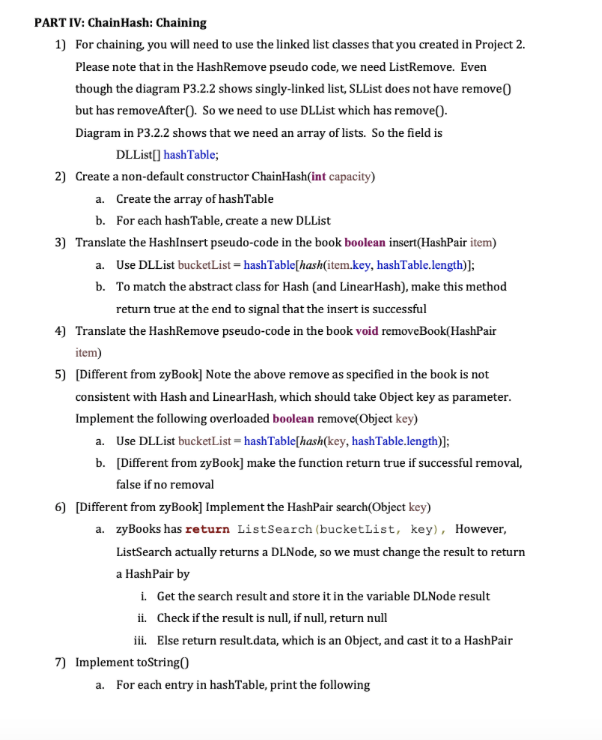
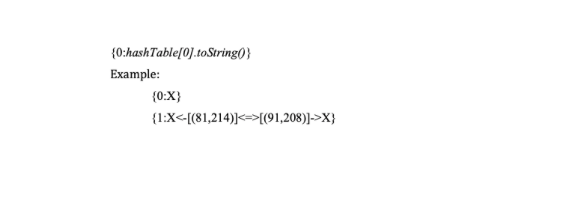
PART IV: ChainHash: Chaining 1) For chaining you will need to use the linked list classes that you created in Project 2. Please note that in the HashRemove pseudo code, we need ListRemove. Even though the diagram P3.2.2 shows singly-linked list, SLList does not have remove but has removeAfter(). So we need to use DLList which has remove(). Diagram in P3.2.2 shows that we need an array of lists. So the field is DLList[] hashTable; 2) Create a non-default constructor ChainHash(int capacity) a. Create the array of hashTable b. For each hashTable, create a new DLList 3) Translate the HashInsert pseudo-code in the book boolean insert(HashPair item) a. Use DLList bucketList=hashTable[hash(item.key, hashTable.length)]; b. To match the abstract class for Hash (and LinearHash), make this method return true at the end to signal that the insert is successful 4) Translate the HashRemove pseudo-code in the book void removeBook(HashPair item) 5) [Different from zyBook] Note the above remove as specified in the book is not consistent with Hash and LinearHash, which should take Object key as parameter. Implement the following overloaded boolean remove(Object key) a. Use DLList bucketList-hashTable[hash(key, hashTable.length)); b. [Different from zyBook] make the function return true if successful removal, false if no removal 6) [Different from zyBook] Implement the HashPair search(Object key) a. zyBooks has return List Search (bucketlist, key), However, ListSearch actually returns a DLNode, so we must change the result to return a HashPair by i. Get the search result and store it in the variable DLNode result ii. Check if the result is null, if null, return null iii. Else return result.data, which is an Object, and cast it to a HashPair 7) Implement toString a. For each entry in hashTable, print the following {0:hash Table[0).toString() Example: {0:X) {1:X[(91,208)]->X} PART IV: ChainHash: Chaining 1) For chaining you will need to use the linked list classes that you created in Project 2. Please note that in the HashRemove pseudo code, we need ListRemove. Even though the diagram P3.2.2 shows singly-linked list, SLList does not have remove but has removeAfter(). So we need to use DLList which has remove(). Diagram in P3.2.2 shows that we need an array of lists. So the field is DLList[] hashTable; 2) Create a non-default constructor ChainHash(int capacity) a. Create the array of hashTable b. For each hashTable, create a new DLList 3) Translate the HashInsert pseudo-code in the book boolean insert(HashPair item) a. Use DLList bucketList=hashTable[hash(item.key, hashTable.length)]; b. To match the abstract class for Hash (and LinearHash), make this method return true at the end to signal that the insert is successful 4) Translate the HashRemove pseudo-code in the book void removeBook(HashPair item) 5) [Different from zyBook] Note the above remove as specified in the book is not consistent with Hash and LinearHash, which should take Object key as parameter. Implement the following overloaded boolean remove(Object key) a. Use DLList bucketList-hashTable[hash(key, hashTable.length)); b. [Different from zyBook] make the function return true if successful removal, false if no removal 6) [Different from zyBook] Implement the HashPair search(Object key) a. zyBooks has return List Search (bucketlist, key), However, ListSearch actually returns a DLNode, so we must change the result to return a HashPair by i. Get the search result and store it in the variable DLNode result ii. Check if the result is null, if null, return null iii. Else return result.data, which is an Object, and cast it to a HashPair 7) Implement toString a. For each entry in hashTable, print the following {0:hash Table[0).toString() Example: {0:X) {1:X[(91,208)]->X}
Step by Step Solution
There are 3 Steps involved in it

Get step-by-step solutions from verified subject matter experts