





Question: Part 4: Transactions-Step3: Adding AR Bands In this step, you will add a column that holds the appropriate AR Banding values, allowing you to merge
Part 4: Transactions-Step3: Adding AR Bands In
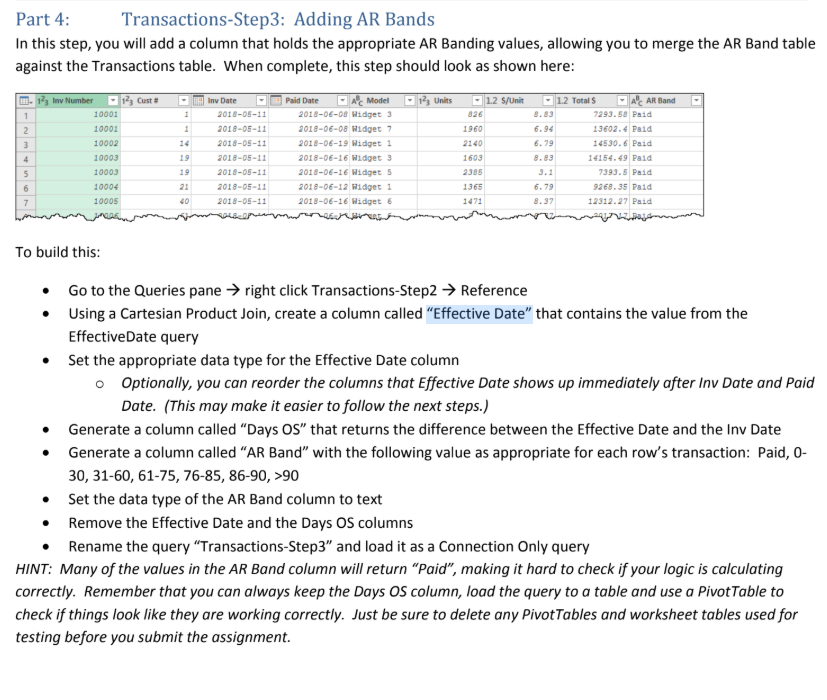
Part 4: Transactions-Step3: Adding AR Bands In this step, you will add a column that holds the appropriate AR Banding values, allowing you to merge the AR Band table against the Transactions table. When complete, this step should look as shown here: TT 145 iw umber = | 175, Cunt # ~ [FF] inv Date ~ 7) Paid Gace * 1%) Unies + |/L2 $fUne == ||? Total ~ || al AR Band 1 10002 i #018-08-11 S26 8.83 253.88) Paid 2 10gg1 1 #018 1560 6.54 13802.4 Paid 3 10002 i 2018 2140 6.79 14530. 6) Paid 4 10003 19 aoe 603 @.83 14154.49 Paid 5 10003 19 a018 2585 a 7393.5 Paid 6 10904 a a 136 6.79 35 Paid 7 10005 40 2018 a. ad To build this: * Go tothe Queries pane > right click Transactions-Step2 > Reference * Using a Cartesian Product Join, create a column called \"Effective Date\" that contains the value from the EffectiveDate query e Set the appropriate data type for the Effective Date column Optionally, you can reorder the columns that Effective Date shows up immediately after Inv Date and Paid Date. (This may make it easier to follow the next steps.) * Generate a column called \"Days OS" that returns the difference between the Effective Date and the Inv Date * Generate a column called \"AR Band\" with the following value as appropriate for each row's transaction: Paid, 0- 30, 31-60, 61-75, 76-85, 86-90, >90 Set the data type of the AR Band column to text * Remove the Effective Date and the Days OS columns * Rename the query \"Transactions-Step3\" and load it as a Connection Only query HINT: Many of the values in the AR Band column will return \"Paid\

Step by Step Solution

There are 3 Steps involved in it

1 Expert Approved Answer
Step: 1 Unlock blur-text-image

Question Has Been Solved by an Expert!

Get step-by-step solutions from verified subject matter experts

Step: 2 Unlock
Step: 3 Unlock

Students Have Also Explored These Related Accounting Questions!