







Question: Part A: a. Write an Java application that prompts a user for a month, day, and year. Display a message that specifies whether the entered
Part A:
a. Write an Java application that prompts a user for a month, day, and year. Display a message that specifies whether the entered date is
1. not this year,
2. in an earlier month this year,
3. in a later month this year, or
4. this month.
Save the file as PastPresentFuture.java
Must include/finsh this code wth these variables:
import java.util.*; import java.time.LocalDate; public class PastPresentFuture { public static void main (String[] args) { LocalDate today = LocalDate.now(); //Creates the local class of today int mo, da, yr; int todayMo, todayDa, todayYr; Scanner input = new Scanner(System.in); todayMo = today.getMonthValue(); todayDa = today.getDayOfMonth(); todayYr = today.getYear(); //Input month, day and year enter text for month, day and year System.out.print( ); mo = input.nextInt(); System.out.print( ); da = input.nextInt(); System.out.print( ); yr = input.nextInt(); //Reference if and else statement example on p. 274 //Display text statements shown as (1, 2, 3, 4) on p. 295 for this problem if(yr != todayYr) System.out.println(yr + ); else if(mo todayMo) System.out.println(mo + ); else System.out.println(mo + ); } }
PART B:
b. Use the Web to learn how to use the LocalDate Boolean methods isBefore(), isAfter(), and equals(). Use your knowledge to write a program that prompts a user for a month, day, and year, and then displays a message specifying whether the entered day is in the past, the current date, or in the future. Save the file as PastPresentFuture2.java No program shell
Program B is exactly like the Program A, except for the methods isBefore(), isAfter(), and equals() modify the if and else statement example on p. 274
Example Below:
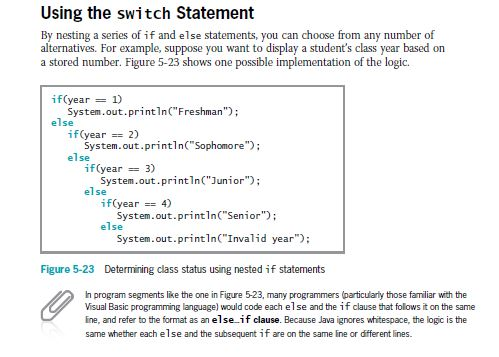
Using the switch Statement By nesting a series of if and else statements, you can choose from any number of alternatives. For example, suppose you want to display a student's class year based on a stored number. Figure 5-23 shows one possible implementation of the logic. if(year = System.out.printlnC" Freshman if(year 2) = System.out.println Sophomore else if(year = 3) System.out.printlnC"Junior else if(year4) System.out.println( Senior); else System.out.printn Invalid year"): Figure 5-23 Determining class status using nested if statements In program segments lise the one in Figure 5-23, many programmers (particularly those familiar with the Visual Basic poming language) would code each else and the if clause that folows it on the same ine, and refer to the format as an else if clause. Because Java ignores whitespace, the logic is the same whether each else and the subsequent if are on the same ine or different lines
Step by Step Solution
There are 3 Steps involved in it

Get step-by-step solutions from verified subject matter experts
 Study Help