







Question: Part A: Display Results from Using the sed Utility Note the contents from the following tab-delimited file called stuff.txt: Line one. This is the
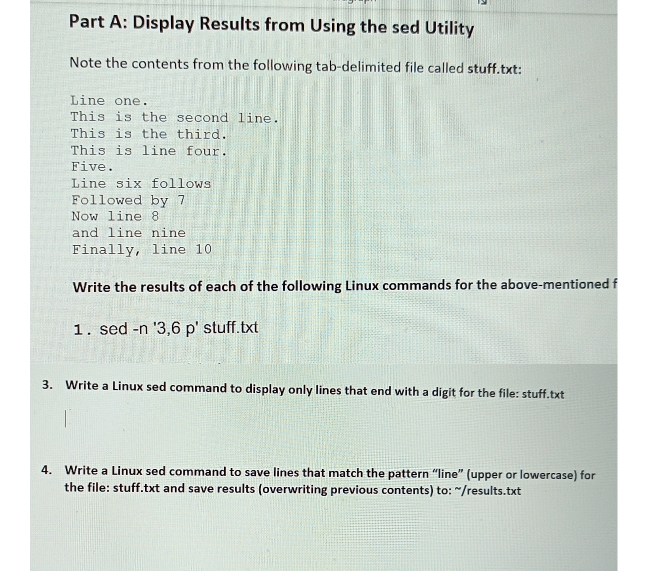
Part A: Display Results from Using the sed Utility Note the contents from the following tab-delimited file called stuff.txt: Line one. This is the second line. This is the third. This is line four. Five. Line six follows Followed by 7 Now line 8 and line nine Finally, line 10. Write the results of each of the following Linux commands for the above-mentioned f 1. sed -n '3,6 p' stuff.txt 3. Write a Linux sed command to display only lines that end with a digit for the file: stuff.txt 4. Write a Linux sed command to save lines that match the pattern "line" (upper or lowercase) for the file: stuff.txt and save results (overwriting previous contents) to: "/results.txt
Step by Step Solution
There are 3 Steps involved in it

Get step-by-step solutions from verified subject matter experts
 Study Help