







Question: Part A: #include using namespace std; int main() { int age; // user's age double ticket_price; // cost of admission based on user input const
Part A:
#include
using namespace std;
int main()
{
int age; // user's age
double ticket_price; // cost of admission based on user input
const double // using named constants to facilitate future price changes
INFANT_ADM = 0.00,
CHILD_ADM = 8.00,
JUNIOR_ADM = 10.00,
ADULT_ADM = 20.00,
SENIOR_ADM = 9.00;
cout
cout
cin >> age;
// Add a multiple-alternative selection statement to assign ticket price based on user input
// Now add ticket_price to the following cout statement to produce the correct output
cout
system("pause");
return 0;
}
Part B:
#include
using namespace std;
int main() {
int num1, num2;
cout
cout
cin >> num1 >> num2;
// Add code here to compute and display the sum, difference, and product of the input numbers.
// If possible, also compute the display the quotient and remainder in this form: XX rX (ex: 12 r3)
return 0;
}
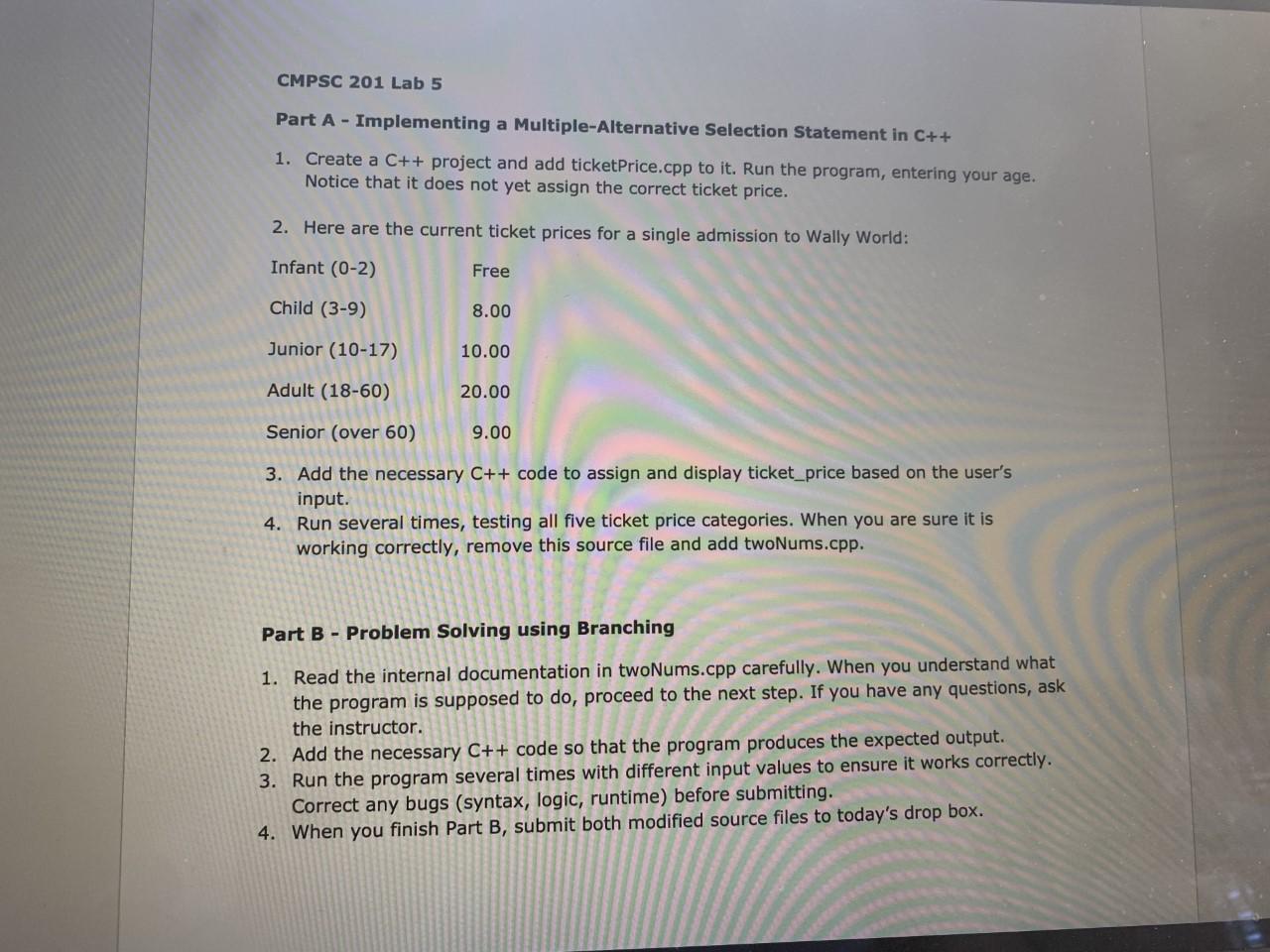
CMPSC 201 Lab 5 Part A - Implementing a Multiple-Alternative Selection Statement in C++ 1. Create a C++ project and add ticketPrice.cpp to it. Run the program, entering your age. Notice that it does not yet assign the correct ticket price. 2. Here are the current ticket prices for a single admission to Wally World: Infant (0-2) Free Child (3-9) 8.00 Junior (10-17) 10.00 Adult (18-60) 20.00 Senior (over 60) 9.00 3. Add the necessary C++ code to assign and display ticket_price based on the user's input. 4. Run several times, testing all five ticket price categories. When you are sure it is working correctly, remove this source file and add twoNums.cpp. Part B - Problem Solving using Branching 1. Read the internal documentation in twoNums.cpp carefully. When you understand what the program is supposed to do, proceed to the next step. If you have any questions, ask the instructor. 2. Add the necessary C++ code so that the program produces the expected output. 3. Run the program several times with different input values to ensure it works correctly. Correct any bugs (syntax, logic, runtime) before submitting. 4. When you finish Part B, submit both modified source files to today's drop box
Step by Step Solution
There are 3 Steps involved in it

Get step-by-step solutions from verified subject matter experts
 Study Help