







Question: Part A - Styled Content with a List Information you need to complete part B includes: Color Codes border & standard hyperlinks: #f775bb visited hyperlinks:
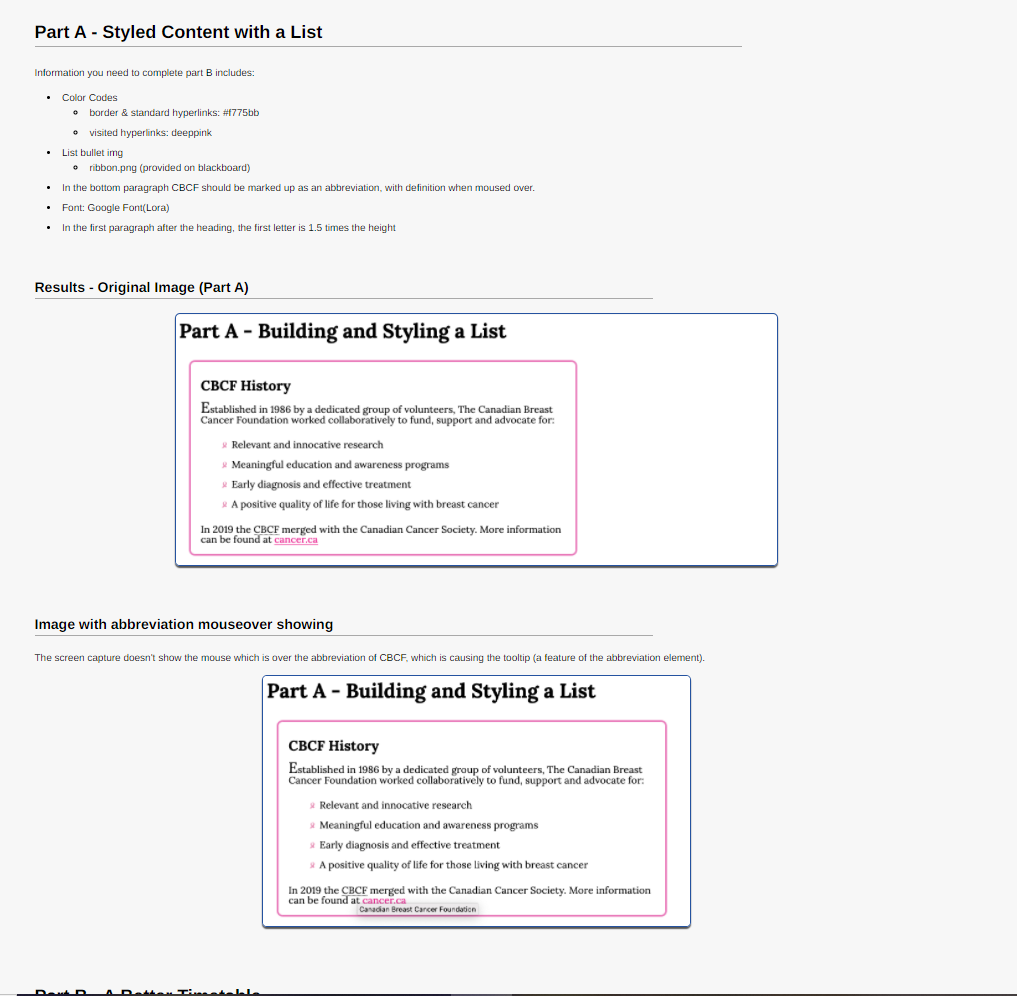
Part A - Styled Content with a List Information you need to complete part B includes: Color Codes border & standard hyperlinks: #f775bb visited hyperlinks: deeppink List bullet img ribbon.png (provided on blackboard) In the bottom paragraph CBCF should be marked up as an abbreviation with definition when moused over. Font: Google Font(Lora) In the first paragraph after the heading, the first letter is 1.5 times the height Results - Original image (Part A) Part A - Building and Styling a List CBCF History Established in 1986 by a dedicated group of volunteers, The Canadian Breast Cancer Foundation worked collaboratively to fund, support and advocate for: Relevant and innocative research Meaningful education and awareness programs Early diagnosis and effective treatment A positive quality of life for those living with breast cancer In 2019 the CBCF merged with the Canadian Cancer Society. More information can be found at cancer.ca Image with abbreviation mouseover showing The screen capture doesn't show the mouse which is over the abbreviation of CBCF, which is causing the tooltip (a feature of the abbreviation element). Part A - Building and Styling a List CBCF History Established in 1986 by a dedicated group of volunteers, The Canadian Breast Cancer Foundation worked collaboratively to fund, support and advocate for: Relevant and innocative research Meaningful education and awareness programs Early diagnosis and effective treatment * A positive quality of life for those living with breast cancer In 2019 the CBCF merged with the Canadian Cancer Society. More information can be found at cancer.ca Canadian Breast Cancer Foundation
Step by Step Solution
There are 3 Steps involved in it

Get step-by-step solutions from verified subject matter experts
 Study Help