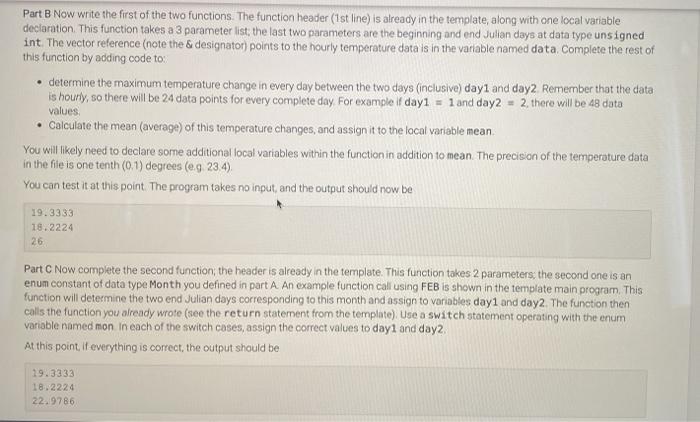
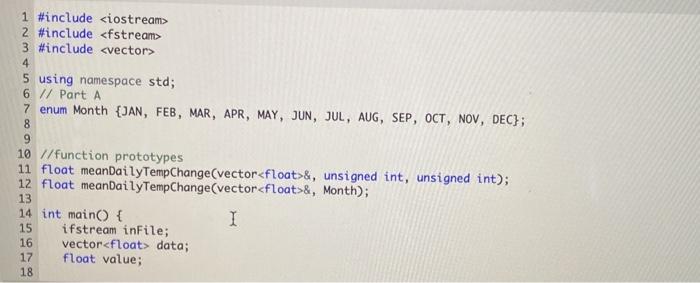
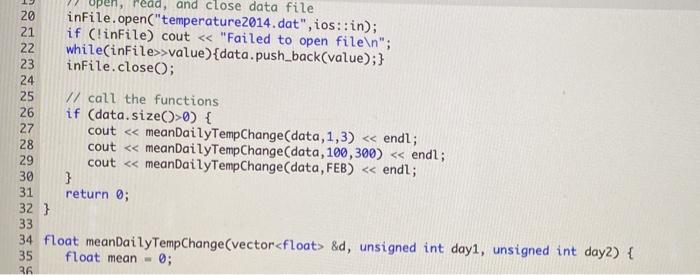
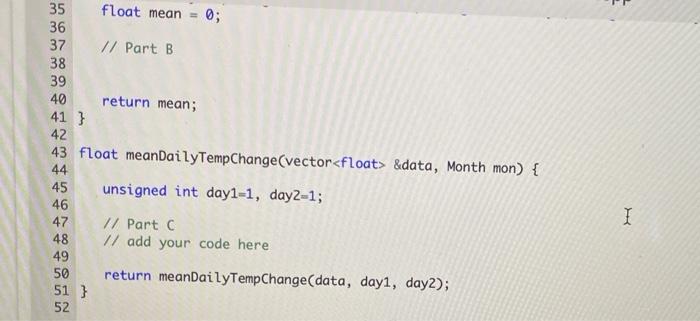
Part B Now write the first of the two functions. The function header (1st line) is already in the template, along with one local variable declaration This function takes a 3 parameter list, the last two parameters are the beginning and end Julian days at data type unsigned int The vector reference (note the designator) points to the hourly temperature data is in the variable named data. Complete the rest of this function by adding code to: determine the maximum temperature change in every day between the two days (inclusive) day1 and day2 Remember that the data is hourly, so there will be 24 data points for every complete day. For example if day1 = 1 and day2 = 2, there will be 48 data values Calculate the mean (average) of this temperature changes, and assign it to the local variable mean You will likely need to declare some additional local variables within the function in addition to mean The precision of the temperature data in the file is one tenth (0:1) degrees (eg. 23.4). You can test it at this point. The program takes no input, and the output should now be 19.3333 18.2224 26 Part Now complete the second function, the header is already in the template. This function takes 2 parameters: the second one is an enum constant of data type Month you defined in part A. An example function call using FEB is shown in the template main program. This function will determine the two end Julian days corresponding to this month and assign to variables day1 and day. The function then calls the function you already wrote (see the return statement from the template). Use a switch statement operating with the enum variable named mon in each of the switch cases, assign the correct values to day1 and day2 At this point, if everything is correct, the output should be 19.3333 18.2224 22.9786 1 #include 2 #include 3 #include 4 5 using namespace std; 6 // Part A 7 enum Month {JAN, FEB, MAR, APR, MAY, JUN, JUL, AUG, SEP, OCT, NOV, DEC}; 8 9 10 //function prototypes 11 float meanDailyTempChange(vector&, unsigned int, unsigned int); 12 float meanDailyTempChange(vector&, Month); 13 14 int main() { I 15 ifstream inFile; 16 vector data; 17 float value; 18 22 27 28 !, read, and close data file 20 infile.open("temperature2014.dat", ios::in); 21 if (!inFile) cout >value){data.push_back(value);} 23 infile.close(); 24 25 // call the functions 26 if (data.size(>0) { cout &data, Month mon) { 44 45 unsigned int day1=1, day2=1; 46 47 // Part 6 48 // add your code here 49 50 return meanDailyTempChange(data, day, day2); 51 } 52 I Part B Now write the first of the two functions. The function header (1st line) is already in the template, along with one local variable declaration This function takes a 3 parameter list, the last two parameters are the beginning and end Julian days at data type unsigned int The vector reference (note the designator) points to the hourly temperature data is in the variable named data. Complete the rest of this function by adding code to: determine the maximum temperature change in every day between the two days (inclusive) day1 and day2 Remember that the data is hourly, so there will be 24 data points for every complete day. For example if day1 = 1 and day2 = 2, there will be 48 data values Calculate the mean (average) of this temperature changes, and assign it to the local variable mean You will likely need to declare some additional local variables within the function in addition to mean The precision of the temperature data in the file is one tenth (0:1) degrees (eg. 23.4). You can test it at this point. The program takes no input, and the output should now be 19.3333 18.2224 26 Part Now complete the second function, the header is already in the template. This function takes 2 parameters: the second one is an enum constant of data type Month you defined in part A. An example function call using FEB is shown in the template main program. This function will determine the two end Julian days corresponding to this month and assign to variables day1 and day. The function then calls the function you already wrote (see the return statement from the template). Use a switch statement operating with the enum variable named mon in each of the switch cases, assign the correct values to day1 and day2 At this point, if everything is correct, the output should be 19.3333 18.2224 22.9786 1 #include 2 #include 3 #include 4 5 using namespace std; 6 // Part A 7 enum Month {JAN, FEB, MAR, APR, MAY, JUN, JUL, AUG, SEP, OCT, NOV, DEC}; 8 9 10 //function prototypes 11 float meanDailyTempChange(vector&, unsigned int, unsigned int); 12 float meanDailyTempChange(vector&, Month); 13 14 int main() { I 15 ifstream inFile; 16 vector data; 17 float value; 18 22 27 28 !, read, and close data file 20 infile.open("temperature2014.dat", ios::in); 21 if (!inFile) cout >value){data.push_back(value);} 23 infile.close(); 24 25 // call the functions 26 if (data.size(>0) { cout &data, Month mon) { 44 45 unsigned int day1=1, day2=1; 46 47 // Part 6 48 // add your code here 49 50 return meanDailyTempChange(data, day, day2); 51 } 52