







Question: Part B: Resultant Force Calculator Create a MATLAB function that will compute the resultant force based on individual forces entered by the user. The function
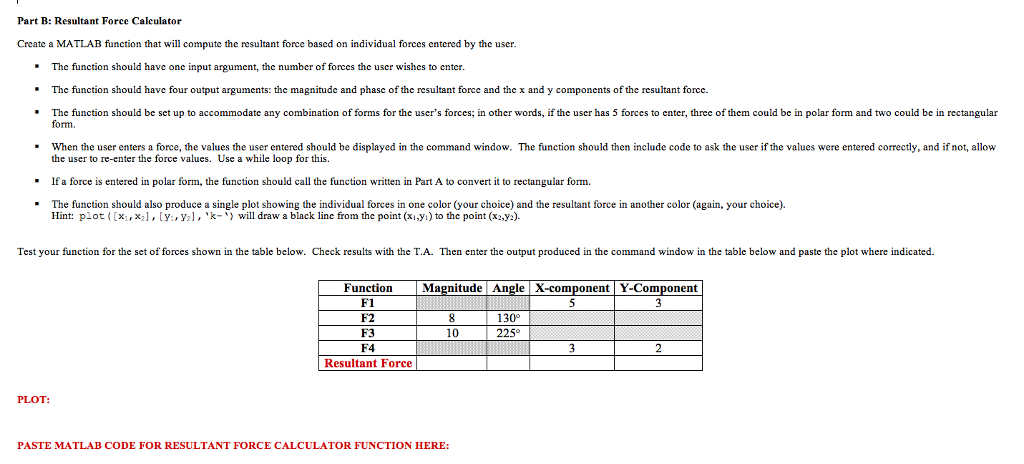
Part B: Resultant Force Calculator Create a MATLAB function that will compute the resultant force based on individual forces entered by the user. The function should have one input argument, the number of forces the user wishes to enter. The function should have four output arguments: the magnitude and phase of the resultant force and the x and y components of the resultant force. The function should be set up to accommodate any combination of forms for the user's forces; in other words, if the user has 5 forces to enter, three of them could be in polar form and two could be in rectangular form. When the user enters a force, the values the user entered should be displayed in the command window. The function should then include code to ask the user if the values were entered correctly, and if not, allow the user to re-enter the force values. Use a while loop for this. If a force is entered in polar form, the function should call the function written in Part A to convert it to rectangular formn. The function should also produce a single plot showing the individual forces in one color (your choice) and the resultant force in another color (again, your choice). Hint: plot((x1, x2], [y, ya], 'k-) will draw a black line from the point (x1,y) to the point (x2,y2). Test your function for the set of forces shown in the table below. Check results with the T.A. Then enter the output produced in the command window in the table below and paste the plot where indicated. Function Magnitude Angle X-componentY-Component F1 F2 F3 F4 Resultant Force PLOT: PASTE MATLAB CODE FOR RESULTANT FORCE CALCULATOR FUNCTION HERE: Part B: Resultant Force Calculator Create a MATLAB function that will compute the resultant force based on individual forces entered by the user. The function should have one input argument, the number of forces the user wishes to enter. The function should have four output arguments: the magnitude and phase of the resultant force and the x and y components of the resultant force. The function should be set up to accommodate any combination of forms for the user's forces; in other words, if the user has 5 forces to enter, three of them could be in polar form and two could be in rectangular form. When the user enters a force, the values the user entered should be displayed in the command window. The function should then include code to ask the user if the values were entered correctly, and if not, allow the user to re-enter the force values. Use a while loop for this. If a force is entered in polar form, the function should call the function written in Part A to convert it to rectangular formn. The function should also produce a single plot showing the individual forces in one color (your choice) and the resultant force in another color (again, your choice). Hint: plot((x1, x2], [y, ya], 'k-) will draw a black line from the point (x1,y) to the point (x2,y2). Test your function for the set of forces shown in the table below. Check results with the T.A. Then enter the output produced in the command window in the table below and paste the plot where indicated. Function Magnitude Angle X-componentY-Component F1 F2 F3 F4 Resultant Force PLOT: PASTE MATLAB CODE FOR RESULTANT FORCE CALCULATOR FUNCTION HERE
Step by Step Solution
There are 3 Steps involved in it

Get step-by-step solutions from verified subject matter experts
 Study Help