







Question: Part B: The World Data (35% test program] In Part B, you will add functions that work with the World type. Put the function prototypes
![Part B: The World Data (35% test program] In Part B,](https://dsd5zvtm8ll6.cloudfront.net/si.experts.images/questions/2024/09/66f5310be452f_90766f5310b4e129.jpg)
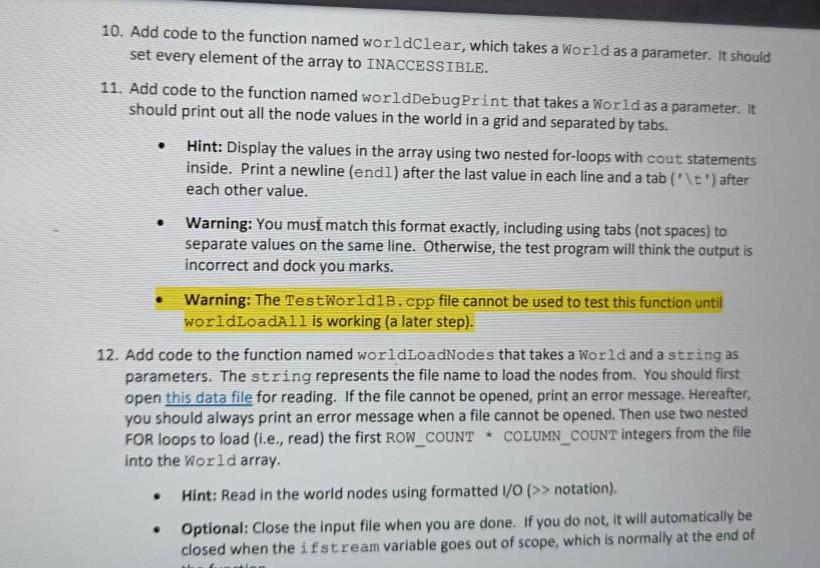
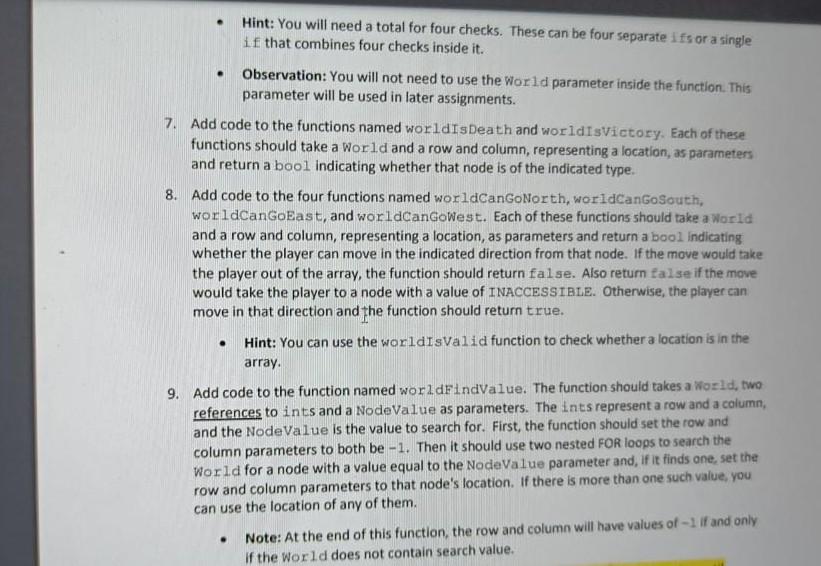
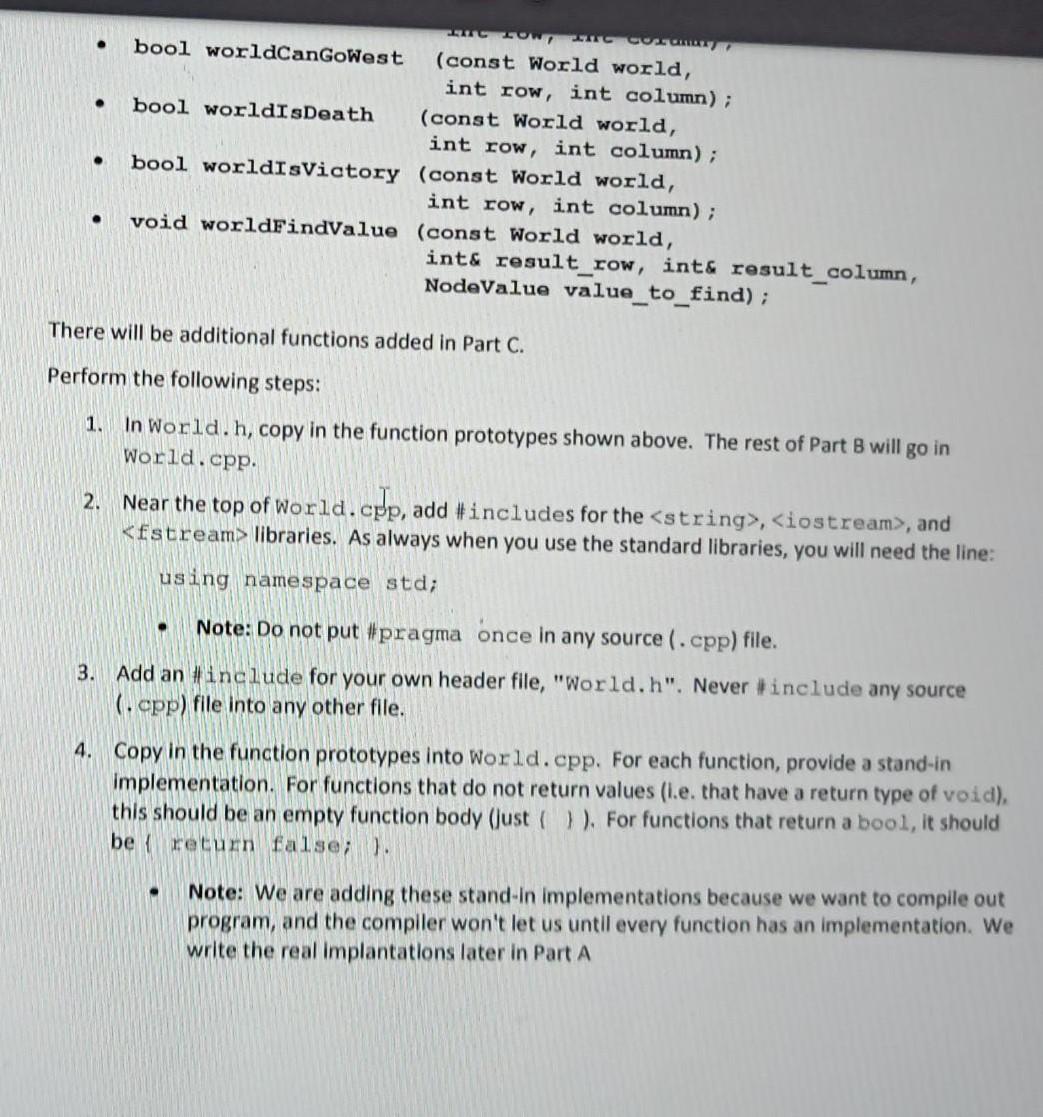
Part B: The World Data (35% test program] In Part B, you will add functions that work with the World type. Put the function prototypes in your World.h file and the function implementations in a new file named World.cpp. I By the end of Part B, your World type will have associated functions with the following prototypes: . . . . void worldClear (World world); void worldLoadAll (World world, string game_name); void worldLoadNodes (World world, string filename); void worldDebugPrint (const World world); bool worldIsValid (const World world, int row, int column); bool worldCanGoNorth (const World world, int row, int column); bool worldCanGoSouth (const World world, int row, int column); bool worldCanGoEast (const World world, int row, int column); bool worldCanGoWest (const World world, int row, int column); bool worldIsDeath (const World world, int row, int column); bool worldIsVictory (const World world, int row, int column); void worldfindValue (const World world, int& result_row, int& result_column, NodeValue value to find); 10. Add code to the function named worldClear, which takes a World as a parameter. It should set every element of the array to INACCESSIBLE. 11. Add code to the function named worldDebugPrint that takes a World as a parameter. It should print out all the node values in the world in a grid and separated by tabs. Hint: Display the values in the array using two nested for-loops with cout statements inside. Print a newline (endl) after the last value in each line and a tab ("\t") after each other value. . . Warning: You must match this format exactly, including using tabs (not spaces) to separate values on the same line. Otherwise, the test program will think the output is incorrect and dock you marks. Warning: The TestWorldlb.cpp file cannot be used to test this function until worldLoadAll is working (a later step). 12. Add code to the function named worldLoadNodes that takes a World and a string as parameters. The string represents the file name to load the nodes from. You should first open this data file for reading. If the file cannot be opened, print an error message. Hereafter, you should always print an error message when a file cannot be opened. Then use two nested FOR loops to load (i.e., read) the first ROW_COUNT COLUMN_COUNT integers from the file into the World array. Hint: Read in the world nodes using formatted 1/0 (>> notation), Optional: Close the input file when you are done. If you do not, it will automatically be closed when the ifstream variable goes out of scope, which is normally at the end of . Hint: You will need a total for four checks. These can be four separate ifs or a single if that combines four checks inside it. . Observation: You will not need to use the World parameter inside the function. This parameter will be used in later assignments. 7. Add code to the functions named worldIsDeath and worldIsVictory. Each of these functions should take a World and a row and column, representing a location, as parameters and return a bool indicating whether that node is of the indicated type. 8. Add code to the four functions named worldCanGoNorth, worldCanGoSouth, worldCanGoEast, and worldCanGoWest. Each of these functions should take a World and a row and column, representing a location, as parameters and return a bool indicating whether the player can move in the indicated direction from that node. If the move would take the player out of the array, the function should return false. Also return false if the move would take the player to a node with a value of INACCESSIBLE. Otherwise, the player can move in that direction and the function should return true. Hint: You can use the worldisvalid function to check whether a location is in the array. 9. Add code to the function named worldFindValue. The function should takes a World, two references to ints and a NodeValue as parameters. The ints represent a row and a column, and the NodeValue is the value to search for. First, the function should set the row and column parameters to both be -1. Then it should use two nested FOR loops to search the world for a node with a value equal to the NodeValue parameter and, if it finds one, set the row and column parameters to that node's location. If there is more than one such value, you can use the location of any of them. Note: At the end of this function, the row and column will have values of -1 if and only if the World does not contain search value. . . . CONTENT bool worldCanGoWest (const World world, int row, int column); bool worldIsDeath (const World world, int row, int column); bool worldIsVictory (const World world, int row, int column); void worldFindValue (const World world, int& result_row, int& result_column, NodeValue value_to_find); . There will be additional functions added in Part C. Perform the following steps: 1. In World.h, copy in the function prototypes shown above. The rest of Part B will go in World.cpp 2. Near the top of world.cpp, add #includes for the
Step by Step Solution
There are 3 Steps involved in it

Get step-by-step solutions from verified subject matter experts
 Study Help