







Question: Part B - Users and Groups 1. Using the most appropriate tools for the task, create the following local user accounts and groups on
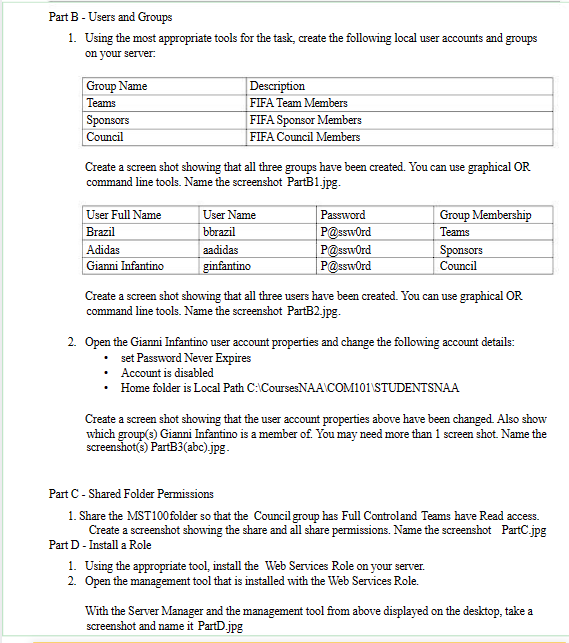
Part B - Users and Groups 1. Using the most appropriate tools for the task, create the following local user accounts and groups on your server: Group Name Teams Sponsors Council Description FIFA Team Members FIFA Sponsor Members FIFA Council Members Create a screen shot showing that all three groups have been created. You can use graphical OR command line tools. Name the screenshot PartB1.jpg. User Full Name User Name Brazil bbrazil Adidas aadidas Gianni Infantino ginfantino Password Group Membership P@ssword Teams P@ssword Sponsors P@ssword Council Create a screen shot showing that all three users have been created. You can use graphical OR command line tools. Name the screenshot PartB2.jpg. 2. Open the Gianni Infantino user account properties and change the following account details: . set Password Never Expires Account is disabled Home folder is Local Path C:\Courses NAA\COM101\STUDENTSNAA Create a screen shot showing that the user account properties above have been changed. Also show which group(s) Gianni Infantino is a member of. You may need more than 1 screen shot. Name the screenshot(s) PartB3(abc).jpg- Part C - Shared Folder Permissions 1. Share the MST100 folder so that the Council group has Full Controland Teams have Read access. Create a screenshot showing the share and all share permissions. Name the screenshot PartC.jpg Part D - Install a Role 1. Using the appropriate tool, install the Web Services Role on your server. 2. Open the management tool that is installed with the Web Services Role. With the Server Manager and the management tool from above displayed on the desktop, take a screenshot and name it PartD.jpg
Step by Step Solution
There are 3 Steps involved in it

Get step-by-step solutions from verified subject matter experts
 Study Help