







Question: Part C - A Flexbox Navigation Write the necessary HTML and CSS to produce the menu in the pictures below. Information you need to complete
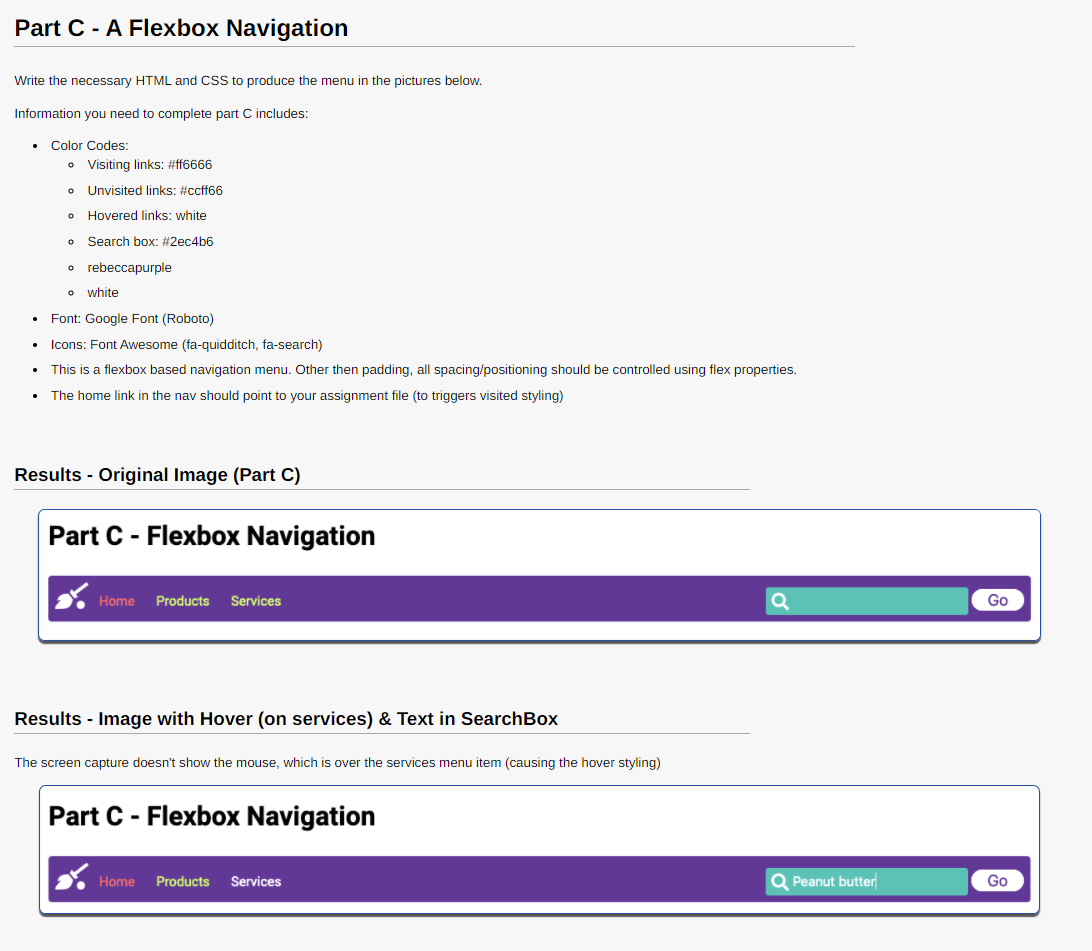
Part C - A Flexbox Navigation Write the necessary HTML and CSS to produce the menu in the pictures below. Information you need to complete part C includes: Color Codes: o Visiting links: #ff6666 O Unvisited links: #ccff66 o Hovered links: white o Search box: #2ec4b6 o rebeccapurple o white Font: Google Font (Roboto) Icons: Font Awesome (fa-quidditch, fa-search) This is a flexbox based navigation menu. Other then padding, all spacing/positioning should be controlled using flex properties. The home link in the nav should point to your assignment file (to triggers visited styling) Results - Original image (Part C) Part C - Flexbox Navigation Home Products Services a Go Results - Image with Hover (on services) & Text in SearchBox The screen capture doesn't show the mouse, which is over the services menu item (causing the hover styling) Part C - Flexbox Navigation Home Products Services Peanut butter Go
Step by Step Solution
There are 3 Steps involved in it

Get step-by-step solutions from verified subject matter experts
 Study Help