







Question: Part E Now check your work by using the GeoGebra geometry tool to repeat parts A through D. Open GeoGebra , and complete each step
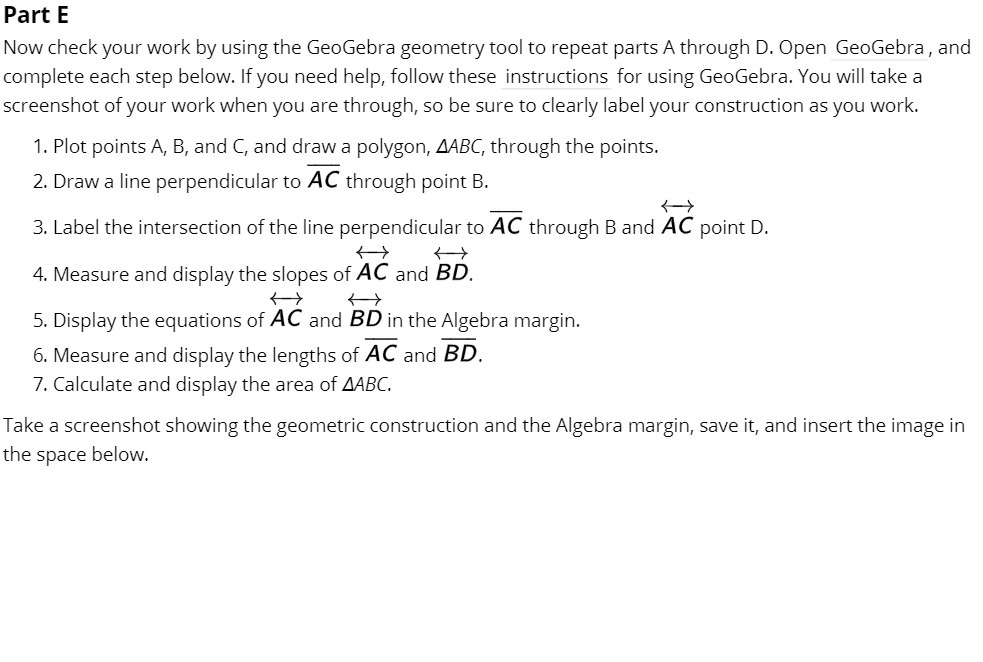
Part E Now check your work by using the GeoGebra geometry tool to repeat parts A through D. Open GeoGebra , and complete each step below. ltyou need help, follow these instructions for using GeoGebra. You will take a screenshot of your work when you are through, so be sure to clearly label your construction as you work. 1. Plot points A, B, and C, and draw a polygon, MBC, through the points. 2. Draw a line perpendicular to AC through point B. _ {l' 3. Label the intersection of the line perpendicular to AC through B and AC point D. H H 4. Measure and display the slopes ofAC and SD. {> 4} 5. Display the equations of AC and SD in the Algebra margin. 6. Measure and display the lengths ofAC and BD. 7. Calculate and display the area of MSG Take a screenshot showing the geometric construction and the Algebra margin, save it, and insert the image in the space below
Step by Step Solution
There are 3 Steps involved in it

Get step-by-step solutions from verified subject matter experts
 Study Help