







Question: Part Four: Chapter 6 Lab - Classes and Objects Lab Objectives Be able to declare a new class Be able to write a constructor Be
Part Four:
Chapter 6 Lab - Classes and Objects
Lab Objectives
Be able to declare a new class
Be able to write a constructor
Be able to write instance methods that return a value
Be able to write instance methods that take arguments
Be able to instantiate an object
Be able to use calls to instance methods to access and change the state of an object
Introduction
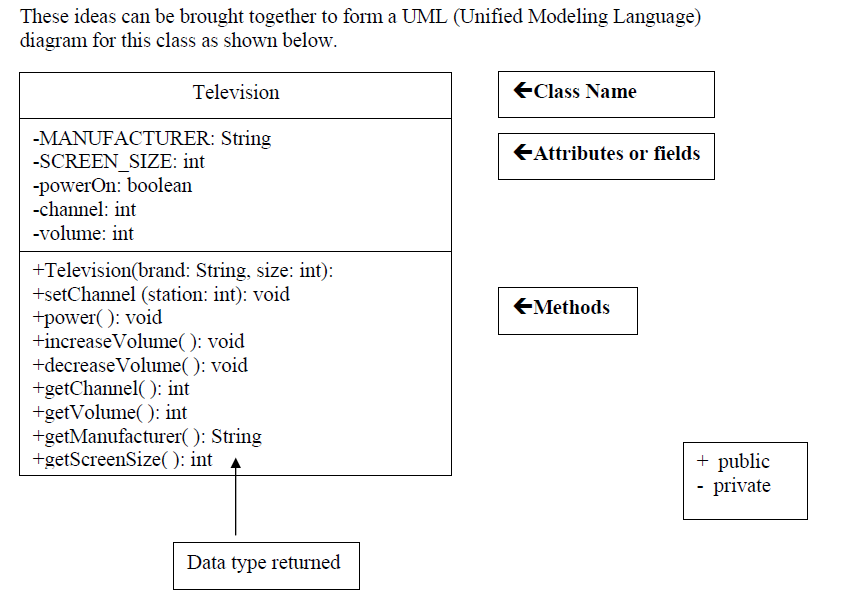
We will write a television class. A television object will have the following attributes (fields in the class):
manufacturer. The manufacturer attribute will hold the brand name, such as Sony, Toshiba, etc. This cannot change once the television is created, so will be a named constant.
screenSize. The screenSize attribute will hold the size of the television screen. This cannot change once the television has been created so will be a named constant.
powerOn. The powerOn attribute will hold the value true if the power is on, and false if the power is off.
channel. The channel attribute will hold the value of the station that the television is showing.
volume. The volume attribute will hold a number value representing the loudness (0 being no sound).
The television object will also be able to control the state of its attributes. These controls become methods in our class.
setChannel. The setChannel method will store the desired station in the channel field.
power. The power method will toggle the power between on and off, changing the value stored in the powerOn field from true to false or from false to true.
increaseVolume. The increaseVolume method will increase the value stored in the volume field by 1.
decreaseVolume. The decreaseVolume method will decrease the value stored in the volume field by 1.
getChannel. The getChannel method will return the value stored in the channel field.
getVolume. The getVolume method will return the value stored in the volume field.
getManufacturer. The getManufacturer method will return the constant value stored in the MANUFACTURER field.
getScreenSize. The getScreenSize method will return the constant value stored in the SCREEN_SIZE field.
We will also need a constructor method that will be used to create an instance of a Television.
Task #1 Creating a Television Class
See the given Television.java file.
The 2 constant fields and the 3 remaining fields listed in the UML diagram have been declared.
Read and try to understand the constructor that has two parameters, a manufacturers brand and a screen size. These parameters will bring in information.
Initialize the powerOn field to false (power is off), the volume to 20, and the channel to 2 inside the constructor.
Compile and fix the syntax errors. Do not run.
Task #2 Methods
Define access methods called getChannel, getManufacturer, and getScreenSize that return the value of the corresponding field. Follow the sample given as getVolume.
Read and try to understand the method given in the Televesion.java. Define decreaseVolume method that will decrease the volume by 1.
Compile and fix the syntax errors. Do not run.
Task #3 Run the application
You can only execute (run) a program that has a main method, so there is a driver program that is already written to test out your Television class. Copy the file TelevisionDemo.java to the same directory as Television.java.
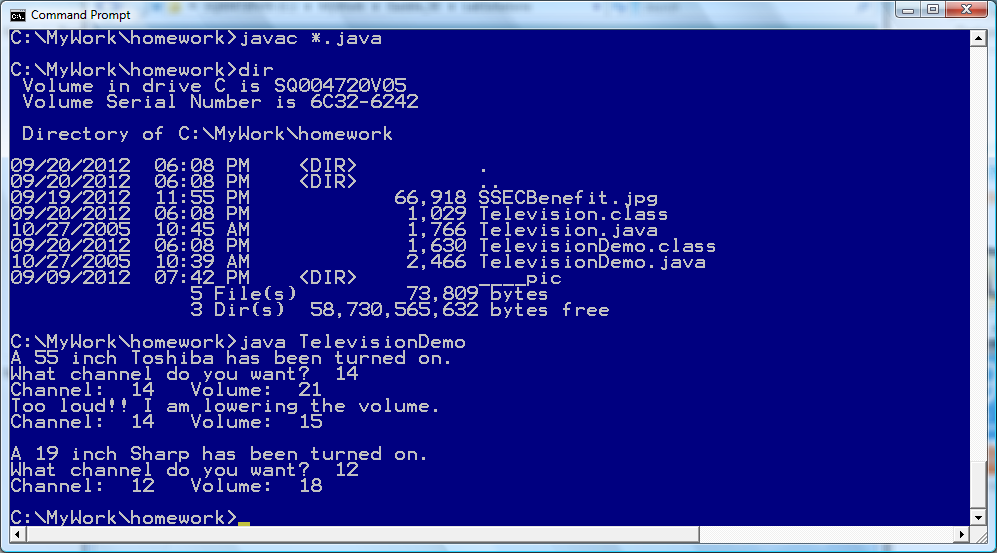
Compile and run TelevisionDemo and follow the prompts. If your output matches the output below, Television.java is complete and correct. You will not need to modify it further for this lab.
OUTPUT (boldface is user input)
A 55 inch Toshiba has been turned on.
What channel do you want? 56
Channel: 56 Volume: 21
Too loud!! I am lowering the volume.
Channel: 56 Volume: 15
Task #4 Create another instance of a Television
Edit the TelevisionDemo.java file. Declare another Television object called portable.
Instantiate portable to be a Sharp 19 inch television.
Use a call to the power method to turn the power on.
Use calls to the accessor methods to print what television was turned on.
Use calls to the mutator methods to change the channel to the users preference and decrease the volume by two.
Use calls to the accessor methods to print the changed state of the portable.
Compile and run TelevisionDemo again. See the given output sample (outputSample.doc)
Television:
/**The purpose of this class is to madel a television*/ public class Television { private String MANUFACTURER; //the maker of the television private int SCREEN_SIZE; //the size of the television private boolean powerOn; //contains true if the TV power is on private int channel; //the numeric station setting private int volume; //the numeric level of the sound /**Constructor creates a television with given brand and size @param brand The manufacturer of the television @param size The size of the screen */ public Television(String brand, int size) { MANUFACTURER = brand; SCREEN_SIZE = size; // To do - Task 1 step 4 } /**accessor method returns the current volume @return the current volume */ public int getVolume() { return volume; } /**accessor method returns the current channel @return the current channel */ // To do - Add code here /**accessor method returns the manufacturer's name @return the television manufacture's name */ // To do - Add code here /**accessor method returns the size of the screen @return the size of the screen */ // To do - Add code here /**mutator method stores the desired station in the channel field @param station the desired television channel */ public void setChannel(int station) { channel = station; } /**toggles the power on and off*/ public void power() { powerOn = !powerOn; } /**increases the volume by one*/ public void increaseVolume() { volume++; } /**decreases the volume by one*/ // To do - Add code here }
TelevisionDemo:
/** This class demonstrates the Television class*/
import java.util.Scanner;
public class TelevisionDemo { public static void main(String[] args) { //create a Scanner object to read from the keyboard Scanner keyboard = new Scanner (System.in);
//declare variables int station; //the user's channel choice
//declare and instantiate a television object Television bigScreen = new Television("Toshiba", 55); //turn the power on bigScreen.power(); //display the state of the television System.out.println("A " + bigScreen.getScreenSize() + " inch " + bigScreen.getManufacturer() + " has been turned on."); //prompt the user for input and store into station System.out.print("What channel do you want? "); station = keyboard.nextInt();
//change the channel on the television bigScreen.setChannel(station); //increase the volume of the television bigScreen.increaseVolume(); //display the the current channel and volume of the television System.out.println("Channel: " + bigScreen.getChannel() + " Volume: " + bigScreen.getVolume()); System.out.println("Too loud!! I am lowering the volume."); //decrease the volume of the television bigScreen.decreaseVolume(); bigScreen.decreaseVolume(); bigScreen.decreaseVolume(); bigScreen.decreaseVolume(); bigScreen.decreaseVolume(); bigScreen.decreaseVolume(); //display the current channel and volume of the television System.out.println("Channel: " + bigScreen.getChannel() + " Volume: " + bigScreen.getVolume()); System.out.println(); //for a blank line
//HERE IS WHERE YOU DO TASK #4 //Television portable = new Television("Sharp", 19); //turn the power on //display the state of the television //prompt the user for input and store into station //change the channel on the television //decrease the volume of the television //display the current channel and volume of the television } }
Output Sample:
---------------------------------------------ThankYou----------------------
These ideas can be brought together to form a UML (Unified Modeling Language) diagram for this class as shown below. +Class Name Television MANUFACTURER: String +Attributes or fields -SCREEN SIZE: int -poweron: boolean -channel: int -volume: int +Television brand: String, size: int) +setChannel (station: int void Methods power void tincrease Volume(): void +decrease Volume void +get Channel(): int +getVolume(): int etManufacturer(): String +getScreenSize(): int A t public private Data type returned
Step by Step Solution
There are 3 Steps involved in it

Get step-by-step solutions from verified subject matter experts
 Study Help