







Question: Part I Single Feature 1 . Create a matlab script that will perform each of the steps required for this exercise. 2 . Load partOneData
Part I Single Feature
Create a matlab script that will perform each of the steps required for this exercise.
Load partOneDatamat into the matlab environment previously used for assignment one
Generate a random partition of the data, splitting each of the classes into training and
testing.
a Using only the training data, classify each of the test samples using the KNearest
Neighbor Classifier.
b Use the Euclidean Distance as the distance metric.
c Print out the total prediction accuracy using the fprintf commands.
Part II Multivariate
Create a matlab script that will perform each of the steps required for this exercise.
Load partTwoDatamat into the matlab environment previously used for assignment one
Create a random partition of the data, splitting each of the classes into training and
testing.
a Using only the training data, classify each of the test samples using the KNearest
Neighbor Classifier with k
b Use the Euclidean Distance as the distance metric.
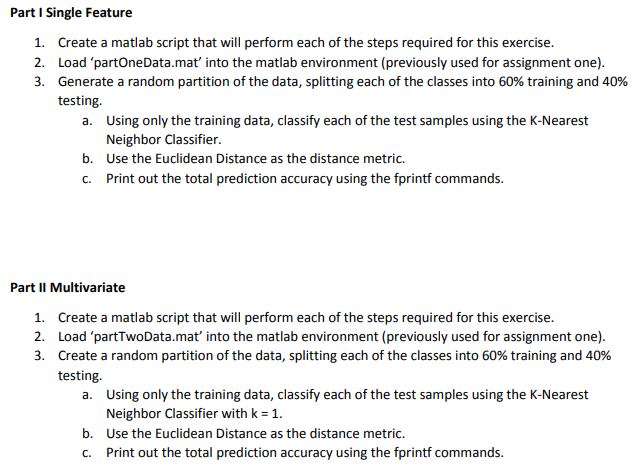
c Print out the total prediction accuracy using the fprintf commands.Part I Single Feature
Create a matlab script that will perform each of the steps required for this exercise.
Load 'partOneData.mat' into the matlab environment previously used for assignment one
Generate a random partition of the data, splitting each of the classes into training and
testing.
a Using only the training data, classify each of the test samples using the KNearest
Neighbor Classifier.
b Use the Euclidean Distance as the distance metric.
c Print out the total prediction accuracy using the fprintf commands.
Part II Multivariate
Create a matlab script that will perform each of the steps required for this exercise.
Load 'partTwoData.mat' into the matlab environment previously used for assignment one
Create a random partition of the data, splitting each of the classes into training and
testing.
a Using only the training data, classify each of the test samples using the KNearest
Neighbor Classifier with k
b Use the Euclidean Distance as the distance metric.
c Print out the total prediction accuracy using the fprintf commands.
Step by Step Solution
There are 3 Steps involved in it
1 Expert Approved Answer
Step: 1 Unlock

Question Has Been Solved by an Expert!
Get step-by-step solutions from verified subject matter experts
Step: 2 Unlock
Step: 3 Unlock
 Study Help