





Question: Part II Look at your computer Hardware Information from control panel ((if you don't see the control panel on your desktop, search for it in
Part II Look at your computer Hardware

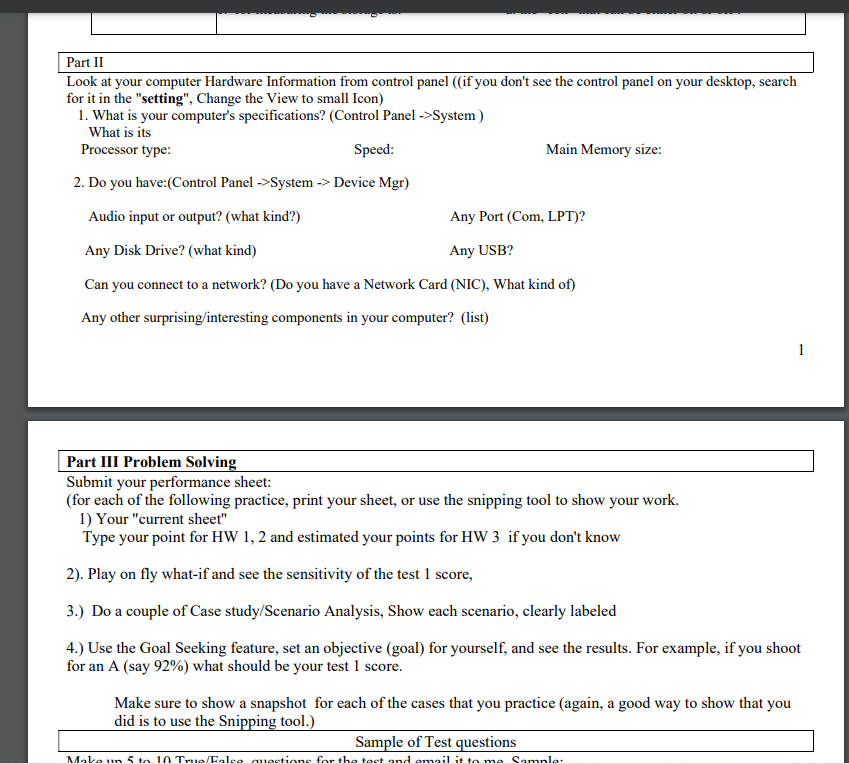
Part II Look at your computer Hardware Information from control panel ((if you don't see the control panel on your desktop, search for it in the "setting", Change the View to small Icon) 1. What is your computer's specifications? (Control Panel ->System) What is its Processor type: Speed: Main Memory size: 2. Do you have:(Control Panel ->System -> Device Mgr) Audio input or output? (what kind?) Any Port (Com, LPT)? Any Disk Drive? (what kind) Any USB? Can you connect to a network? (Do you have a Network Card (NIC), What kind of) Any other surprising/interesting components in your computer? (list) 1 Part III Problem Solving Submit your performance sheet: (for each of the following practice, print your sheet, or use the snipping tool to show your work. 1) Your "current sheet" Type your point for HW 1, 2 and estimated your points for HW 3 if you don't know 2). Play on fly what-if and see the sensitivity of the test 1 score, 3.) Do a couple of Case study/Scenario Analysis, Show each scenario, clearly labeled 4.) Use the Goal Seeking feature, set an objective (goal) for yourself, and see the results. For example, if you shoot for an A (say 92%) what should be your test 1 score. Make sure to show a snapshot for each of the cases that you practice (again, a good way to show that you did is to use the Snipping tool.) Sample of Test questions Makeun to 10 True/Folce questions for the test and email it to me Samnle

Step by Step Solution

There are 3 Steps involved in it

1 Expert Approved Answer
Step: 1 Unlock blur-text-image

Question Has Been Solved by an Expert!

Get step-by-step solutions from verified subject matter experts

Step: 2 Unlock
Step: 3 Unlock

Students Have Also Explored These Related General Management Questions!