







Question: PartA: Create the database fromThe doctorWho's assignment (Attached below). Name the database doctorWho. Then create a page that allows Doctor Whos assistant to add a
PartA:
Create the database fromThe doctorWho's assignment (Attached below). Name the database doctorWho. Then create a page that allows Doctor Whos assistant to add a new patient record. You will need to give the assistant rights to this database. The assistants username is 'helper' and the password is 'feelBetter'. For this to work, you will need to create several pages so be sure to include all of them when submitting your work. Name the main page addPatient.php.
PartB:
Add at least five records to the patients table in the doctorWho database you created in PartA. Now create a page that will display three or more fields from each of these records. The display should consist of, at a minimum, the patients first and last names and a unique identifier. Name the page getPatient.php and be sure to include the necessary accompanying files when you submit your work.
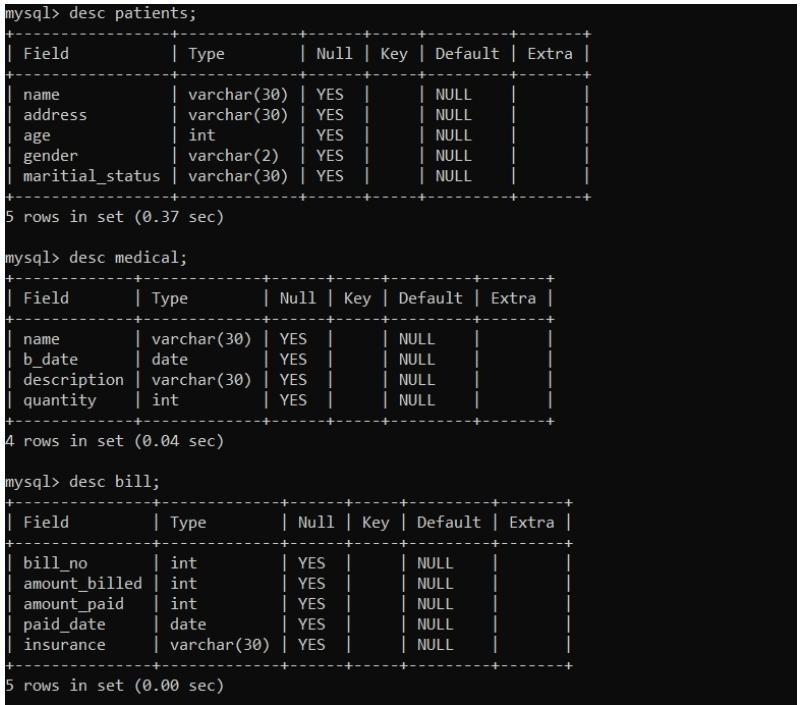
mysql> desc patients; | Field | Type | Null | Key | Default | Extra | name | varchar(30) | YES address | varchar(30) | YES age | int | YES gender | varchar(2) | YES | maritial_status | varchar(30) | YES NULL NULL NULL NULL NULL 5 rows in set (0.37 sec) mysql> desc medical; Field | Type | Null | Key | Default | Extra | name | varchar(30) | YES b_date | date | YESI | description | varchar(30) | YES I | quantity | int | YES NULL NULL | NULL NULL 4 rows in set (0.94 sec) mysql> desc bill; | Field | Type | Null key | Default | Extra | | bill_no | int | YES amount_billed | int | YES amount_paid | int | YES paid_date | date | YES insurance | varchar(30) | YES | NULL NULL | NULL | NULL | NULL 5 rows in set (0.00 sec)
Step by Step Solution
There are 3 Steps involved in it

Get step-by-step solutions from verified subject matter experts
 Study Help