







Question: Pat Pangolin has asked you to develop a document flowchart for the cash receipts system at Pangolin Trading Pty Ltd. Pat's narrative of the system
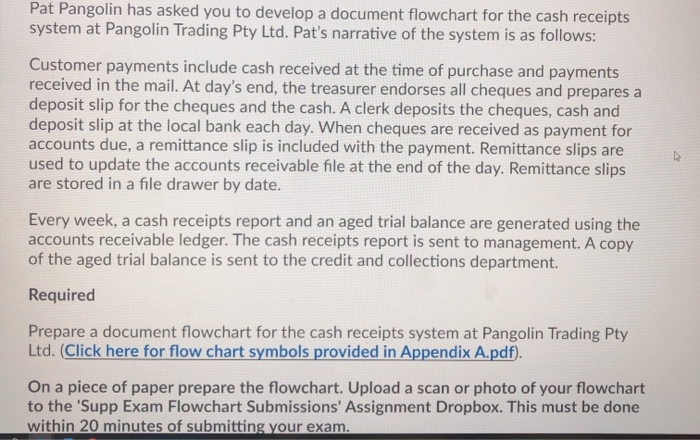
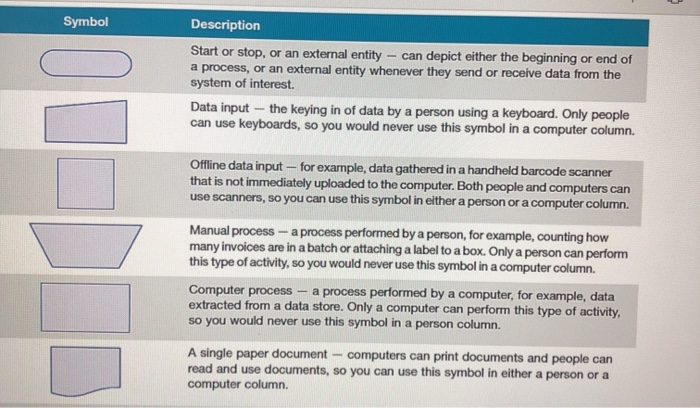
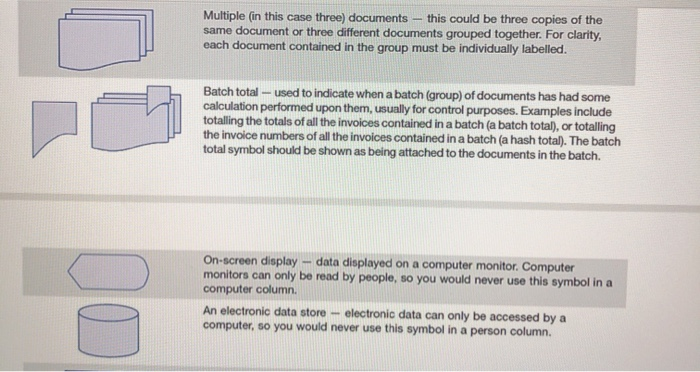
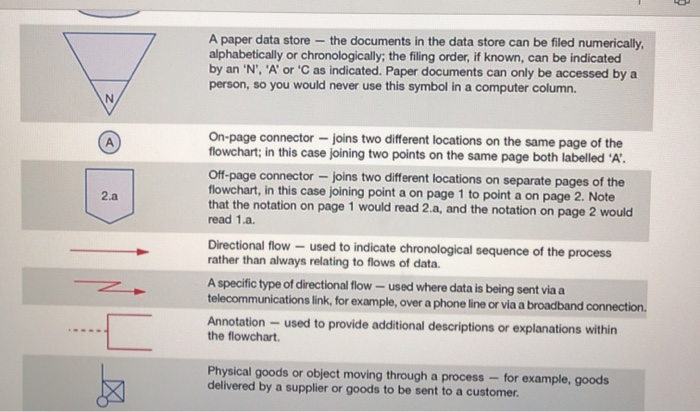
Pat Pangolin has asked you to develop a document flowchart for the cash receipts system at Pangolin Trading Pty Ltd. Pat's narrative of the system is as follows: Customer payments include cash received at the time of purchase and payments received in the mail. At day's end, the treasurer endorses all cheques and prepares a deposit slip for the cheques and the cash. A clerk deposits the cheques, cash and deposit slip at the local bank each day. When cheques are received as payment for accounts due, a remittance slip is included with the payment. Remittance slips are used to update the accounts receivable file at the end of the day. Remittance slips are stored in a file drawer by date. Every week, a cash receipts report and an aged trial balance are generated using the accounts receivable ledger. The cash receipts report is sent to management. A copy of the aged trial balance is sent to the credit and collections department. Required Prepare a document flowchart for the cash receipts system at Pangolin Trading Pty Ltd. (Click here for flow chart symbols provided in Appendix A.pdf). On a piece of paper prepare the flowchart. Upload a scan or photo of your flowchart to the 'Supp Exam Flowchart Submissions' Assignment Dropbox. This must be done within 20 minutes of submitting your exam. Symbol Description Start or stop, or an external entity - can depict either the beginning or end of a process, or an external entity whenever they send or receive data from the system of interest Data input - the keying in of data by a person using a keyboard. Only people can use keyboards, so you would never use this symbol in a computer column. Offline data input - for example, data gathered in a handheld barcode scanner that is not immediately uploaded to the computer. Both people and computers can use scanners, so you can use this symbol in either a person or a computer column. Manual process - a process performed by a person, for example, counting how many invoices are in a batch or attaching a label to a box. Only a person can perform this type of activity, so you would never use this symbol in a computer column. Computer process - a process performed by a computer, for example, data extracted from a data store. Only a computer can perform this type of activity, so you would never use this symbol in a person column. A single paper document computers can print documents and people can read and use documents, so you can use this symbol in either a person or a computer column. Multiple (in this case three) documents this could be three copies of the same document or three different documents grouped together. For clarity, each document contained in the group must be individually labelled. Batch total - used to indicate when a batch (group) of documents has had some calculation performed upon them, usually for control purposes. Examples include totalling the totals of all the invoices contained in a batch (a batch total), or totalling the invoice numbers of all the invoices contained in a batch (a hash total). The batch total symbol should be shown as being attached to the documents in the batch. On-screen display - data displayed on a computer monitor. Computer monitors can only be read by people, so you would never use this symbol in a computer column An electronic data store electronic data can only be accessed by a computer, so you would never use this symbol in a person column. A paper data store - the documents in the data store can be filed numerically, alphabetically or chronologically; the filing order, if known, can be indicated by an 'N', 'A' or 'C as indicated. Paper documents can only be accessed by a person, so you would never use this symbol in a computer column. N 2.a On-page connector - joins two different locations on the same page of the flowchart; in this case joining two points on the same page both labelled 'A'. Off-page connector - joins two different locations on separate pages of the flowchart, in this case joining point a on page 1 to point a on page 2. Note that the notation on page 1 would read 2.a, and the notation on page 2 would read 1.a. Directional flow - used to indicate chronological sequence of the process rather than always relating to flows of data. A specific type of directional flow - used where data is being sent via a telecommunications link, for example, over a phone line or via a broadband connection. Annotation - used to provide additional descriptions or explanations within the flowchart. Physical goods or object moving through a process - for example, goods delivered by a supplier or goods to be sent to a customer
Step by Step Solution
There are 3 Steps involved in it

Get step-by-step solutions from verified subject matter experts
 Study Help