







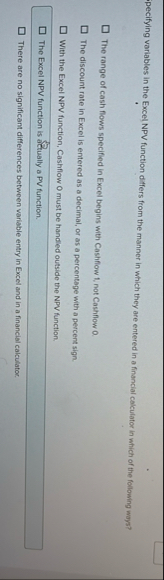
Question: pecifying variables in the Excel NPV function differs from the manner in which they are entered in a financial calculator in which of the following
pecifying variables in the Excel NPV function differs from the manner in which they are entered in a financial calculator in which of the following ways?
The range of cash flows specified in Excel begins with Cashffow t not Cashflow a
The discount rate in Excel is entered as a decimal, or as a percentage with a percent sign.
With the Excel NPV function, Cashflow must be handled outside the NPV function.
The Excel NPV function is aftually a PV function.
There are no significant differences betwoen variable entry in Excel and in a financial calculator.
Step by Step Solution
There are 3 Steps involved in it
1 Expert Approved Answer
Step: 1 Unlock

Question Has Been Solved by an Expert!
Get step-by-step solutions from verified subject matter experts
Step: 2 Unlock
Step: 3 Unlock
 Study Help