







Question: Penalty Kick To hide the input in Python, you could simply replace 1113321110 with getpass . getpass O . import getpass secret_inpu1: = getpass .
Penalty Kick
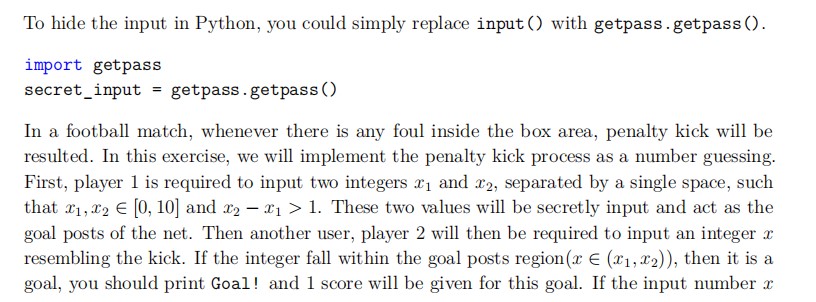
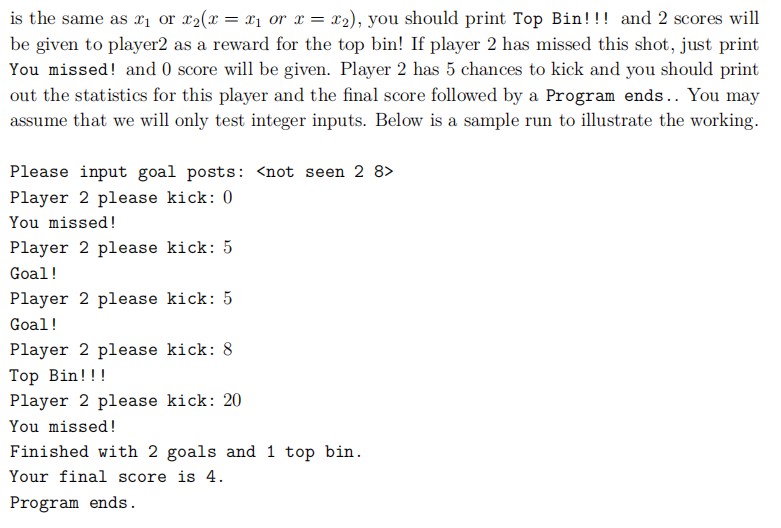
To hide the input in Python, you could simply replace 1113321110 with getpass . getpass O . import getpass secret_inpu1: = getpass . getpassl) In a ootball match, whenever there is any foul inside the box area, penalty kick will be resulted. In this exercise, we will implement the penalty kick process as a number guessing. First, player 1 is required to input two integers 5:1 and $2, separated by a single space, such that 331,32 E [{l, 10] and 3:2 3:1 2: 1. These two values will be secretly input and act as the goal posts of the net. Then another user, player 2 will then be required to input an integer rs resembling the kick. If the integer fall within the goal posts region [3 E ($1,532)), then it is a goal, you should print Goal! and 1 score will be given for this goal. If the input number m is the same as 5.31 or mm = 5:1 or m = mg), you should print Top Bin! !! and 2 scores will be gyen to player2 as a reward for the top bin! If player 2 has missed this shot, just print You missed! and 0 score will be given. Player 2 has 5 chances to kick and you should print out the statistics for this player and the nal score foowed by a Program ends . . You may assume that we will only test integer inputs. Below is a sample run to illustrate the working. Please input goal posts:
Step by Step Solution
There are 3 Steps involved in it

Get step-by-step solutions from verified subject matter experts
 Study Help