







Question: Perform a simulation using MATLAB / Simulink that captures the dynamic behavior of dropping a racquetball from the top of a building ( similar to
Perform a simulation using MATLABSimulink that captures the dynamic behavior of dropping a
racquetball from the top of a building similar to the Empire State Building as shown below, using the
linear air dragfriction model. The goal is to determine: a the time that it takes the ball to hit the ground,
and b the velocity at which the ball hits the ground. You will need to perform the followings tasks:
a Derive a differential equation that describes the dynamic behavior of the ball, in terms of the
variable y and its derivatives. The telltale for y is located at the top of the building.
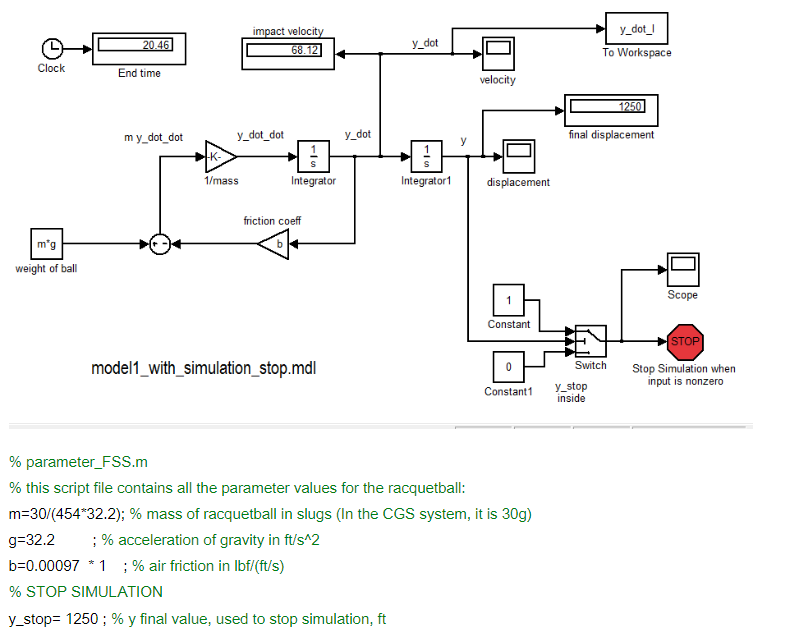
b Implement a solution for the differential equation that you derived using Simulink. Incorporate a
mechanism in the model so that the simulation stops when the ball hits the ground I recommend
that you do it without first looking at the Simulink implementation shown in the Reference
Section. And then, once you are finished, you can look at it to confirm Also use the Display
icon. It displays the value of the time variable when the simulation stops. Also the clock icon
produces the time variable during the simulation.
c Simulate the system. Make sure that you get the same results of the simulation shown in the
Reference section. Provide a screen shot of your parameter file ie a script file and the Simulink
diagram, using the Display icons. parameterFSSm
this script file contains all the parameter values for the racquetball:
; mass of racquetball in slugs In the CGS system, it is
; acceleration of gravity in
; air friction in
STOP SIMULATION
ystop ; y final value, used to stop simulation,
Step by Step Solution
There are 3 Steps involved in it
1 Expert Approved Answer
Step: 1 Unlock

Question Has Been Solved by an Expert!
Get step-by-step solutions from verified subject matter experts
Step: 2 Unlock
Step: 3 Unlock
 Study Help