







Question: Phone Plan Analysis You are planning to switch your cell phone provider. You have imported your data usage from the last six months with your
Phone Plan Analysis
You are planning to switch your cell phone provider. You have imported your data usage from the last six months with your previous provider and entered this information on the "Data" worksheet so that you can analyze which plan is best for you based on your prior data usage.
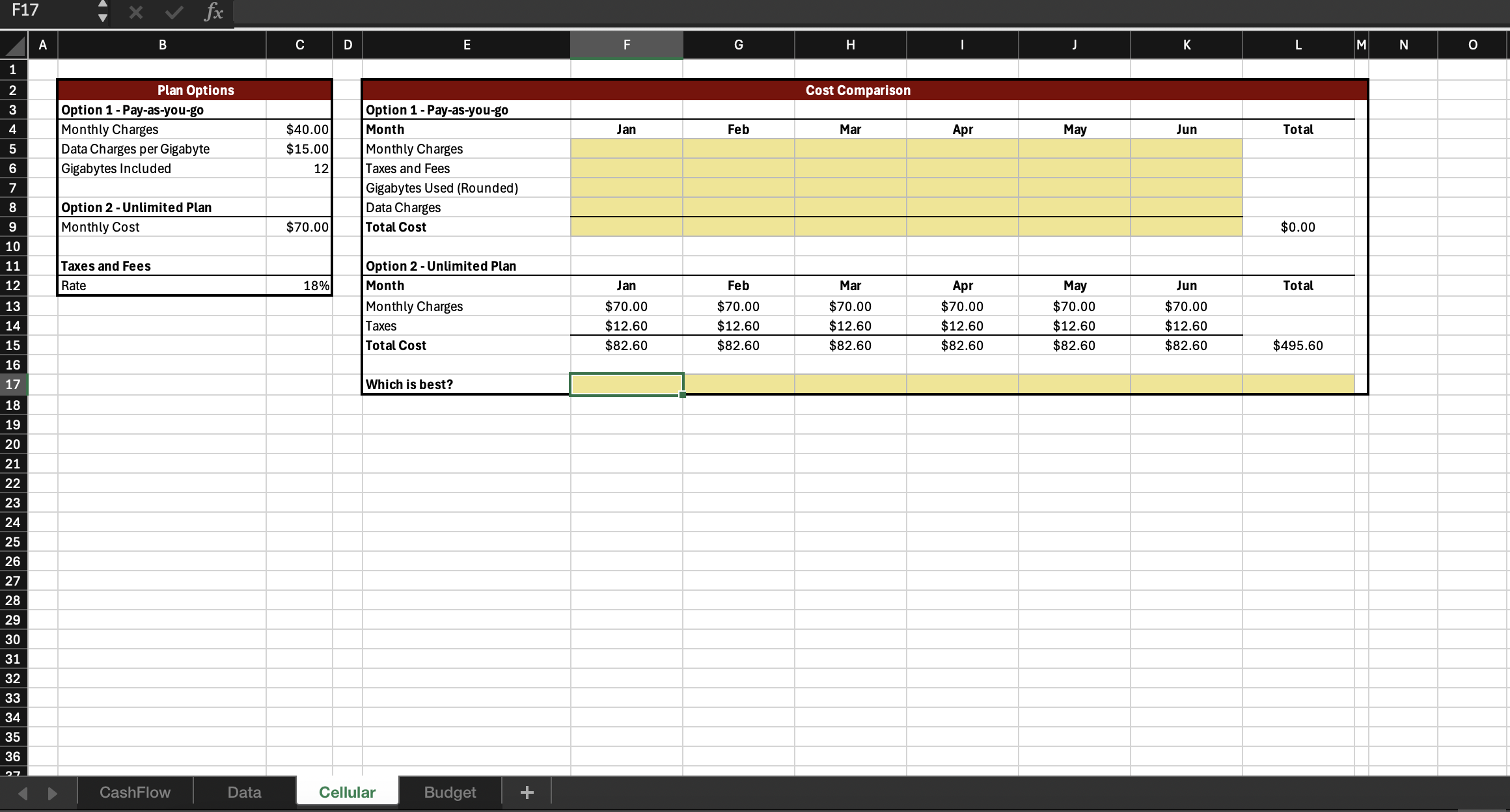
The Cellular worksheet presents two options for a cell phone plan with the new company. You could choose a payasyougo plan or an unlimited plan. You want to evaluate which plan will be best for you. Both plans provide unlimited calling and texting. The unlimited plan also offers unlimited data usage. The payasyougo plan includes gigabytes of data. Any data you use beyond the gigabytes will cost $ per gigabyte.
Complete the tasks to compare what your bill would be for both plan options based on the past data usage.
Complete the Megabytes Used row G:L of the Usage Summary table on the Data worksheet.
Build the formula to calculate total Megabytes Used for January G by referencing the month name inGand the appropriate columns in the data table B:D
Reuse your formula to calculate the Megabytes Used for the other months.
Notice that the "Gigabytes Used" G:L row is already completed in the worksheet. "Gigabytes Used" is calculated as the "Megabytes Used" divided by the number of megabytes in a gigabyte
The Gigabytes Used RoundedG:L row is also completed in the worksheet. Since the mobile carrier rounds the Gigabytes Used up to the next whole gigabyte, the ROUNDUP function is used to adjust the Gigabytes Used up to the next integer.
Complete the Monthly Charges row F:K of the Cost Comparison table on the Cellular worksheet for Option
Enter the monthly charges for January F by referenceing the monthly charges for option C in the Plan Options table.
Reuse your formula to complete the monthly charges for Option for each month.
Complete the Taxes and Fees row F:K of the Cost Comparison table on the Cellular worksheet for Option
Calculate the tax for January in cellF
The taxes and fees are calculated as the monthly charges in cellFnot including any data charges times the taxes and fees rate cellC on the Plan Options table.
Reuse your formula to complete the taxes and fees for Option for each month.
Complete the Gigabytes Used Rounded row F:K of the Cost Comparison table on the Cellular worksheet for Option The phone carrier rounds the data used up to the nearest gigabyte for billing purposes.
Enter the rounded number of gigabytes used for January in cellFby referencing its calculated value in the appropriate cell on the Data sheet.
Reuse your formula to complete the Gigabytes Used Rounded for Option for the remaining months.
Complete the Data Charges row F:K of the Cost Comparison table on the Cellular worksheet for Option
Calculate the data charges for option in January in cellF
The phone carrier charges $ for each gigabyte used rounded up to the next whole gigabyte that exceeds the data amount included with the plan.
Be sure to reference the Gigabytes Used Rounded in January as well as Data Charges per Gigabyte and Gigabytes Included from the Plan Options section of the worksheet.
Display a zero if the data does not exceed the gigabytes included with the plan.
Reuse your formula to complete the data charges for Option for each month.
Complete the Total Cost row F:K of the Cost Comparison table on the Cellular worksheet for Option
Calculate the total cost for option in January in cellF
The total cost is the sum of the monthly charges, taxes and fees, and the data charges for January.
Reuse your formula to complete the total cost for Option for each month.
Complete the Which is best? row F:L of the Cost Comparison table on the Cellular worksheet.
Notice that the costs associated with Option are already calculated in the worksheet.
Write a formula to display "Option if the total cost of Option is less than the total cost of Option for that month.
If the total cost of Option is less than the total cost of Option display "Option
Otherwise, display No Difference".
Reuse your formula to determine which option is best for each month and in cellLto determine which option is best overall. F
begintabularcccc
hline & A & B & C
hline & & &
hline & & multicolumnlPlan Options
hline & & Option Payasyougo &
hline & & Monthly Charges & $
hline & & Data Charges per Gigabyte & $
hline & & Gigabytes Included &
hline & & &
hline & & Option Unlimited Plan &
hline & & Monthly Cost & $
hline & & &
hline & & Taxes and Fees &
hline & & Rate &
hline
endtabular
Step by Step Solution
There are 3 Steps involved in it
1 Expert Approved Answer
Step: 1 Unlock

Question Has Been Solved by an Expert!
Get step-by-step solutions from verified subject matter experts
Step: 2 Unlock
Step: 3 Unlock
 Study Help