







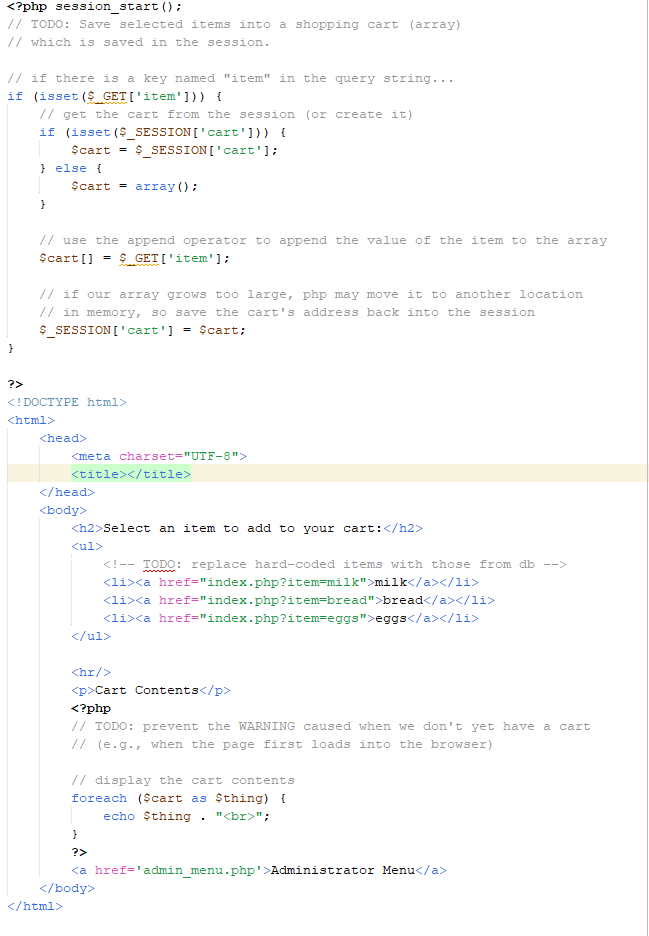
Question: PHP Code. This is the index.php file. The comments are work to be done: / / which is saved in the session. / / if
PHP Code. This is the index.php file. The comments are work to be done:
which is saved in the session.
if there is a key named "item" in the query string...
if isset$GETitem
get the cart from the session or create it
if isset $SESSIONcart
$cart $SESSIONcart;
else
$cart array;
use the append operator to append the value of the item to the array
$cart $GETitem;
if our array grows too large, php may move it to another location
in memory, so save the cart's address back into the session
$SESSIONcart $cart;
DOCTYPE html
htmls
head
TODO: prevent the WARNING caused when don't yet have a cart
when the page first loads into the browser
display the cart contents
foreach $cart $thing
echo $thing ;
body
Step by Step Solution
There are 3 Steps involved in it
1 Expert Approved Answer
Step: 1 Unlock

Question Has Been Solved by an Expert!
Get step-by-step solutions from verified subject matter experts
Step: 2 Unlock
Step: 3 Unlock
 Study Help