







Question: PHP language. For this activity you are required to do the followings: 1. Drawing and with detailed description: Complete/design the remaining 2 interfaces for the
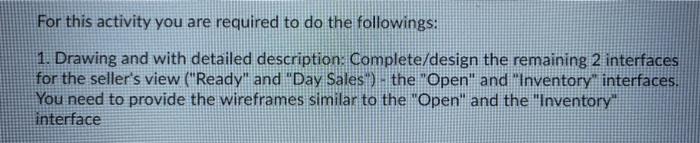
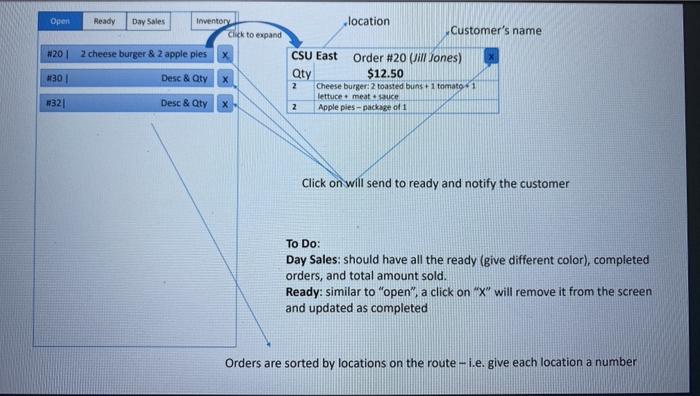
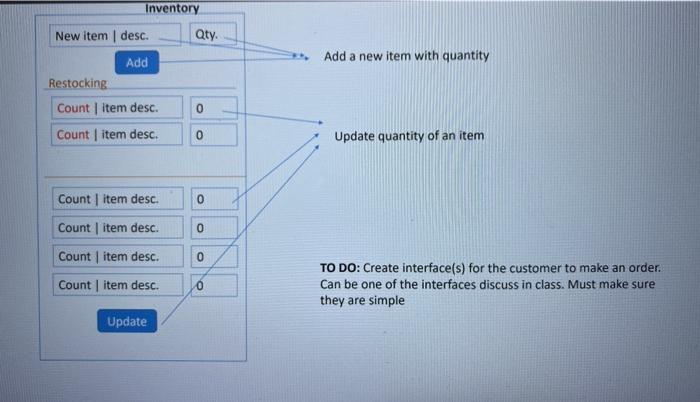
For this activity you are required to do the followings: 1. Drawing and with detailed description: Complete/design the remaining 2 interfaces for the seller's view ("Ready" and "Day Sales) - the "Open" and "Inventory interfaces. You need to provide the wireframes similar to the "Open" and the "Inventory interface Open Ready Day Sales location Inventory Click to expand Customer's name N20 2 cheese burger & 2 apple pies 301 Desc& Qty CSU East Order #20 (Jill Jones) Qty $12.50 2 Cheeseburger: 2 toasted buns + 1 tomato - 1 lettuce meat e sauce 2 Apple pies-package of 1 1321 Desc& Qty X Click on will send to ready and notify the customer To Do: Day Sales: should have all the ready (give different color), completed orders, and total amount sold. Ready: similar to "open", a click on "X" will remove it from the screen and updated as completed Orders are sorted by locations on the route - i.e. give each location a number Inventory Qty. Add a new item with quantity New item desc. Add Restocking Count item desc. Count item desc. 0 Update quantity of an item Count item desc 0 Count item desc. 0 Count item desc. 0 Count item desc. 0 TO DO: Create interface(s) for the customer to make an order Can be one of the interfaces discuss in class. Must make sure they are simple Update For this activity you are required to do the followings: 1. Drawing and with detailed description: Complete/design the remaining 2 interfaces for the seller's view ("Ready" and "Day Sales) - the "Open" and "Inventory interfaces. You need to provide the wireframes similar to the "Open" and the "Inventory interface Open Ready Day Sales location Inventory Click to expand Customer's name N20 2 cheese burger & 2 apple pies 301 Desc& Qty CSU East Order #20 (Jill Jones) Qty $12.50 2 Cheeseburger: 2 toasted buns + 1 tomato - 1 lettuce meat e sauce 2 Apple pies-package of 1 1321 Desc& Qty X Click on will send to ready and notify the customer To Do: Day Sales: should have all the ready (give different color), completed orders, and total amount sold. Ready: similar to "open", a click on "X" will remove it from the screen and updated as completed Orders are sorted by locations on the route - i.e. give each location a number Inventory Qty. Add a new item with quantity New item desc. Add Restocking Count item desc. Count item desc. 0 Update quantity of an item Count item desc 0 Count item desc. 0 Count item desc. 0 Count item desc. 0 TO DO: Create interface(s) for the customer to make an order Can be one of the interfaces discuss in class. Must make sure they are simple Update
Step by Step Solution
There are 3 Steps involved in it

Get step-by-step solutions from verified subject matter experts
 Study Help