Question: PHP Programming Question Kindly please include clear instructions on how many files to create and their names in bold. Also include comments comments in your
PHP Programming Question
Kindly please include clear instructions on how many files to create and their names in bold. Also include comments comments in your code as I am having trouble with this task.
Appreciate your help.
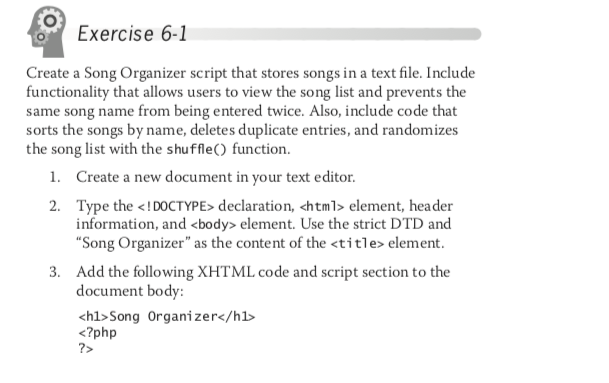
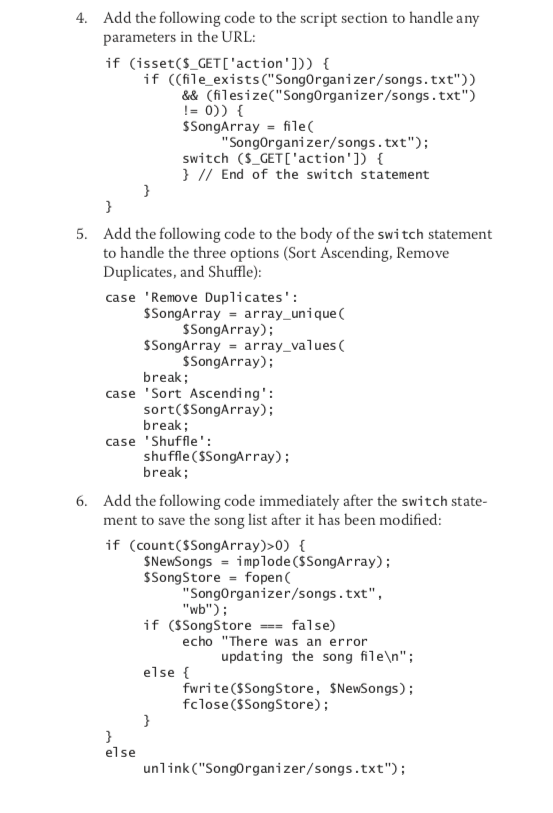
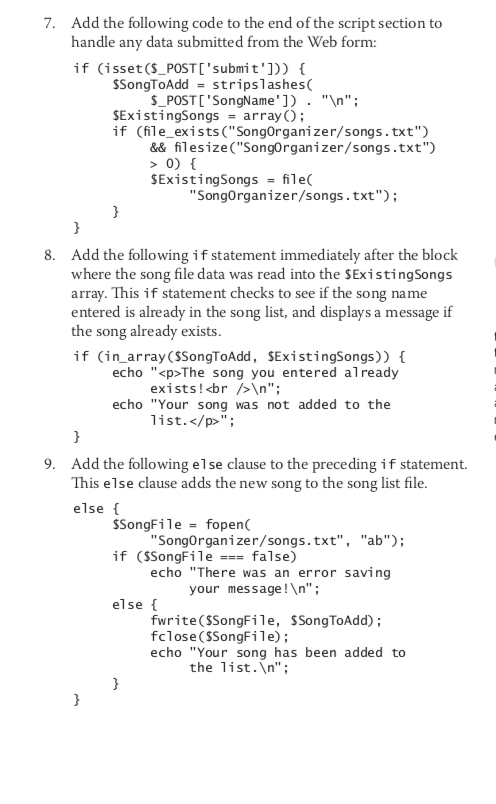
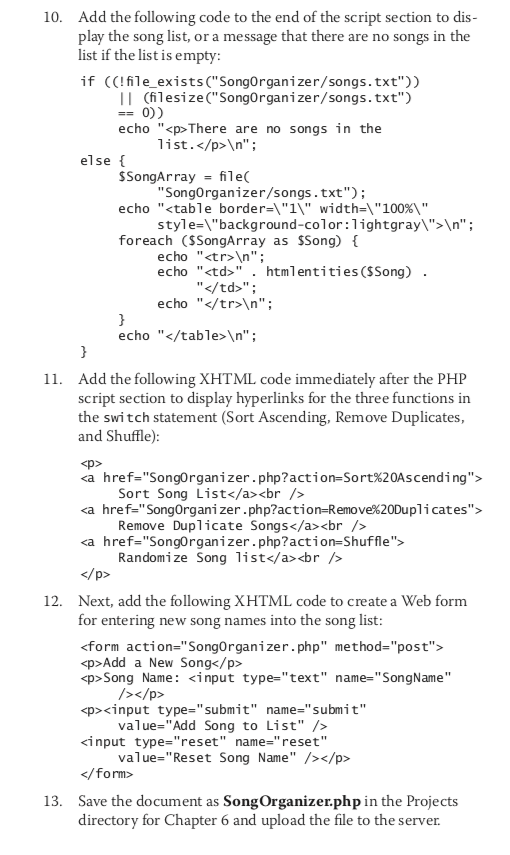
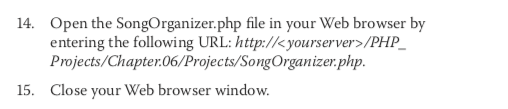
Exercise 6-1 Create a Song Organizer script that stores songs in a text file. Include functionality that allows users to view the song list and prevents the same song name from being entered twice. Also, include code that sorts the songs by name, deletes duplicate entries, and randomizes the song list with the shuffle) function 1. Create a new document in your text editor 2. Type the element, header information, and element. Use the strict DTD and Song Organizer" as the content of the Song Organizer<?php 7> Add the following code to the end of the script section to dis play the song list, or a message that there are no songs in the list if the list is empty: if ((lfile_exists C"SongOrganizer/songs.txt")) 10. II (filesize C"SongOrganizer/songs.txt") echo "<p>There are no songs in the else SSongArray fileC echo "</p><table border- width- foreach as ssong t style- lightgray> "; echo "<tr> " echo "<td>" . htmlentities (SSong) . echo "</td></tr>"; echo "</table> "; 11. Add the following XHTML code immediately after the PHP script section to display hyperlinks for the three functions in the switch statement (Sort Ascending, Remove Duplicates, and Shuffle) sp> a href-"Songorganizer.php?action-Sort%20Ascending" Sort Song List<br>a href-"Songorganizer.php?action-Remove %20Duplicates"> Remove Duplicate Songs<br>Randomize Song list<br>12. Next, add the following XHTML code to create a Web form for entering new song names into the song list <form action- method-> <p>Add a New Song</p> <p>Song Name: <input type- name-><input type- name- kinput> value="Add Song to List" /> value-"Reset Song Name" /></p> 13. Save the document as SongOrganizer.php in the Projects directory for Chapter 6 and upload the file to the server. 14. Open the SongOrganizer php file in your Web browser by entering the following URL: http:lk yourserverPHP Projects/Chapter06/Projects/SongOrganizer.php. Close your Web browser window. 15. Exercise 6-1 Create a Song Organizer script that stores songs in a text file. Include functionality that allows users to view the song list and prevents the same song name from being entered twice. Also, include code that sorts the songs by name, deletes duplicate entries, and randomizes the song list with the shuffle) function 1. Create a new document in your text editor 2. Type the <i doctype declaration chtml> element, header information, and element. Use the strict DTD and Song Organizer" as the content of the <title element add the following xhtml code and script section to document body h1>Song Organizer<?php 7> Add the following code to the end of the script section to dis play the song list, or a message that there are no songs in the list if the list is empty: if ((lfile_exists C"SongOrganizer/songs.txt")) 10. II (filesize C"SongOrganizer/songs.txt") echo "<p>There are no songs in the else SSongArray fileC echo "</p><table border- width- foreach as ssong t style- lightgray> "; echo "<tr> " echo "<td>" . htmlentities (SSong) . echo "</td></tr>"; echo "</table> "; 11. Add the following XHTML code immediately after the PHP script section to display hyperlinks for the three functions in the switch statement (Sort Ascending, Remove Duplicates, and Shuffle) sp> a href-"Songorganizer.php?action-Sort%20Ascending" Sort Song List<br>a href-"Songorganizer.php?action-Remove %20Duplicates"> Remove Duplicate Songs<br>Randomize Song list<br>12. Next, add the following XHTML code to create a Web form for entering new song names into the song list <form action- method-> <p>Add a New Song</p> <p>Song Name: <input type- name-><input type- name- kinput> value="Add Song to List" /> value-"Reset Song Name" /></p> 13. Save the document as SongOrganizer.php in the Projects directory for Chapter 6 and upload the file to the server. 14. Open the SongOrganizer php file in your Web browser by entering the following URL: http:lk yourserverPHP Projects/Chapter06/Projects/SongOrganizer.php. Close your Web browser window. 15</form>









 Study Help