







Question: PHP programming. Working with Files and Directories. I am trying to create an directory that will let an user upload or download files to an
PHP programming. Working with Files and Directories. I am trying to create an directory that will let an user upload or download files to an directory. I'm using notepad++ and xampp for this task. I currently have three files, ViewFiles.php, FileUploader.php, and FileDownloader.php. Here are the codes below:
ViewFile.php:
/p>
Strict//EN"
"http://www.w3.org/TR/xhtml1/DTD/xhtml1-strict.dtd">
content="text/html; charset=iso-8859-1" />
$Dir = "files";
$DirEntries = scandir($Dir);
echo "
| Directory listing for " . htmlentities($Dir) . " | |||||
|---|---|---|---|---|---|
| Name | ";Owner ID | ";Permissions | ";Size | ";||
| "; if (is_file($FullEntryName)) echo "" . htmlentities($Entry). ""; else echo htmlentities($Entry); echo " | " . fileowner($FullEntryName); if (is_file($FullEntryName)) { $perms = fileperms($FullEntryName); $perms = decoct($perms % 01000); echo " | 0$perms"; echo " | " . number_format(filesize($FullEntryName), 0) . " bytes"; } else echo " | align='center'> echo " | |
";
?>
. // End
FileUploader.php:
/p>
Strict//EN"
"http://www.w3.org/TR/xhtml1/DTD/xhtml1-strict.dtd">
content="text/html; charset=iso-8859-1" />
$Dir = "files";
if (isset($_POST['upload'])) {
if (isset($_FILES['new_file'])) {
if (move_uploaded_file(
$_FILES['new_file']['tmp_name'],
$Dir . "/" . $_FILES['new_file']
['name']) == TRUE) {
chmod($Dir . "/" . $_FILES['new_file']
['name'], 0644);
echo "File \"" .
htmlentities($_FILES['new_file']
['name']) .
"\"successfully uploaded.
";
}
else
echo "There was an error
uploading \"" .
htmlentities($_FILES['new_file']
['name']) .
"\".
";
}
}
?>
//End
FileDownloader.php:
$Dir = "files";
if (isset($_GET['filename'])) {
$FileToGet = $Dir . "/" . stripslashes
($_GET['filename']);
if (is_readable($FileToGet)) {
}
else {
$ErrorMsg = "Cannot read \"$FileToGet\"";
$ShowErrorPage = TRUE;
}
}
else {
$ErrorMsg = "No filename specified";
$ShowErrorPage = TRUE;
}
if ($ShowErrorPage) {
header("Content-Description: File Transfer");
header("Content-Type: application/force-download");
header("Content-Disposition: attachment;
filename=\"" . $_GET['filename'] . "\"");
header("Content-Transfer-Encoding: base64");
header("Content-Length: " . filesize($FileToGet));
readfi le($FileToGet);
$ShowErrorPage = FALSE;
?>
/p>
Strict//EN"
"http://www.w3.org/TR/xhtml1/DTD/xhtml1-strict.dtd">
There was an error downloading "
htmlentities($_GET['filename']); ?>"
}
?> //End
The first problem is this is that the file directory is not coming out how it is suppose to.
Also, when in the ViewFiles.php file, I could not get the browser to download the files when selected.
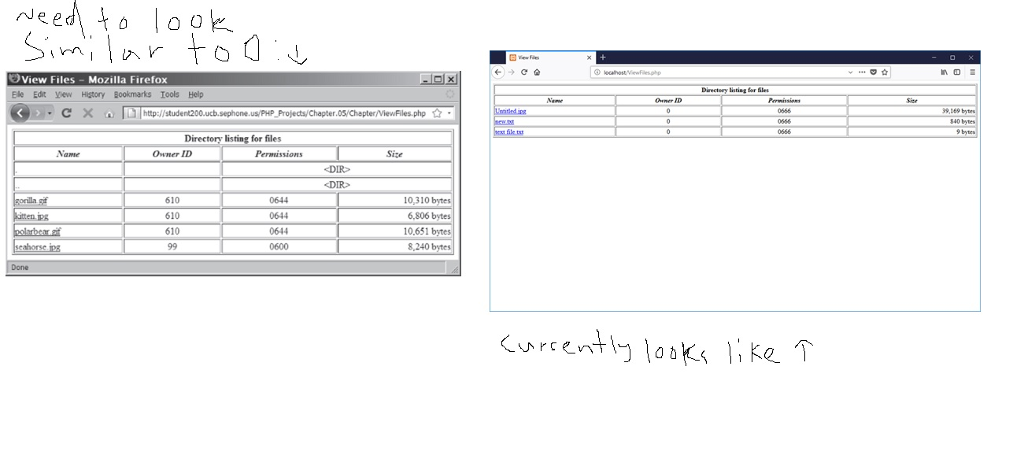
Nee View Files Mozilla Firefox Directory lsting tor Sle Ele Edit ew Higtory Bookmarks Iools Help . >
Step by Step Solution
There are 3 Steps involved in it

Get step-by-step solutions from verified subject matter experts
 Study Help