







Question: Phyton I have multiple folders in each folder I have one file CSV file. So I need to read all of those multiple folders with
Phyton
I have multiple folders in each folder I have one file CSV file. So I need to read all of those multiple folders with CSV files. Find the column name location and read each of the cells after it if it is 2 should be unknown, 3,4,5 should be yes and 6 should be perfect. And save the result to the new CSV file
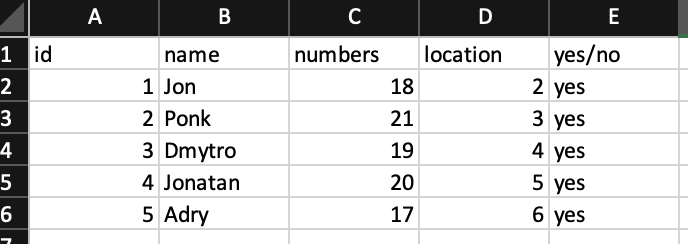
And save the result to the new CSV file, the result should be like on the screenshot. And also new columns with the name of the folder it was open because now all of the folder contains file with the name location.
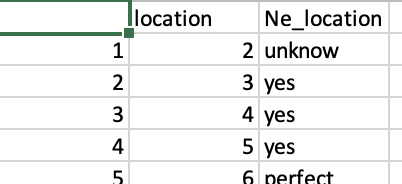
\begin{tabular}{|l|l|l|r|r|r|} \hline \multicolumn{2}{|c|}{ A } & B & \multicolumn{1}{c|}{ C } & D & E \\ \hline 1 & id & name & numbers & location & yeso \\ \hline 2 & 1 & Jon & 18 & 2 yes \\ \hline 3 & 2 & Ponk & 21 & 3 yes \\ \hline 4 & 3 & Dmytro & 19 & 4 yes \\ \hline 5 & 4 Jonatan & 20 & 5 yes \\ \hline 6 & 5 & Adry & 17 & 6 yes \\ \hline \end{tabular} \begin{tabular}{|r|r|l|} \hline location & \multicolumn{1}{|c|}{Ne location } \\ \hline 1 & 2 unknow \\ \hline 2 & 3 yes \\ \hline 3 & 4 yes \\ \hline 4 & 5 yes \\ \hline 5 & 6 nerfect \\ \hline \end{tabular}
Step by Step Solution
There are 3 Steps involved in it

Get step-by-step solutions from verified subject matter experts
 Study Help