



Question: Play around with the UI to understand what the current behaviors are without data persistence, then read the following on how a user must be
Play around with the UI to understand what the current behaviors are without data persistence, then read the following on how a user must be able to interact with the application with the serverside code completed. Keep in mind the following requirements are overall behavior, so your implementation in appjs will help complete these required behaviors:
Adding a task
If a user types a task into the input box and singleclicks the Add button, the task is appended to the end of the TODO list.
Duplicate tasks found in TODO or Completed are not added and cause an alert popup to show stating "Bad Request: task already exists!".
Data is persisted in the same order when the browser is refreshed, closed, or cleared of local storage cache.
Completing a task
When a user singleclicks a task in the TODO list, the item is removed from the TODO list and appended to the end of the Completed list.
Data moved between lists is persisted in the same order when the browser is refreshed, closed, or cleared of local storage cache.
Deleting tasks
When a user singleclicks a task item in the Completed list, the task is deleted from the the list and no longer appears in the UI at all. This item is already completed for you
When a user singleclicks the Clear All button, all tasks in the TODO and Completed lists are deleted from their respective lists.
Tasks that have been deleted remain deleted after browser is refreshed, closed, or cleared of local storage cache.
Data persistence requirement
You may not use browser local storage because we want the user to be able to access their saved data from anywhere! You are required to handle data persistence by storing the data inmemory in the provided Express server that we will run in the cloud for them. To clarify, the expectation is that data is persistent when the browser state is changed, not when the server state is changed. For example, if you reboot the node application, data is not required to be persisted then, but when the browser is refreshed or closed and opened again, it is
Additional information:
All clientside frontend jQuery AJAX code will already be complete. You should not need to update any of the provided jQuery AJAX code, but please feel free do so if you feel it is necessary to accomplish one of the required behaviors listed above.
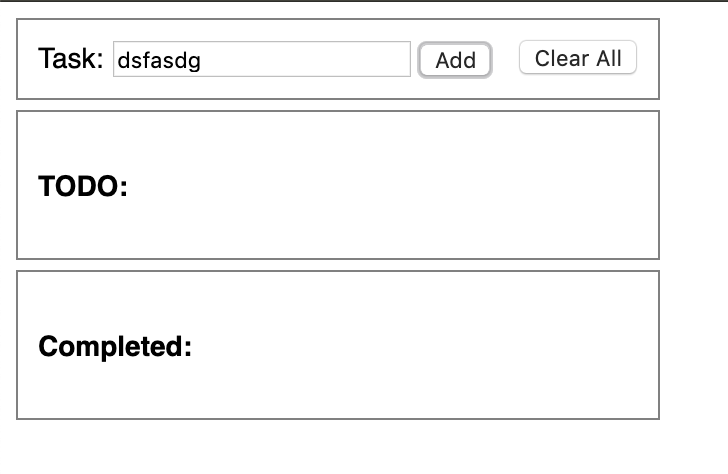
Use this to create a todo list using html javascript, and css to look like the picture
Step by Step Solution
There are 3 Steps involved in it
1 Expert Approved Answer
Step: 1 Unlock

Question Has Been Solved by an Expert!
Get step-by-step solutions from verified subject matter experts
Step: 2 Unlock
Step: 3 Unlock