







Question: PLC Lab 11: Liquid heating Control with Comparison Instructions Name: Make a ladder logic program to control the process in Lab10. You may use comparison
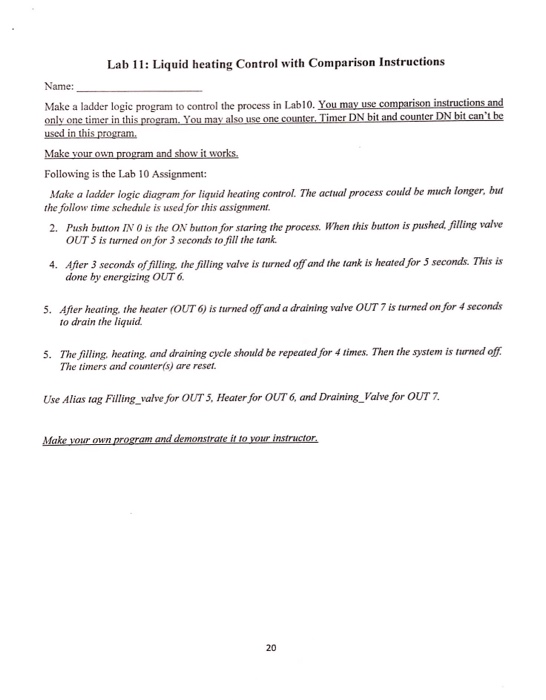
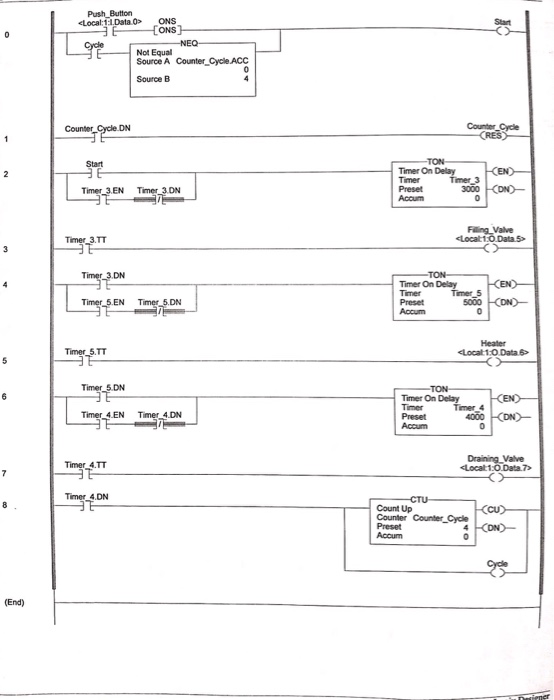
Lab 11: Liquid heating Control with Comparison Instructions Name: Make a ladder logic program to control the process in Lab10. You may use comparison instructions and used in this program Following is the Lab 10 Assignment: Make a ladder logic diagram for liquid heating control. The actual process could be much longer, but the follows time schedule is used for this assignment. 2 Push button IN O is the ON button for staring the process. When this button is pushed, filling valve OUT 5 is turned on for 3 seconds to fill the tank. 4. After 3 seconds of fillng, the filling valve is turned off and the tank is heated for 5 secons. This is done by energizing OUT6 5. After heating, the heater (OUT 6) is turned off and a draining valve OUT 7 is turned on for 4 seconds to drain the liquid 5. The filling, heating, and draining cycle should be repeated for 4 times. Then the system is turned off The timers and counter(s) are reset. Use Alias tag Filing_valve for OUT 5, Heater for OUT 6, and Draining_Valve for OUT7 20
Step by Step Solution
There are 3 Steps involved in it

Get step-by-step solutions from verified subject matter experts
 Study Help