







Question: ple using quickbook to do it. Mr. V has Decided to start a career selling Violins and giving Violin Lessons. He has decided to call
ple using quickbook to do it.
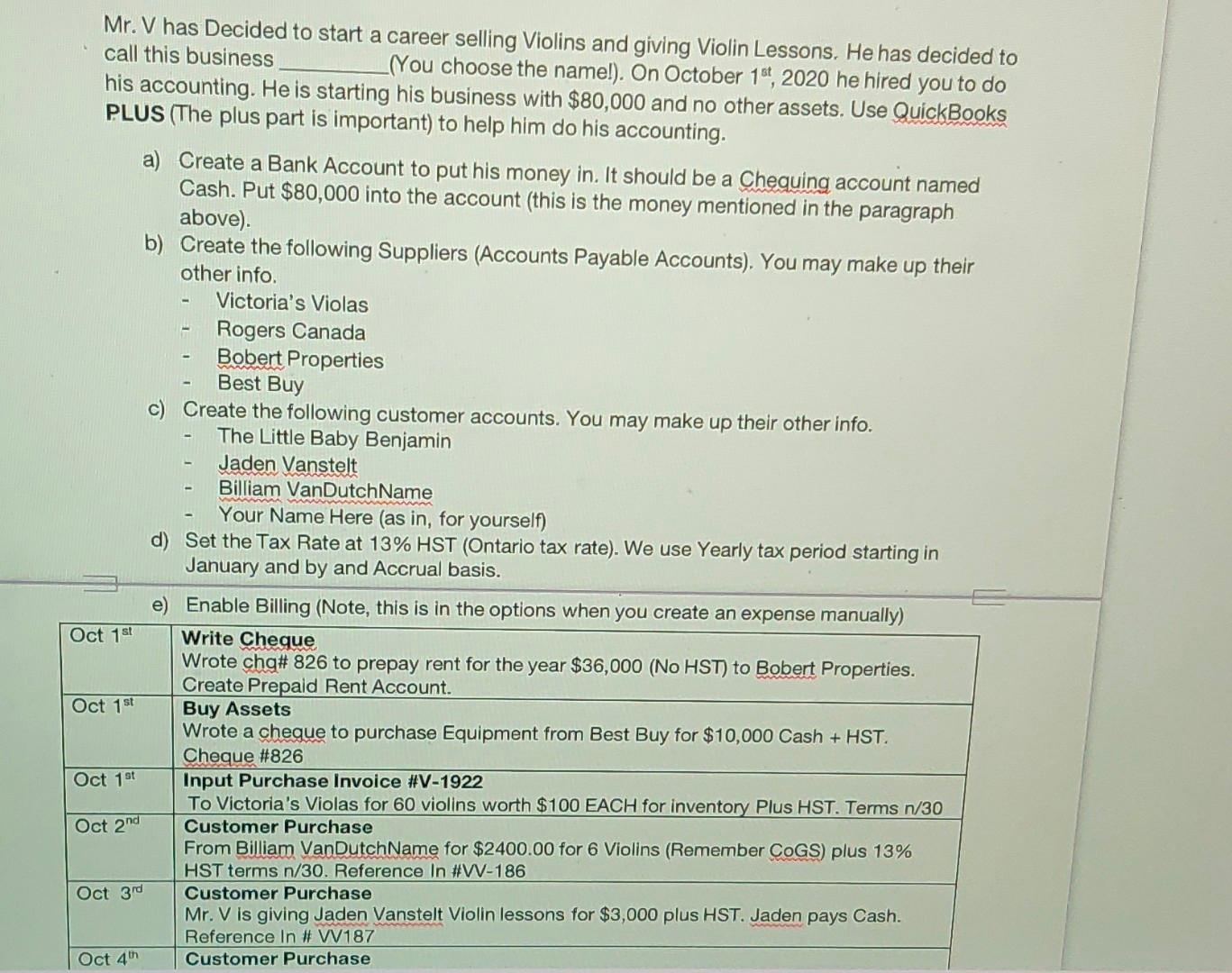
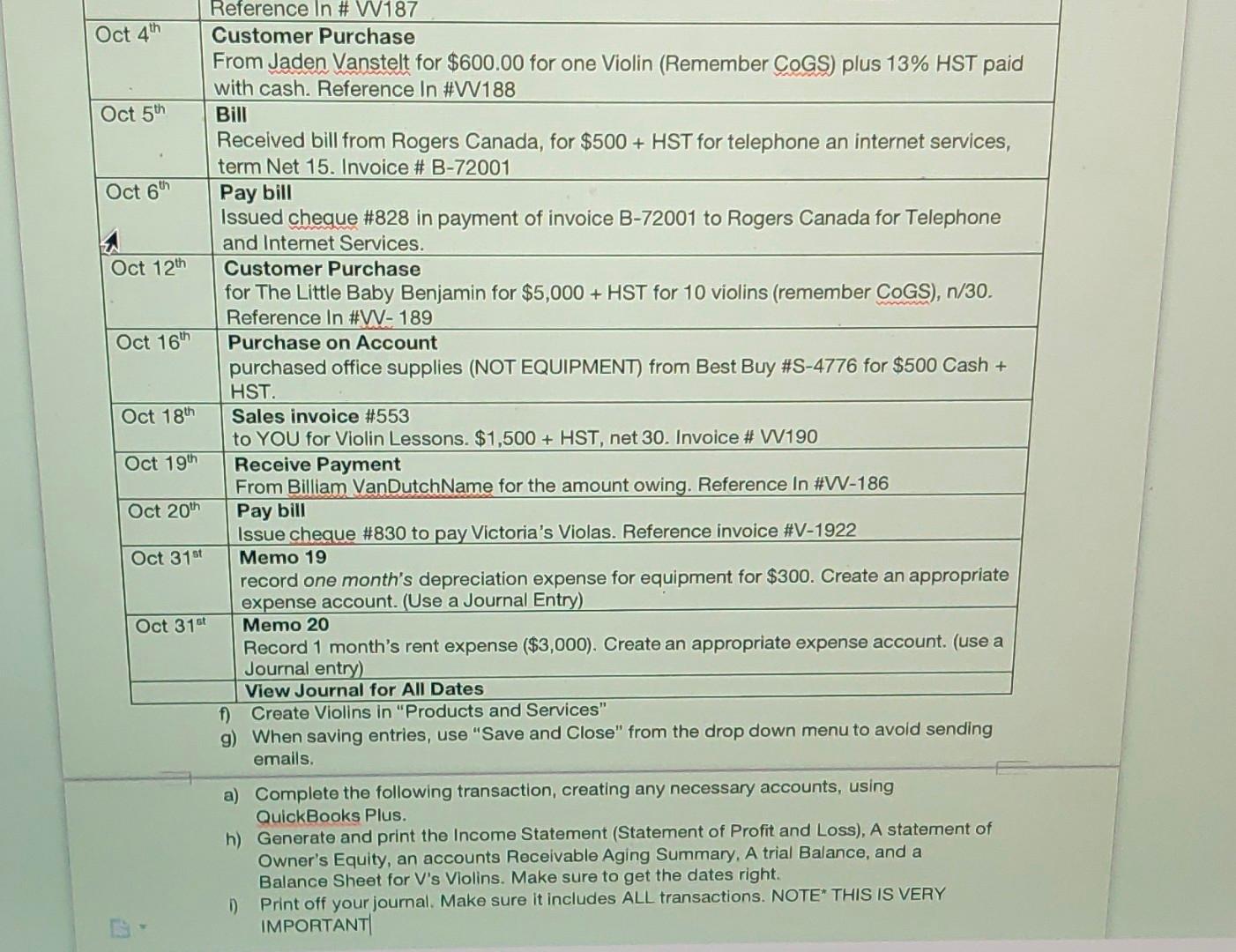
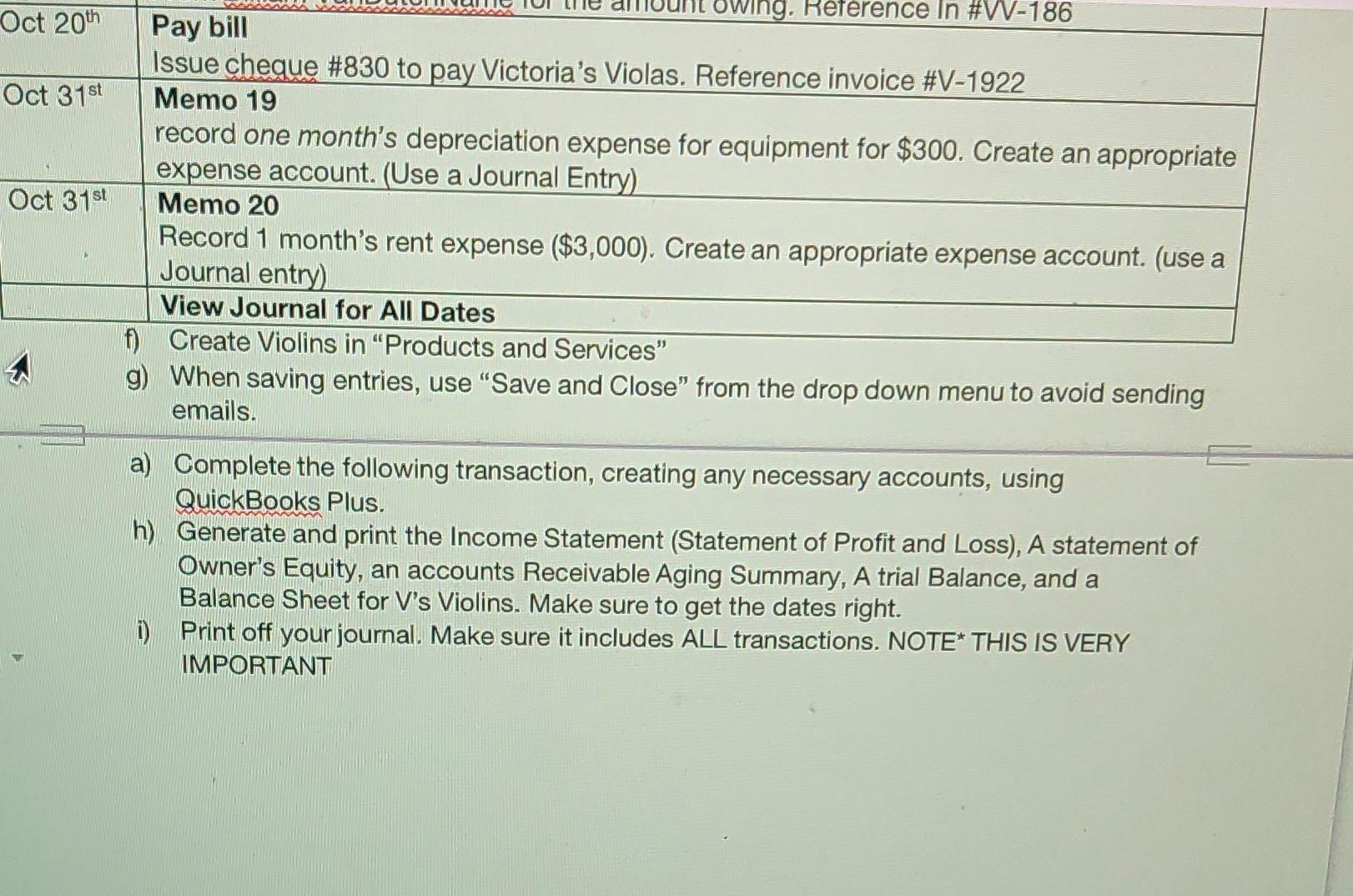
Mr. V has Decided to start a career selling Violins and giving Violin Lessons. He has decided to call this business (You choose the name!). On October 16, 2020 he hired you to do his accounting. He is starting his business with $80,000 and no other assets. Use QuickBooks PLUS (The plus part is important) to help him do his accounting. a) Create a Bank Account to put his money in. It should be a Chequing account named Cash. Put $80,000 into the account this is the money mentioned in the paragraph above). b) Create the following Suppliers (Accounts Payable Accounts). You may make up their other info Victoria's Violas Rogers Canada Bobert Properties Best Buy c) Create the following customer accounts. You may make up their other info. The Little Baby Benjamin Jaden Vanstelt Billiam VanDutchName Your Name Here (as in, for yourself) d) Set the Tax Rate at 13% HST (Ontario tax rate). We use Yearly tax period starting in January and by and Accrual basis. e) Enable Billing (Note, this is in the options when you create an expense manually) Oct 1st Write Cheque Wrote chg# 826 to prepay rent for the year $36,000 (No HST) to Bobert Properties. Create Prepaid Rent Account. Oct 1st Buy Assets Wrote a cheque to purchase Equipment from Best Buy for $10,000 Cash + HST. Cheque #826 Oct 1st Input Purchase Invoice #V-1922 To Victoria's Violas for 60 violins worth $100 EACH for inventory Plus HST. Terms n/30 Oct 2nd Customer Purchase From Billiam VanDutchName for $2400.00 for 6 Violins (Remember CoGS) plus 13% HST terms n/30. Reference In #WV-186 Oct 3rd Customer Purchase Mr. V is giving Jaden Vanstelt Violin lessons for $3,000 plus HST. Jaden pays Cash. Reference in # W187 Oct 4 Customer Purchase Reference In # W187 Oct 4th Customer Purchase From Jaden Vanstelt for $600.00 for one Violin (Remember COGS) plus 13% HST paid with cash. Reference In #W188 Oct 5th Bill Received bill from Rogers Canada, for $500 + HST for telephone an internet services, term Net 15. Invoice # B-72001 Oct 6 Pay bill Issued cheque #828 in payment of invoice B-72001 to Rogers Canada for Telephone and Internet Services. Oct 12th Customer Purchase for The Little Baby Benjamin for $5,000 + HST for 10 violins (remember COGS), n/30. Reference In #W-189 Oct 16th Purchase on Account purchased office supplies (NOT EQUIPMENT) from Best Buy #S-4776 for $500 Cash + HST. Oct 18th Sales invoice #553 to YOU for Violin Lessons. $1,500 + HST, net 30. Invoice # W190 Oct 19th Receive Payment From Billiam VanDutchName for the amount owing. Reference In #W-186 Oct 20th Pay bill Issue cheque #830 to pay Victoria's Violas. Reference invoice #V-1922 Oct 3151 Memo 19 record one month's depreciation expense for equipment for $300. Create an appropriate expense account. (Use a Journal Entry) Oct 31st Memo 20 Record 1 month's rent expense ($3,000). Create an appropriate expense account. (use a Journal entry) View Journal for All Dates f) Create Violins in "Products and Services" g) When saving entries, use "Save and Close" from the drop down menu to avoid sending emails. a) Complete the following transaction, creating any necessary accounts, using QuickBooks Plus. h) Generate and print the Income Statement (Statement of Profit and Loss), A statement of Owner's Equity, an accounts Receivable Aging Summary. A trial Balance, and a Balance Sheet for V's Violins. Make sure to get the dates right. D Print off your journal. Make sure it includes ALL transactions. NOTE THIS IS VERY IMPORTANT Oct 20th Oct 31st Oct 31st owing. Reference in #W-186 Pay bill Issue cheque #830 to pay Victoria's Violas. Reference invoice #V-1922 Memo 19 record one month's depreciation expense for equipment for $300. Create an appropriate expense account. (Use a Journal Entry) Memo 20 Record 1 month's rent expense ($3,000). Create an appropriate expense account. (use a Journal entry) View Journal for All Dates f Create Violins in "Products and Services" g) When saving entries, use "Save and Close" from the drop down menu to avoid sending emails. a) Complete the following transaction, creating any necessary accounts, using QuickBooks Plus. h) Generate and print the Income Statement (Statement of Profit and Loss), A statement of Owner's Equity, an accounts Receivable Aging Summary, A trial Balance, and a Balance Sheet for V's Violins. Make sure to get the dates right. 1) Print off your journal. Make sure it includes ALL transactions. NOTE* THIS IS VERY IMPORTANT Mr. V has Decided to start a career selling Violins and giving Violin Lessons. He has decided to call this business (You choose the name!). On October 16, 2020 he hired you to do his accounting. He is starting his business with $80,000 and no other assets. Use QuickBooks PLUS (The plus part is important) to help him do his accounting. a) Create a Bank Account to put his money in. It should be a Chequing account named Cash. Put $80,000 into the account this is the money mentioned in the paragraph above). b) Create the following Suppliers (Accounts Payable Accounts). You may make up their other info Victoria's Violas Rogers Canada Bobert Properties Best Buy c) Create the following customer accounts. You may make up their other info. The Little Baby Benjamin Jaden Vanstelt Billiam VanDutchName Your Name Here (as in, for yourself) d) Set the Tax Rate at 13% HST (Ontario tax rate). We use Yearly tax period starting in January and by and Accrual basis. e) Enable Billing (Note, this is in the options when you create an expense manually) Oct 1st Write Cheque Wrote chg# 826 to prepay rent for the year $36,000 (No HST) to Bobert Properties. Create Prepaid Rent Account. Oct 1st Buy Assets Wrote a cheque to purchase Equipment from Best Buy for $10,000 Cash + HST. Cheque #826 Oct 1st Input Purchase Invoice #V-1922 To Victoria's Violas for 60 violins worth $100 EACH for inventory Plus HST. Terms n/30 Oct 2nd Customer Purchase From Billiam VanDutchName for $2400.00 for 6 Violins (Remember CoGS) plus 13% HST terms n/30. Reference In #WV-186 Oct 3rd Customer Purchase Mr. V is giving Jaden Vanstelt Violin lessons for $3,000 plus HST. Jaden pays Cash. Reference in # W187 Oct 4 Customer Purchase Reference In # W187 Oct 4th Customer Purchase From Jaden Vanstelt for $600.00 for one Violin (Remember COGS) plus 13% HST paid with cash. Reference In #W188 Oct 5th Bill Received bill from Rogers Canada, for $500 + HST for telephone an internet services, term Net 15. Invoice # B-72001 Oct 6 Pay bill Issued cheque #828 in payment of invoice B-72001 to Rogers Canada for Telephone and Internet Services. Oct 12th Customer Purchase for The Little Baby Benjamin for $5,000 + HST for 10 violins (remember COGS), n/30. Reference In #W-189 Oct 16th Purchase on Account purchased office supplies (NOT EQUIPMENT) from Best Buy #S-4776 for $500 Cash + HST. Oct 18th Sales invoice #553 to YOU for Violin Lessons. $1,500 + HST, net 30. Invoice # W190 Oct 19th Receive Payment From Billiam VanDutchName for the amount owing. Reference In #W-186 Oct 20th Pay bill Issue cheque #830 to pay Victoria's Violas. Reference invoice #V-1922 Oct 3151 Memo 19 record one month's depreciation expense for equipment for $300. Create an appropriate expense account. (Use a Journal Entry) Oct 31st Memo 20 Record 1 month's rent expense ($3,000). Create an appropriate expense account. (use a Journal entry) View Journal for All Dates f) Create Violins in "Products and Services" g) When saving entries, use "Save and Close" from the drop down menu to avoid sending emails. a) Complete the following transaction, creating any necessary accounts, using QuickBooks Plus. h) Generate and print the Income Statement (Statement of Profit and Loss), A statement of Owner's Equity, an accounts Receivable Aging Summary. A trial Balance, and a Balance Sheet for V's Violins. Make sure to get the dates right. D Print off your journal. Make sure it includes ALL transactions. NOTE THIS IS VERY IMPORTANT Oct 20th Oct 31st Oct 31st owing. Reference in #W-186 Pay bill Issue cheque #830 to pay Victoria's Violas. Reference invoice #V-1922 Memo 19 record one month's depreciation expense for equipment for $300. Create an appropriate expense account. (Use a Journal Entry) Memo 20 Record 1 month's rent expense ($3,000). Create an appropriate expense account. (use a Journal entry) View Journal for All Dates f Create Violins in "Products and Services" g) When saving entries, use "Save and Close" from the drop down menu to avoid sending emails. a) Complete the following transaction, creating any necessary accounts, using QuickBooks Plus. h) Generate and print the Income Statement (Statement of Profit and Loss), A statement of Owner's Equity, an accounts Receivable Aging Summary, A trial Balance, and a Balance Sheet for V's Violins. Make sure to get the dates right. 1) Print off your journal. Make sure it includes ALL transactions. NOTE* THIS IS VERY IMPORTANT
Step by Step Solution
There are 3 Steps involved in it

Get step-by-step solutions from verified subject matter experts
 Study Help