







Question: Please add Excel VBA code in which it'll ask the user for the percent increase for 2023-2025, do the calculations for it all and input
Please add Excel VBA code in which it'll ask the user for the percent increase for 2023-2025, do the calculations for it all and input the resulting numbers into the appropriate cell and the exit the program. The code will need to loop.
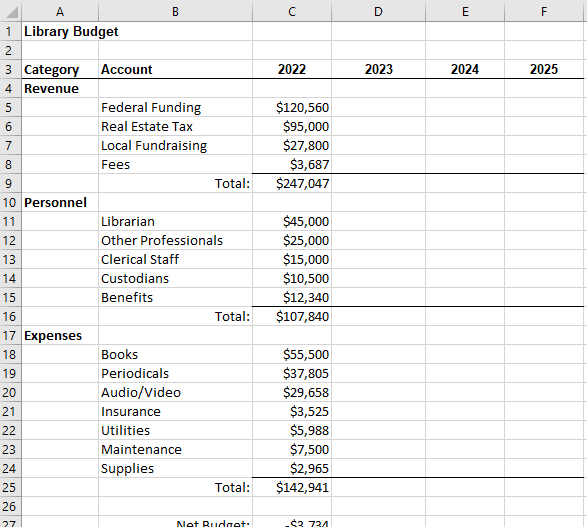
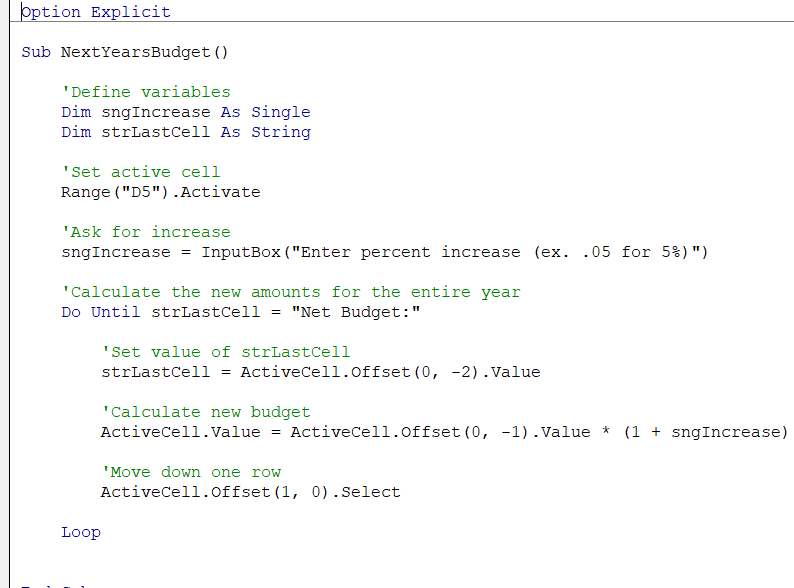
Pic one shows the revenues and the net profit while pic two shows the code.
D E F 2022 2023 2024 2025 inco o $120,560 $95,000 $27,800 $3,687 $247,047 B 1 Library Budget 2 3 Category Account 4 Revenue 5 Federal Funding 6 Real Estate Tax 7 Local Fundraising 8 Fees 9 Total: 10 Personnel 11 Librarian 12 Other Professionals 13 Clerical Staff 14 Custodians 15 Benefits 16 Total: 17 Expenses Books 19 Periodicals 20 Audio/Video 21 Insurance 22 Utilities 23 Maintenance 24 Supplies 25 Total: 26 27 Net Budnet. $45,000 $25,000 $15,000 $10,500 $12,340 $107,840 18 $55,500 $37,805 $29,658 $3,525 $5,988 $7,500 $2,965 $142,941 $3 721 pption Explicit Sub Next YearsBudget() 'Define variables Dim sngIncrease As Single Dim strLastcell As String Set active cell Range ("D5"). Activate 'Ask for increase sngIncrease InputBox ("Enter percent increase (ex. .05 for 5%)") = Calculate the new amounts for the entire year Do Until strLastcell = "Net Budget: Set value of strLastcell strLastcell = ActiveCell.Offset(0, -2).Value Calculate new budget ActiveCell.Value = ActiveCell.offset(0, -1).Value * (1 + sngIncrease) 'Move down one row ActiveCell.Offset(1, 0). Select Loop D E F 2022 2023 2024 2025 inco o $120,560 $95,000 $27,800 $3,687 $247,047 B 1 Library Budget 2 3 Category Account 4 Revenue 5 Federal Funding 6 Real Estate Tax 7 Local Fundraising 8 Fees 9 Total: 10 Personnel 11 Librarian 12 Other Professionals 13 Clerical Staff 14 Custodians 15 Benefits 16 Total: 17 Expenses Books 19 Periodicals 20 Audio/Video 21 Insurance 22 Utilities 23 Maintenance 24 Supplies 25 Total: 26 27 Net Budnet. $45,000 $25,000 $15,000 $10,500 $12,340 $107,840 18 $55,500 $37,805 $29,658 $3,525 $5,988 $7,500 $2,965 $142,941 $3 721 pption Explicit Sub Next YearsBudget() 'Define variables Dim sngIncrease As Single Dim strLastcell As String Set active cell Range ("D5"). Activate 'Ask for increase sngIncrease InputBox ("Enter percent increase (ex. .05 for 5%)") = Calculate the new amounts for the entire year Do Until strLastcell = "Net Budget: Set value of strLastcell strLastcell = ActiveCell.Offset(0, -2).Value Calculate new budget ActiveCell.Value = ActiveCell.offset(0, -1).Value * (1 + sngIncrease) 'Move down one row ActiveCell.Offset(1, 0). Select Loop
Step by Step Solution
There are 3 Steps involved in it

Get step-by-step solutions from verified subject matter experts
 Study Help