







Question: Please add SCALING FUNTIONALITY when the Scale Button is pressed. As stated the instructions.. Show an image that the code runs successfully Please code the
Please add SCALING FUNTIONALITY when the Scale Button is pressed. As stated the instructions.. Show an image that the code runs successfully
Please code the following using Java
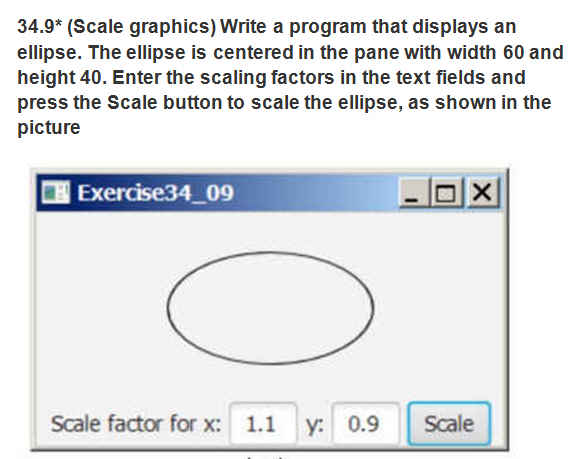
Please add SCALING FUNTIONALITY when the Scale Button is pressed. As stated the instructions.
SHOW AN IMAGE THAT THE CODE RUNS SUCCESSFULLY
package ellipsedemo2d;
import java.awt.BasicStroke; import java.awt.Color; import java.awt.Dimension; import java.awt.Font; import java.awt.FontMetrics; import java.awt.GradientPaint; import java.awt.Graphics; import java.awt.Graphics2D; import java.awt.RenderingHints; import java.awt.Shape; import java.awt.event.WindowAdapter; import java.awt.event.WindowEvent; import java.awt.geom.Arc2D; import java.awt.geom.Ellipse2D; import java.awt.geom.GeneralPath; import java.awt.geom.Line2D; import java.awt.geom.Rectangle2D; import java.awt.geom.RoundRectangle2D; import java.awt.event.ActionEvent; import java.awt.event.ActionListener; import javax.swing.Action; import javax.swing.JApplet; import javax.swing.JButton; import javax.swing.JFrame; import javax.swing.JLabel; import javax.swing.JTextField; import javax.swing.text.JTextComponent;
public class EllipseDemo2D extends JApplet { final static BasicStroke stroke = new BasicStroke(2.0f); JButton btnScale; double x = 100; double y = 100; @Override public void init() { setBackground(Color.white); setForeground(Color.white); System.out.println("Init Invoked:"); }
@Override public void paint(Graphics g) { System.out.println("Paint Invoked:"); Graphics2D g2 = (Graphics2D) g; g2.setRenderingHint(RenderingHints.KEY_ANTIALIASING, RenderingHints.VALUE_ANTIALIAS_ON); g2.setPaint(Color.gray); g2.setStroke(stroke); g2.draw(new Ellipse2D.Double(x, y, 200, 200)); } public void Scale() { JFrame f = new JFrame(""); btnScale=new JButton("Scale"); System.out.println("Scale method Invoked:"); JTextField txtx=new JTextField(); JTextField txty=new JTextField(); JLabel lblx=new JLabel("Scale factor for x:"); JLabel lbly=new JLabel("Y:"); txtx.setBounds(190, 390, 50, 30); txty.setBounds(260, 390, 50, 30); lbly.setBounds(240, 390, 30, 30); lblx.setBounds(50, 390, 130, 30); btnScale.setBounds(320, 390, 100, 30); f.add(btnScale); f.add(txtx); f.add(txty); f.add(lblx); f.add(lbly); btnScale.addActionListener(new ActionListener() {
@Override public void actionPerformed(ActionEvent e) { System.out.println("Button clicked:"); x=Double.parseDouble(txtx.getText()); y=Double.parseDouble(txty.getText()); System.out.println(x); System.out.println(y); } }); f.addWindowListener(new WindowAdapter() { @Override public void windowClosing(WindowEvent e) { System.exit(0); } }); JApplet applet = new EllipseDemo2D(); f.getContentPane().add("Center", applet); applet.init(); f.pack(); f.setSize(new Dimension(550, 500)); f.show(); }
public static void main(String s[]) { EllipseDemo2D ed=new EllipseDemo2D(); ed.Scale(); } }
Step by Step Solution
There are 3 Steps involved in it

Get step-by-step solutions from verified subject matter experts
 Study Help