







Question: PLEASE ANSWER ALL QUESTIONS What was the MAC address assigned to your external IP address? Were there any other external IP addresses listed? Were there
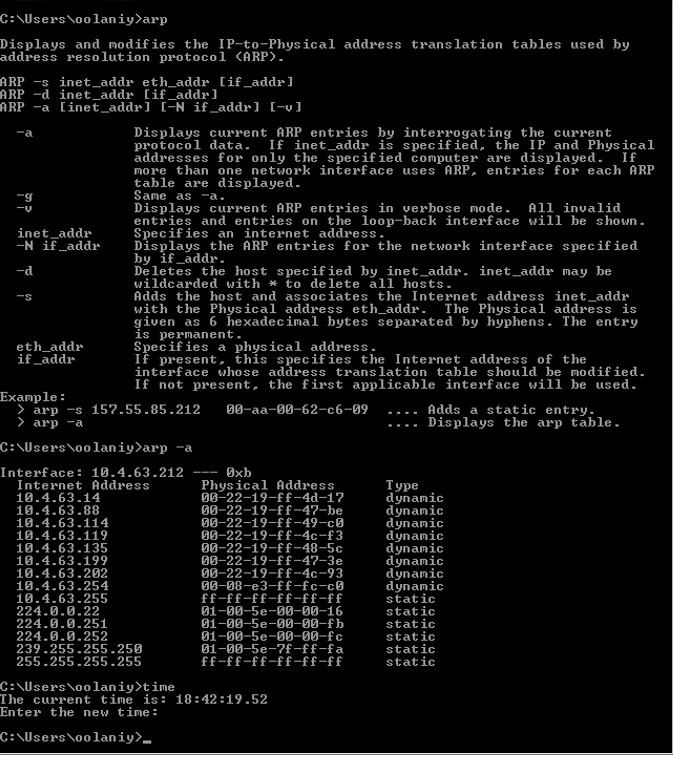
PLEASE ANSWER ALL QUESTIONS
- What was the MAC address assigned to your external IP address?
- Were there any other external IP addresses listed?
- Were there any other internal(private) IP addresses listed? Which ones
- What was the IP address(s) listed for the MAC address with all Fs?
C:\Users\oo laniy>arp Displays and modifies the IP-to-Physical address translation tables used by address resolution protocol CARP). ARP -s inet_addr eth_addr [if_addr] ARP -d inet_addr [if _addr] ARP -a [inet_addr] [-N if _addr] [-u] a Displays current ARP entries by interrogating the current protocol data. If inet_addr is specified, the IP and Physical addresses for only the specified computer are displayed. If more than one network interface uses ARP, entries for each ARP table are displayed. g Same as a. -U Displays current ARP entries in verbose mode. A11 invalid entries and entries on the loop-back interface will be shown. inet_addr Specifies an internet address. -N if _addr Displays the ARP entries for the network interface specified by if _addr. -d Deletes the host specified by inet_addr. inet_addr may be wildcarded with * to delete all hosts. Adds the host and associates the Internet address inet_addr with the Physical address eth_addr. The Physical address is given as 6 hexadecimal bytes separated by hyphens. The entry is permanent. eth_addr Specifies a physical address. if _addr If present, this specifies the Internet address of the interface whose address translation table should be modified. If not present, the first applicable interface will be used. Example: arp -s 157.55.85.212 00-aa-60-62-c6-09 Adds a static entry. arp -a Displays the arp table. C:\Users\oolaniy>arp -a Interface: 10.4.63.212 Oxb Internet Address Physical Address Type 10.4.63.14 06-22-19-ff-4d-17 dynamic 10.4.63.88 00-22-19-ff-47-be dynamic 10.4.63.114 80-22-10-ff-49-c0 dynamic 10.4.63.119 06-22-19-ff-4c-f3 dynamic 10.4.63.135 00-22-19-ff-48-5c dynamic 10.4.63.199 00-22-19-ff-47-3e dynamic 10.4.63.202 00-22-19-ff-4c-93 dynamic 10.4.63.254 06-08-e3-ff-fc-co dynamic 10.4.63.255 ff-ff-ff-ff-ff-ff static 224.0.0.22 01-00-5e-00-00-16 static 224.0.0.251 01-09-5e-00-00-fb static 224.0.0.252 01-00-5e-00-00-fc static 239.255.255.250 01-00-5e-7f-ff-fa static 255.255.255.255 ff-ff-ff-ff-ff-ff static C:\Users\oolaniy>time The current time is: 18:42:19.52 Enter the new time : C:\Users\oolaniy)
Step by Step Solution
There are 3 Steps involved in it

Get step-by-step solutions from verified subject matter experts
 Study Help