



Question: please answer all the question 0 etto.mheducation.com McOwll Connect 6A (-k) Question d. Chapter 6A (-4) - Cor Help Waupaca Company establishes a $420 petty
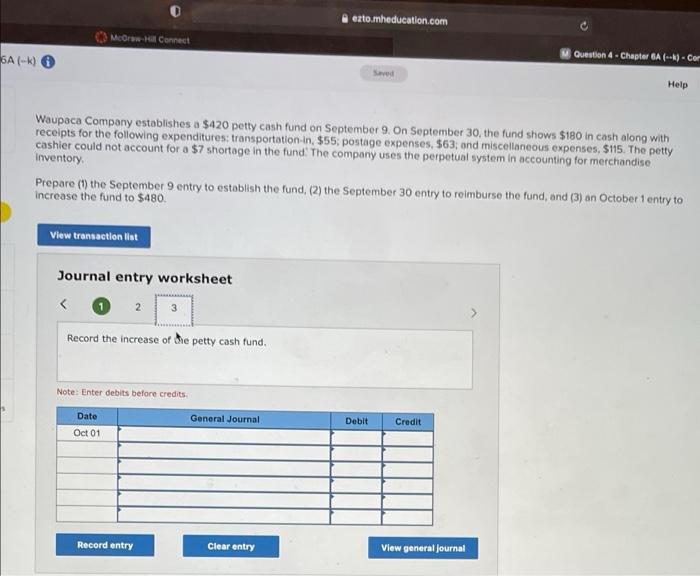
0 etto.mheducation.com McOwll Connect 6A (-k) Question d. Chapter 6A (-4) - Cor Help Waupaca Company establishes a $420 petty cash fund on September 9. On September 30, the fund shows $180 in cash along with receipts for the following expenditures: transportation in $55, postage expenses. $63; and miscellaneous expenses, $115. The petty cashier could not account for a $7 shortage in the fund: The company uses the perpetual system in accounting for merchandise Inventory Prepare (1) the September 9 entry to establish the fund, (2) the September 30 entry to reimburse the fund, and (3) an October 1 entry to increase the fund to $480 View transaction list Journal entry worksheet 2 3 Record the increase or de petty cash fund. Note: Enter debits before credits Date General Journal Debit Credit Oct 01 Record entry Clear entry View general Journal 0 etto.mheducation.com McOwll Connect 6A (-k) Question d. Chapter 6A (-4) - Cor Help Waupaca Company establishes a $420 petty cash fund on September 9. On September 30, the fund shows $180 in cash along with receipts for the following expenditures: transportation in $55, postage expenses. $63; and miscellaneous expenses, $115. The petty cashier could not account for a $7 shortage in the fund: The company uses the perpetual system in accounting for merchandise Inventory Prepare (1) the September 9 entry to establish the fund, (2) the September 30 entry to reimburse the fund, and (3) an October 1 entry to increase the fund to $480 View transaction list Journal entry worksheet 2 3 Record the increase or de petty cash fund. Note: Enter debits before credits Date General Journal Debit Credit Oct 01 Record entry Clear entry View general Journal
Step by Step Solution
There are 3 Steps involved in it

Get step-by-step solutions from verified subject matter experts