







Question: Please answer by using Excel Visual Basic. . 1 4 A B D E F G 1 Practice 11 2 Modify the procedure to assign
Please answer by using Excel Visual Basic.
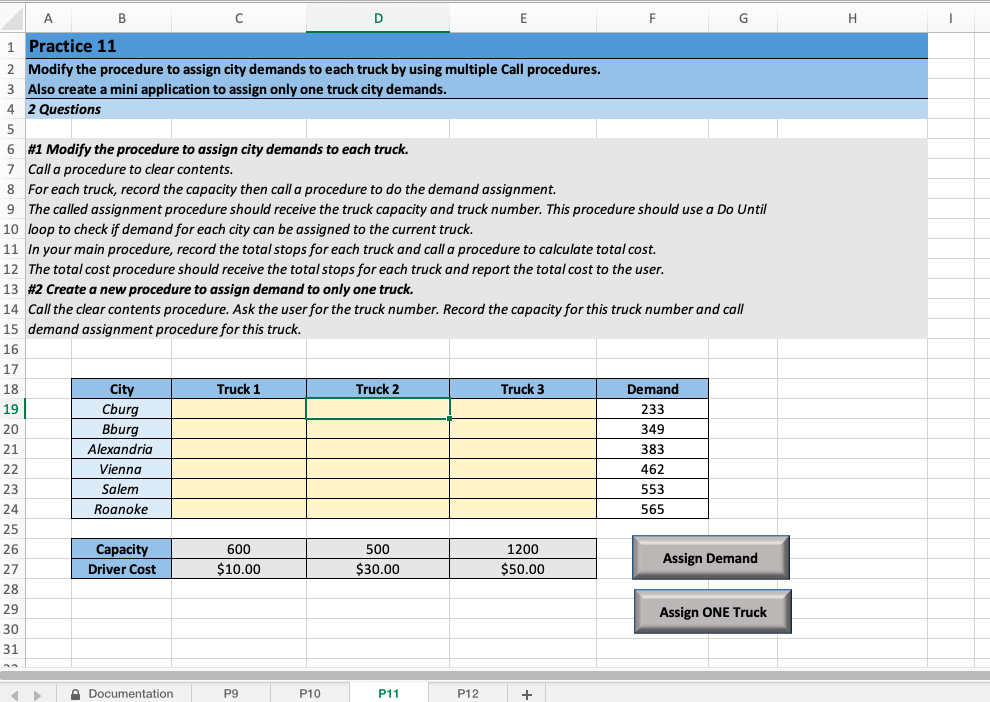
. 1 4 A B D E F G 1 Practice 11 2 Modify the procedure to assign city demands to each truck by using multiple Call procedures. 3 Also create a mini application to assign only one truck city demands. 2 Questions 5 6 #1 Modify the procedure to assign city demands to each truck. 7 Call a procedure to clear contents. 8 For each truck, record the capacity then call a procedure to do the demand assignment. 9 The called assignment procedure should receive the truck capacity and truck number. This procedure should use a Do Until 10 loop to check if demand for each city can be assigned to the current truck. 11 In your main procedure, record the total stops for each truck and call a procedure to calculate total cost. 12 The total cost procedure should receive the total stops for each truck and report the total cost to the user. 13 #2 Create a new procedure to assign demand to only one truck. 14 Call the clear contents procedure. Ask the user for the truck number. Record the capacity for this truck number and call 15 demand assignment procedure for this truck. 16 17 18 City Truck 1 Truck 2 Truck 3 Demand 19 Cburg 233 20 Bburg 349 21 Alexandria 383 22 Vienna 462 23 Salem 553 24 Roanoke 565 25 26 Capacity 600 500 1200 27 Driver Cost Assign Demand $10.00 $30.00 $50.00 28 29 Assign ONE Truck 30 31 A Documentation P9 P10 P11 P12 +
Step by Step Solution
There are 3 Steps involved in it

Get step-by-step solutions from verified subject matter experts
 Study Help