



Question: Please answer CLEARLY and LEGIBLE. Also include queries. thefolowine steps, rint your tables before and affer modification, answer he questions and return to your instructor.
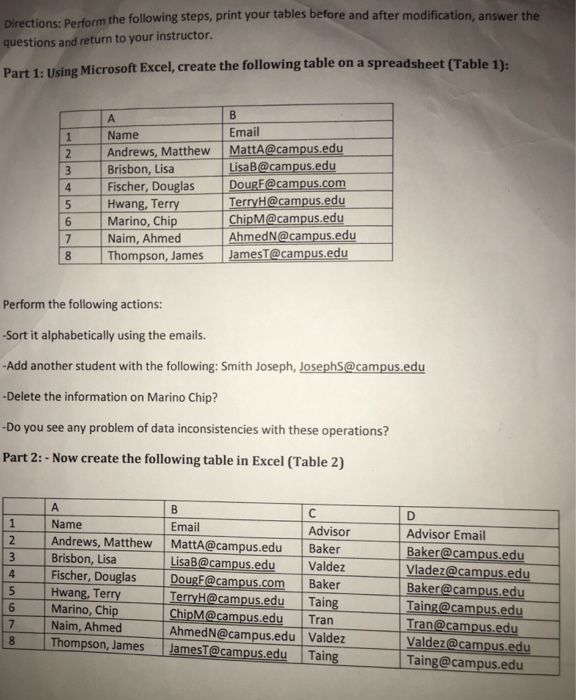
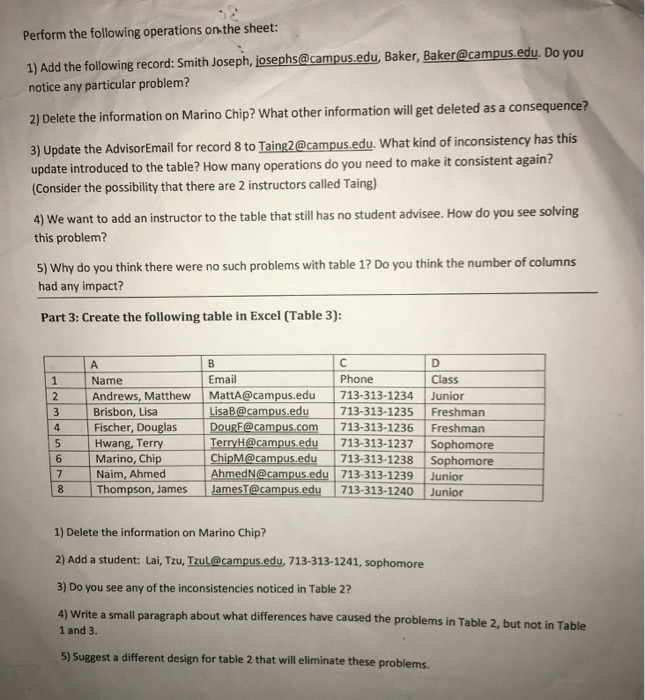
thefolowine steps, rint your tables before and affer modification, answer he questions and return to your instructor. Part 1: Using Microsoft Excel, create the following table on a spreadsheet (Table 1): Email LisaB@campus.edu DougF@campus.com ChipM@campus.edu Name 2 Andrews, Matthew MattA@campus.edu Brisbon, Lisa 4 Fischer, Douglas Hwang, Terry 6 Marino, Chip Naim, Ahmed TerryH@campus.edu AhmedN@campus.edu 8 Thompson, James JamesT@campus.edu Perform the following actions: -Sort it alphabetically using the emails. -Add another student with the following: Smith Joseph, JosephS@campus.edu -Delete the information on Marino Chip? -Do you see any problem of data inconsistencies with these operations? Part 2: - Now create the following table in Excel (Table 2) Name Email Advisor Advisor Email Baker@campus.edu 2 Andrews, Matthew MattA@campus.edu Baker LisaB@campus.eduValde Fischer, Douglas DougF@campus.com Baker TerryH@campus.edu Taing ChipM@campus.edu Tran 7 Naim, AhmedAhmedN@campus.eduValdez 8 Thompson, James JamesT@campus.edu Taing 3 Brisbon, Lisa Baker@campus.edu Marino, Chip Valdez@campus.edu Taing@campus.edu
Step by Step Solution
There are 3 Steps involved in it

Get step-by-step solutions from verified subject matter experts