







Question: please answer every question with an image that indicates the installation process. thanks Introduction This module is assessed by a portfolio of work which is
please answer every question with an image that indicates the installation process. thanks
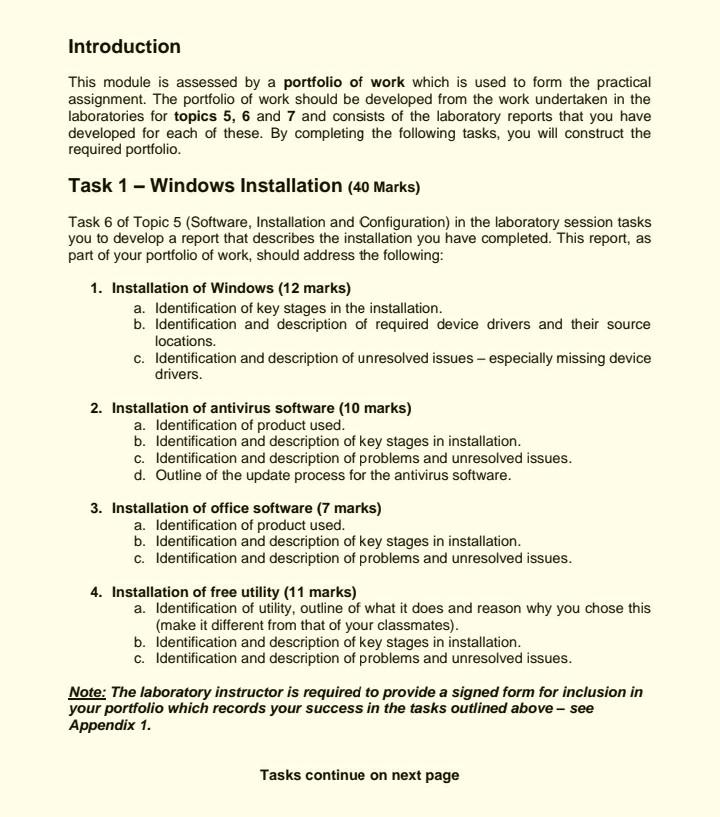
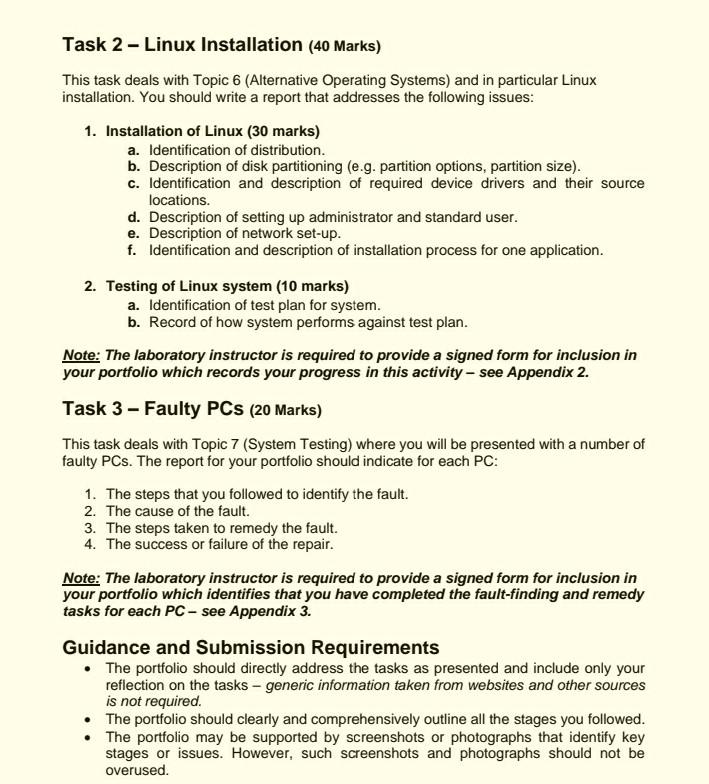
Introduction This module is assessed by a portfolio of work which is used to form the practical assignment. The portfolio of work should be developed from the work undertaken in the laboratories for topics 5, 6 and 7 and consists of the laboratory reports that you have developed for each of these. By completing the following tasks, you will construct the required portfolio. Task 1 - Windows Installation (40 Marks) Task 6 of Topic 5 (Software, Installation and Configuration) in the laboratory session tasks you to develop a report that describes the installation you have completed. This report, as part of your portfolio of work, should address the following: 1. Installation of Windows (12 marks) a. Identification of key stages in the installation. b. Identification and description of required device drivers and their source locations. c. Identification and description of unresolved issues - especially missing device drivers. 2. Installation of antivirus software (10 marks) a. Identification of product used. b. Identification and description of key stages in installation. c. Identification and description of problems and unresolved issues. d. Outline of the update process for the antivirus software. 3. Installation of office software (7 marks) a. Identification of product used. b. Identification and description of key stages in installation. c. Identification and description of problems and unresolved issues. 4. Installation of free utility (11 marks) a. Identification of utility, outline of what it does and reason why you chose this (make it different from that of your classmates). b. Identification and description of key stages in installation. C. Identification and description of problems and unresolved issues. Note: The laboratory instructor is required to provide a signed form for inclusion in your portfolio which records your success in the tasks outlined above - see Appendix 1. Tasks continue on next page Task 2 - Linux Installation (40 Marks) This task deals with Topic 6 (Alternative Operating Systems) and in particular Linux installation. You should write a report that addresses the following issues: 1. Installation of Linux (30 marks) a. Identification of distribution. b. Description of disk partitioning (e.g. partition options, partition size). C. Identification and description of required device drivers and their source locations. d. Description of setting up administrator and standard user. e. Description of network set-up. f. Identification and description of installation process for one application. 2. Testing of Linux system (10 marks) a. Identification of test plan for system. b. Record of how system performs against test plan. Note: The laboratory instructor is required to provide a signed form for inclusion in your portfolio which records your progress in this activity see Appendix 2. Task 3 - Faulty PCS (20 Marks) This task deals with Topic 7 (System Testing) where you will be presented with a number of faulty PCs. The report for your portfolio should indicate for each PC: 1. The steps that you followed to identify the fault. 2. The cause of the fault. 3. The steps taken to remedy the fault. 4. The success or failure of the repair. Note: The laboratory instructor is required to provide a signed form for inclusion in your portfolio which identifies that you have completed the fault-finding and remedy tasks for each PC - see Appendix 3. Guidance and Submission Requirements The portfolio should directly address the tasks as presented and include only your reflection on the tasks - generic information taken from websites and other sources is not required. The portfolio should clearly and comprehensively outline all the stages you followed. The portfolio may be supported by screenshots or photographs that identify key stages or issues. However, such screenshots and photographs should not be overused
Step by Step Solution
There are 3 Steps involved in it

Get step-by-step solutions from verified subject matter experts
 Study Help