







Question: please answer everything completely 11e_IDEA_Problems_07302019-1.d... Messier/Glover/Prawitt End-of-Chapter 4, IDEA Problems Open the Travel Report file you developed in Chapter 3. Problem 2 to complete the
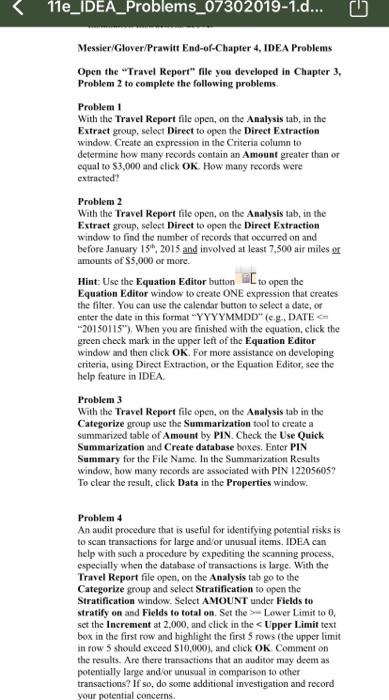
11e_IDEA_Problems_07302019-1.d... Messier/Glover/Prawitt End-of-Chapter 4, IDEA Problems Open the Travel Report" file you developed in Chapter 3. Problem 2 to complete the following problems Problem 1 With the Travel Report file open, on the Analysis tab, in the Extract group, select Direct to open the Direct Extraction window. Create an expression in the Criteria column to determine how many records contain an Amount greater than or equal to $3,000 and click OK. How many records were extracted? Problem 2 With the Travel Report file open, on the Analysis tab, in the Extract group, select Direct to open the Direct Extraction window to find the number of records that occurred on and before January 15, 2015 and involved at least 7,500 air miles or amounts of $5,000 or more. Hint Use the Equation Editor button to open the Equation Editor window to create ONE expression that creates the filter. You can use the calendar button to select a date, or enter the date in this format"YYYYMMDD" (e.g., DATE 20150115"). When you are finished with the equation, click the green check mark in the upper left of the Equation Editor window and then click OK. For more assistance on developing criteria, using Direct Extraction, or the Equation Editor, see the help feature in IDEA Problem 3 With the Travel Report file open, on the Analysis tab in the Categorize group use the Summarization tool to create a summarized table of Amount by PIN. Check the Use Quick Summarization and Create database boxes. Enter PIN Summary for the File Name. In the Summarization Results window, how many records are associated with PIN 12205605? To clear the result, click Data in the Properties window. Problem 4 An audit procedure that is useful for identifying potential risks is to scan transactions for large and/or unusual items, IDEA can help with such a procedure by expediting the scanning process. especially when the database of transactions is large. With the Travel Report file open, on the Analysis tab go to the Categorize group and select Stratification to open the Stratification window. Select AMOUNT under Fields to stratify on and Fields to total on. Set the Lower Limit to 0. set the increment at 2,000, and click in the Upper Limit text box in the first row and highlight the first 5 rows (the upper limit in row 5 should exceed $10,000), and click OK Comment on the results. Are there transactions that an auditor may deem as potentially large and or unusual in comparison to other transactions? If so, do some additional investigation and record your potential concerns
Step by Step Solution
There are 3 Steps involved in it

Get step-by-step solutions from verified subject matter experts
 Study Help