Question: Please answer Exercise 2, reference is provided below. 10 CHAPTER 2 Introduction to Transaction Processing System Student Outcomes: At the end of this topic, students
Please answer Exercise 2, reference is provided below.
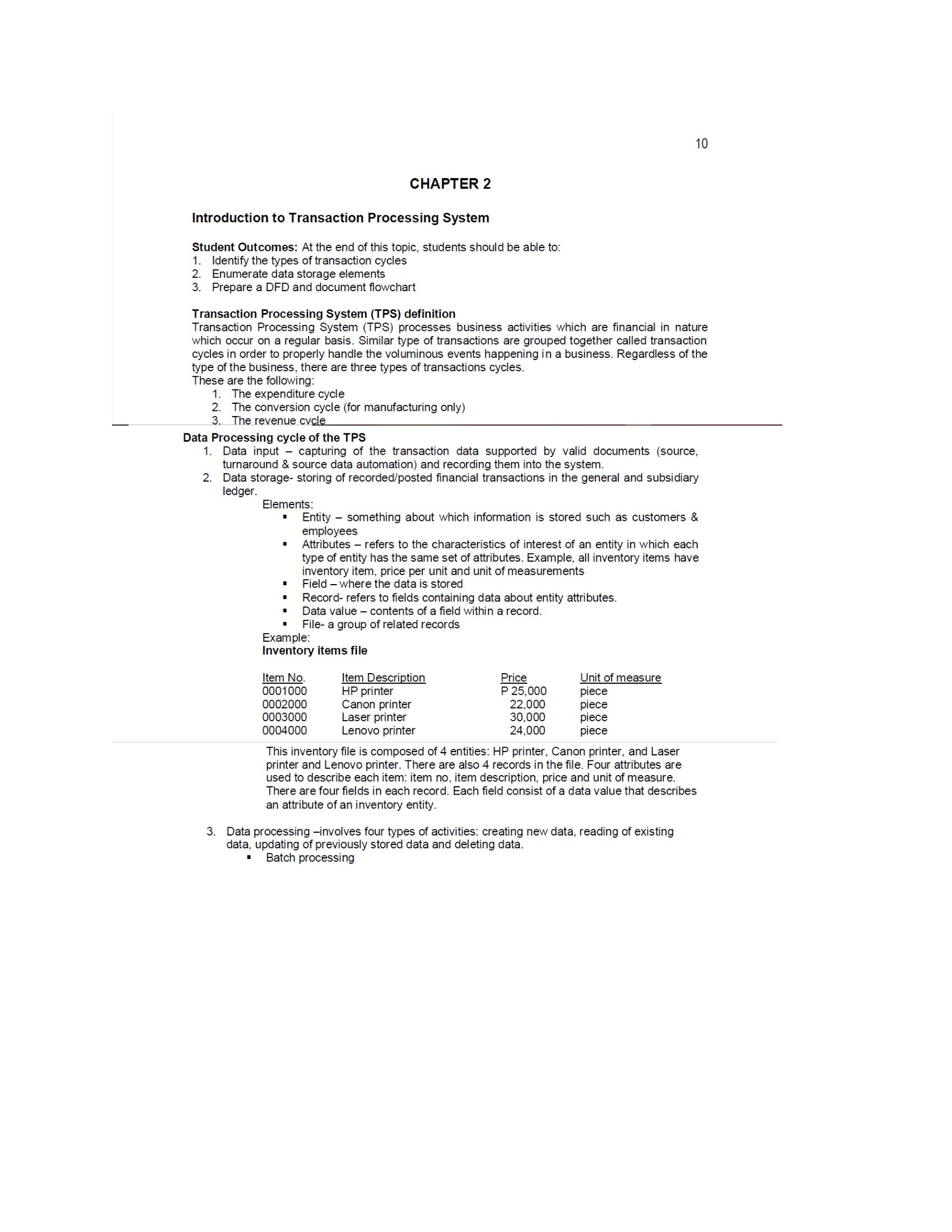
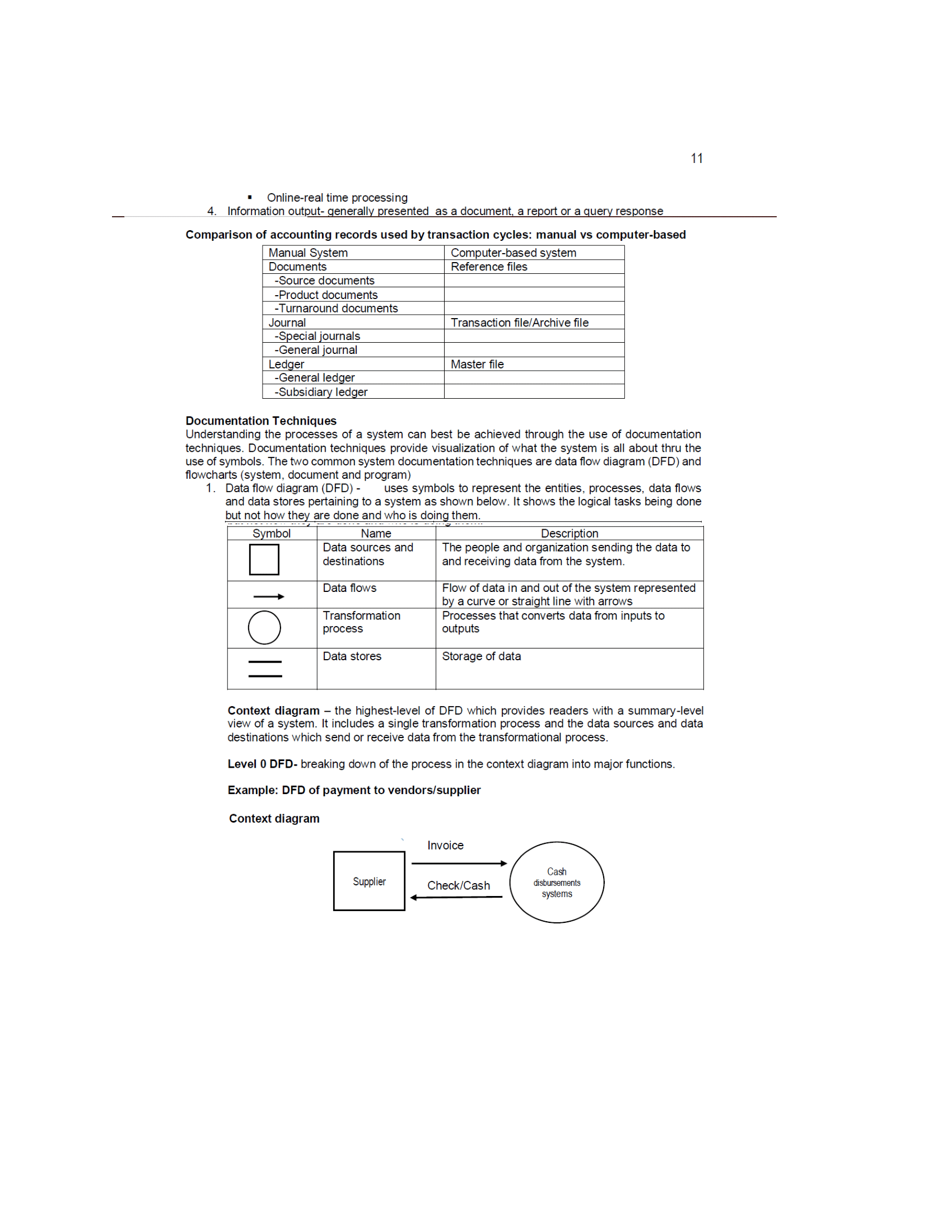
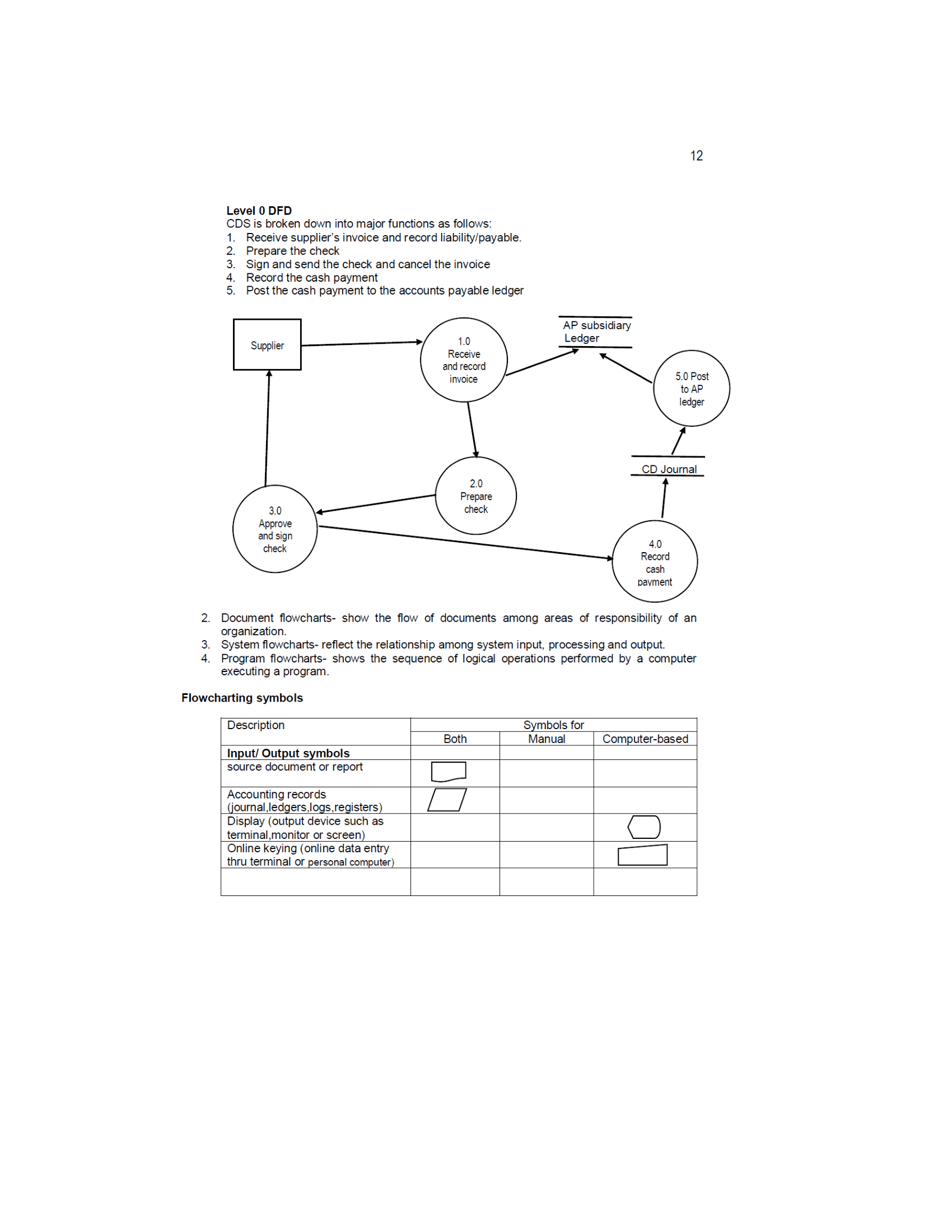
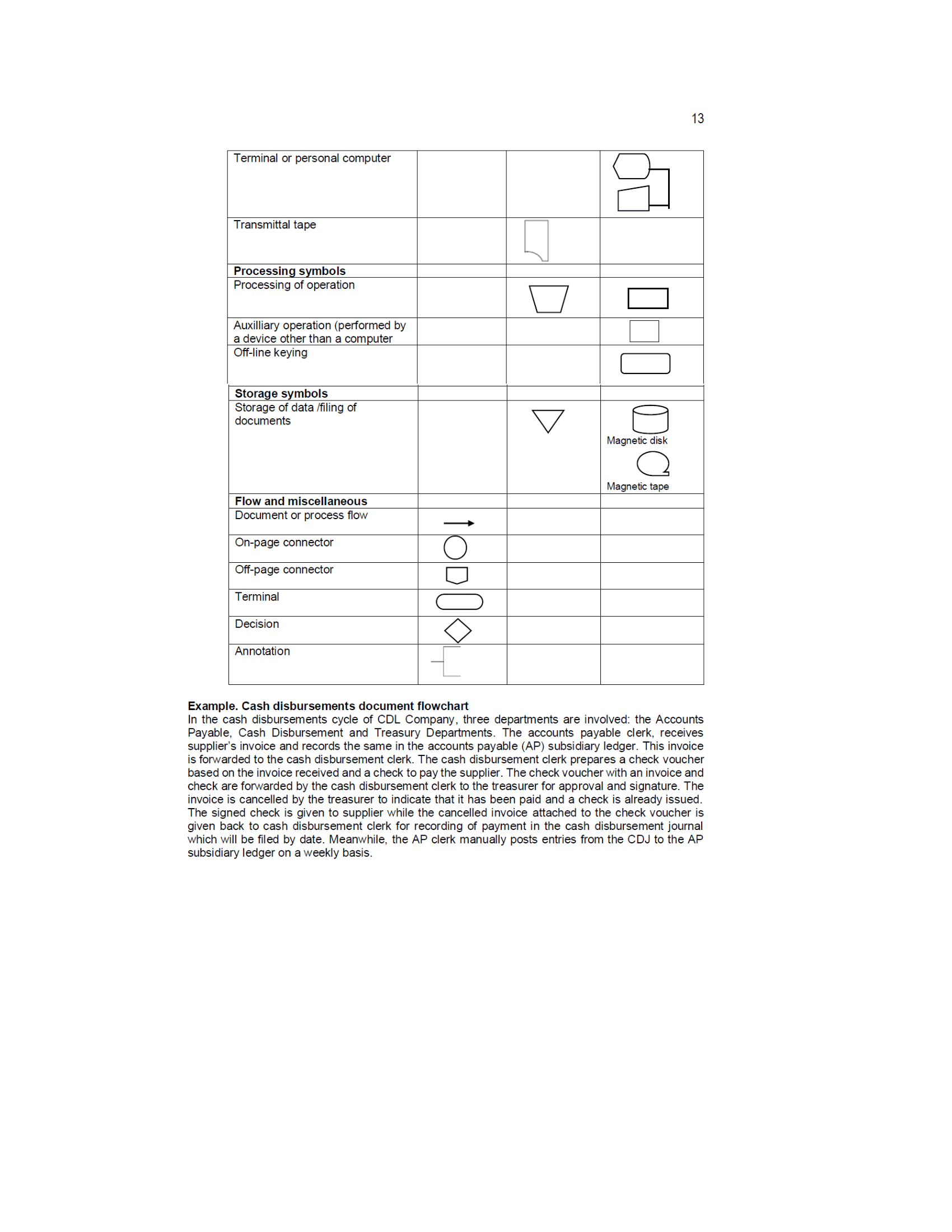
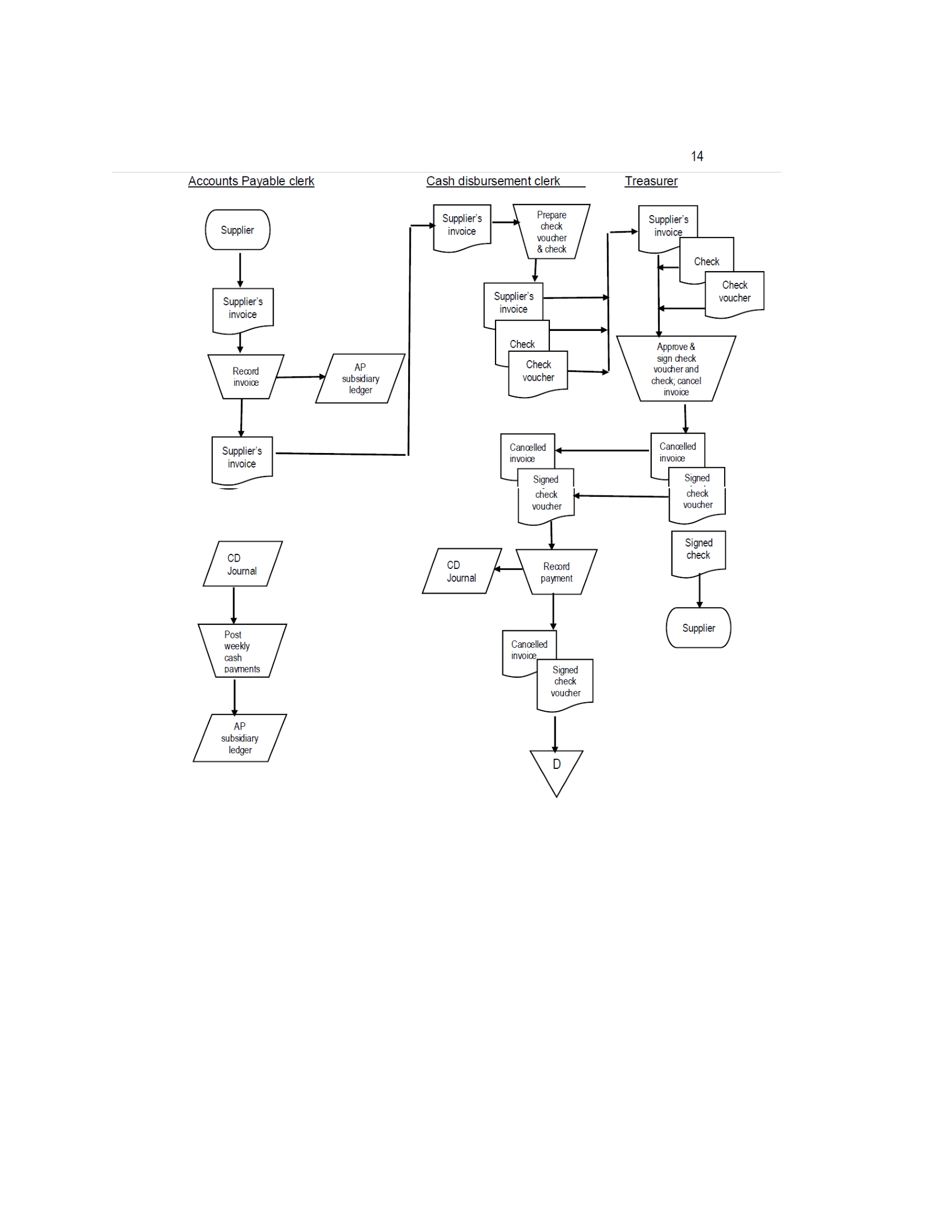
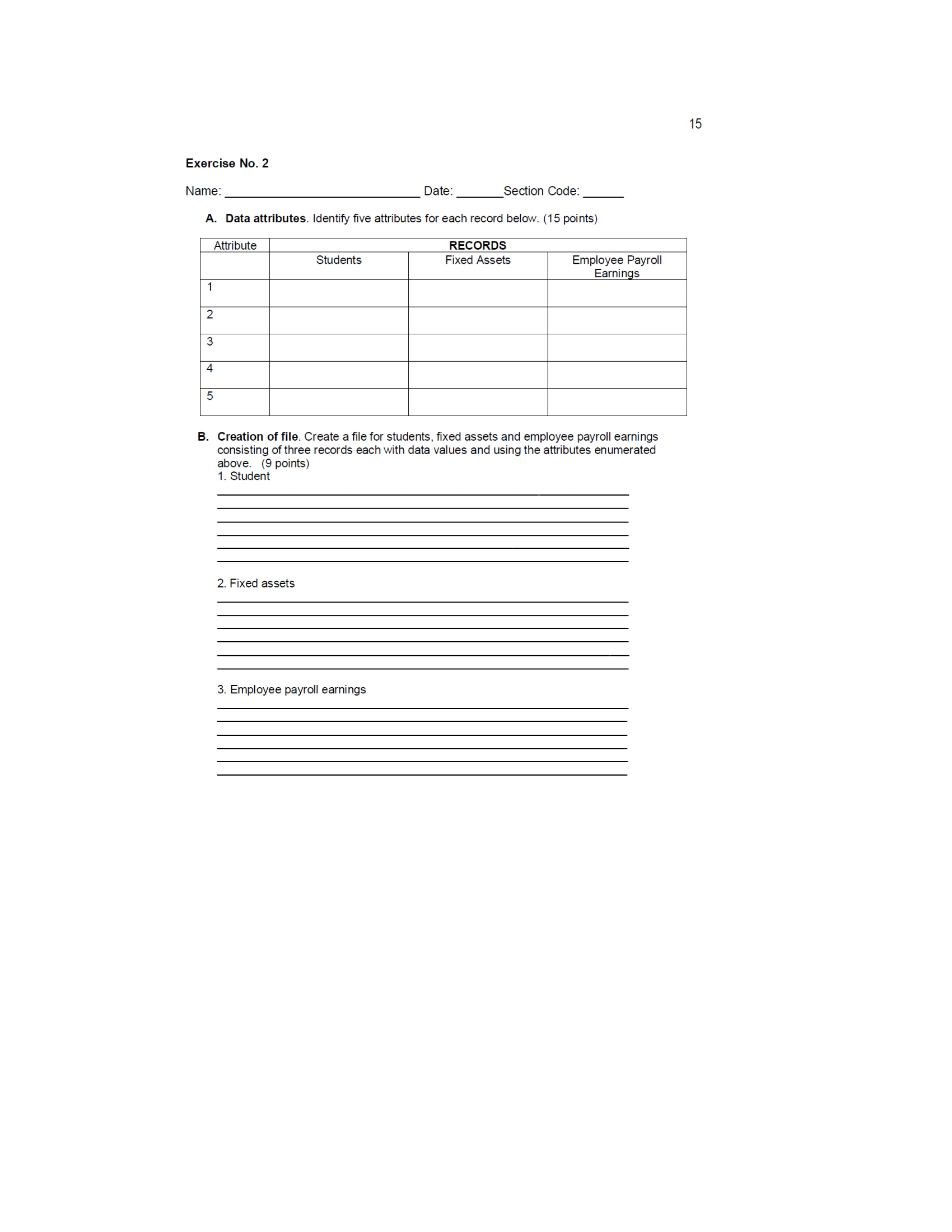
10 CHAPTER 2 Introduction to Transaction Processing System Student Outcomes: At the end of this topic, students should be able to: 1. Identify the types of transaction cycles WN Enumerate data storage elements Prepare a DFD and document flowchart Transaction Processing System (TPS) definition Transaction Processing System (TPS) processes business activities which are financial in nature which occur on a regular basis. Similar type of transactions are grouped together called transaction cycles in order to properly handle the voluminous events happening in a business. Regardless of the type of the business, there are three types of transactions cycles These are the following: 1. The expenditure cycle 2. The conversion cycle (for manufacturing only) The revenue cycle Data Processing cycle of the TPS Data input - capturing of the transaction data supported by valid documents (source, turnaround & source data automation) and recording them into the system. Data storage- storing of recorded/posted financial transactions in the general and subsidiary ledger. Elements: Entity - something about which information is stored such as customers & employees Attributes - refers to the characteristics of interest of an entity in which each type of entity has the same set of attributes. Example, all inventory items have inventory item, price per unit and unit of measurements Field - where the data is stored Record- refers to fields containing data about entity attributes. Data value - contents of a field within a record. File- a group of related records Example: Inventory items file Item No. Item Description Price Unit of measure 0001000 HP printer P 25,000 piece 0002000 Canon printer 22,000 piece 0003000 Laser printer 30,000 piece 0004000 Lenovo printer 24.000 piece This inventory file is composed of 4 entities: HP printer, Canon printer, and Laser printer and Lenovo printer. There are also 4 records in the file. Four attributes are used to describe each item: item no, item description, price and unit of measure There are four fields in each record. Each field consist of a data value that describes an attribute of an inventory entity. Data processing -involves four types of activities: creating new data, reading of existing data, updating of previously stored data and deleting data. Batch processing11 Online-real time processing 4. Information output- generally presented as a document, a report or a query response Comparison of accounting records used by transaction cycles: manual vs computer-based Manual System Computer-based system Documents Reference files -Source documents -Product documents -Turnaround documents Journal Transaction file/ Archive file -Special journal -General journal Ledger Master file -General ledger -Subsidiary ledger Documentation Techniques Understanding the processes of a system can best be achieved through the use of documentation techniques. Documentation techniques provide visualization of what the system is all about thru the use of symbols. The two common system documentation techniques are data flow diagram (DFD) and flowcharts (system, document and program) 1. Data flow diagram (DFD) - uses symbols to represent the entities, processes, data flows and data stores pertaining to a system as shown below. It shows the logical tasks being done but not how they are done and who is doing them. Symbol Name Description Data sources and The people and organization sending the data to destinations and receiving data from the system Data flows Flow of data in and out of the system represented by a curve or straight line with arrows Transformation Processes that converts data from inputs to process outputs Data stores Storage of data Context diagram - the highest-level of DFD which provides readers with a summary-level view of a system. It includes a single transformation process and the data sources and data destinations which send or receive data from the transformational process. Level 0 DFD- breaking down of the process in the context diagram into major functions. Example: DFD of payment to vendors/supplier Context diagram Invoice Cash Supplier Check/Cash disbursements systems12 Level 0 DFD CDS is broken down into major functions as follows: Receive supplier's invoice and record liability/payable. Prepare the check DAWN . Sign and send the check and cancel the invoice Record the cash payment Post the cash payment to the accounts payable ledger AP subsidiary Supplier 1.0 Ledger Receive and record invoice 5.0 Post to AP ledger CD Journal 2.0 Prepare 3.0 check Approve and sign check 4.0 Record cash payment 2. Document flowcharts- show the flow of documents among areas of responsibility of an organization. 3. System flowcharts- reflect the relationship among system input, processing and output. Program flowcharts- shows the sequence of logical operations performed by a computer executing a program. Flowcharting symbols Description Symbols for Both Manual Computer-based Input/ Output symbols source document or report Accounting records (journal,ledgers,logs,registers) Display (output device such as terminal,monitor or screen Online keying (online data entry thru terminal or personal computer)13 Terminal or personal computer Transmittal tape Processing symbols Processing of operation Auxilliary operation (performed by a device other than a computer Off-line keying Storage of data tting of documents V 8 Magnetic tape Flow and miscellaneous Document or process flow Onpage connector Off-page connector U Terminal C) Decision Annotation Example. Cash disbursements document owchart in the cash disbursements cycle of CDL Company, three departments are involved: the Accounts Payable. Cash Disbursement and Treasury Departments. The accounts payable clerk. receives supplier's invoice and records the same in the accounts payable (AP) subsidiary ledger. This invoice is forwarded to the cash disbursement clerk. The cash disbursement clerk prepares a check voucher based on the invoice received and a check to pay the supplier. The check voucher with an invoice and check are forwarded by the cash disbursement clerk to the treasurer for approval and signature. The invoice is cancelled by the treasurer to indicate that it has been paid and a check is already issued. The signed check is given to supplier while the cancelled invoice attached to the check voucher is given back to cash disbursement clerk for recording of payment in the cash disbursement journal which will be led by date. Meanwhile, the AP clerk manually posts entries from the CDJ to the AP subsidiary ledger on a weekly basis. 14 Accounts Payable clerk Cash disbursement clerk Treasurer Supplier's Prepare Supplier invoice check Supplier's voucher invoice & check Check Supplier's Check Supplier's invoice invoice voucher Check Approve & Record AP Check sign check invoice subsidiary vouche voucher and ledger check; cancel invoice Supplier's Cancelled Cancelled invoice invoice invoice Signed Signed check check voucher voucher CD Signed Journal check CD Record Journa payment Post Supplier weekly Cancelled cash invoice pavments Signed check voucher AP subsidiary ledger D15 Exercise No. 2 Name Date: Section Code: A. Data attributes. Identify five attributes for each record below. (15 points) Attribute RECORDS Students Fixed Assets Employee Payroll Earnings 2 3 4 5 B. Creation of file. Create a file for students, fixed assets and employee payroll earnings consisting of three records each with data values and using the attributes enumerated above. (9 points) 1. Student 2. Fixed assets 3. Employee payroll earnings
Step by Step Solution
There are 3 Steps involved in it
1 Expert Approved Answer
Step: 1 Unlock
Question Has Been Solved by an Expert!
Get step-by-step solutions from verified subject matter experts
Step: 2 Unlock
Step: 3 Unlock
Students Have Also Explored These Related Accounting Questions!









 Study Help