







Question: please answer in excel format and provide formulas. G E 84 C C Play Ode to Joy 2 Cick bere for a gcod time Sales
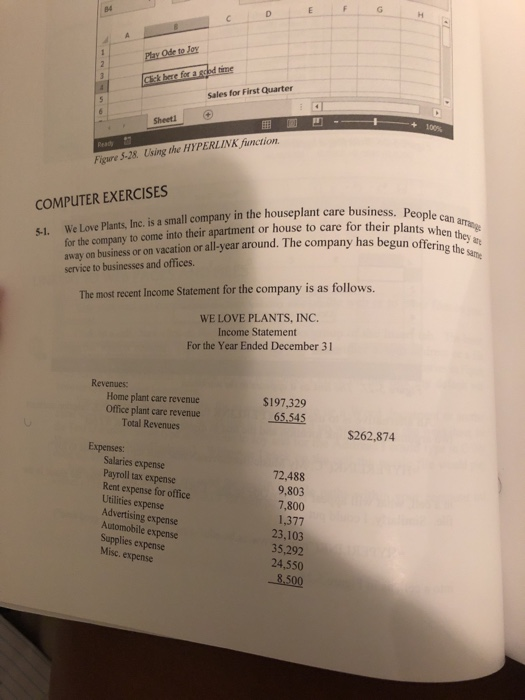
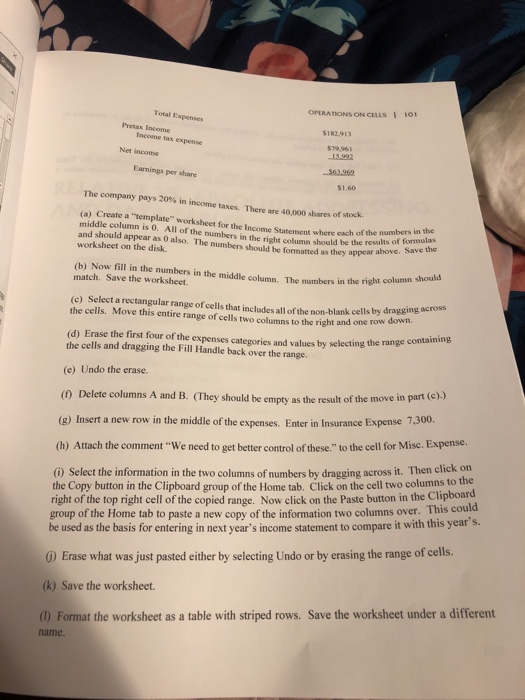
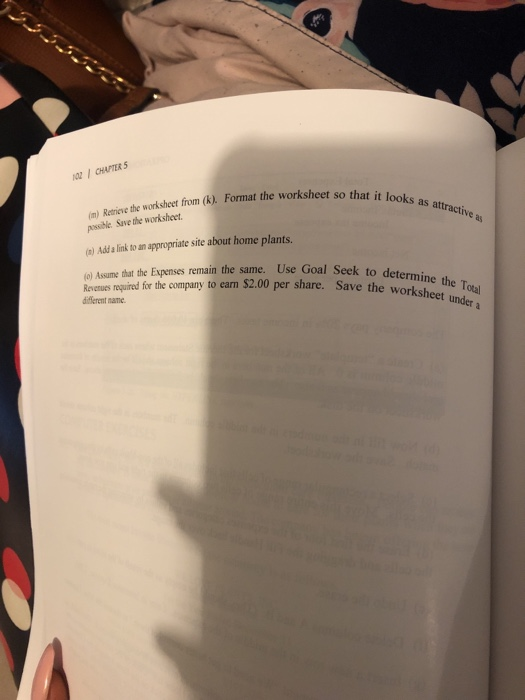
G E 84 C C Play Ode to Joy 2 Cick bere for a gcod time Sales for First Quarter 100% Sheetl Reatu Figure 5-28. Using the HYPERLINK function. COMPUTER EXERCISES We Love Plants, Inc. is a small company in the houseplant care business. People c for the company to come into their apartment or house to care for their plants when they a away on business or on vacation or all-year around. The company has begun offering the same can arrange 5-1. service to businesses and offices The most recent Income Statement for the company is as follows. WE LOVE PLANTS, INC. Income Statement For the Year Ended December 31 Revenues Home plant care revenue Office plant care revenue Total Revenues $197,329 65.545 $262,874 Expenses Salaries expense 72.488 9,803 7,800 1,377 23,103 35.292 24,550 Payroll tax expense Rent expense for office Utilities expense Advertising expense Automobile expense Supplies expense Misc. expense 8,500 OPERATIONS ON CELLS I 101 Total Expenses Pretax Income $I82.913 Income tax expense $79.961 Net income 15.992 563,969 Earnings per share S1.60 The company pays 20% in income taxes. There are 40 000 shares of stock (a) Create a "template" worksheet for the Income Statement where each of the numbers in the middle column is 0. All of the numbers in the right column should be the results of formulas and should appear as 0 also. The numbers should be formatted as they appear above. Save the worksheet on the disk (b) Now fill in the numbers in the middle column. The numbers in the right column should match. Save the worksheet. (c) Select a rectangular range of cells that includes all of the non-blank cells by dragging across the cells, Move this entire range of cells two columns to the right and one row down. (d) Erase the first four of the expenses categories and values by selecting the range containing the cells and dragging the Fill Handle back over the range. (e) Undo the erase. () Delete columns A and B. (They should be empty as the result of the move in part (c).) row in the middle of the expenses. Enter in Insurance Expense 7,300. (g) Insert a new (h) Attach the comment "We need to get better control of these,." to the cell for Misc. Expense. (i) Select the information in the two columns of numbers by dragging across it. Then click on the Copy button in the Clipboard group of the Home tab. Click on the cell two columns to the right of the top right cell of the copied range. Now click on the Paste button in the Clipboard group of the Home tab to paste a new copy of the information two columns over. This could be used as the basis for entering in next year's income statement to compare it with this year's. )Erase what was just pasted either by selecting Undo or by erasing the range of cells. (k) Save the worksheet. table with striped rows. Save the worksheet under a different (1) Format the worksheet as a nme. 0I CHAPTER 5 (m) Retrieve the worksheet from (k). Format the worksheet so that it looks as attractive as possible Save the worksheet (a) Add a link to an appropriate site about home plants, (o) Assume that the Expenses remain the same. Use Goal Seek to determine the Total Revenues required for the company to earn $2.00 per share. Save the worksheet under a different name
Step by Step Solution
There are 3 Steps involved in it

Get step-by-step solutions from verified subject matter experts
 Study Help