







Question: please answer in java. What You Will Learn .Using a Timer .Using a null layout .Using paintComponent .Using the keyboard listener Contents . Lab 09
please answer in java.
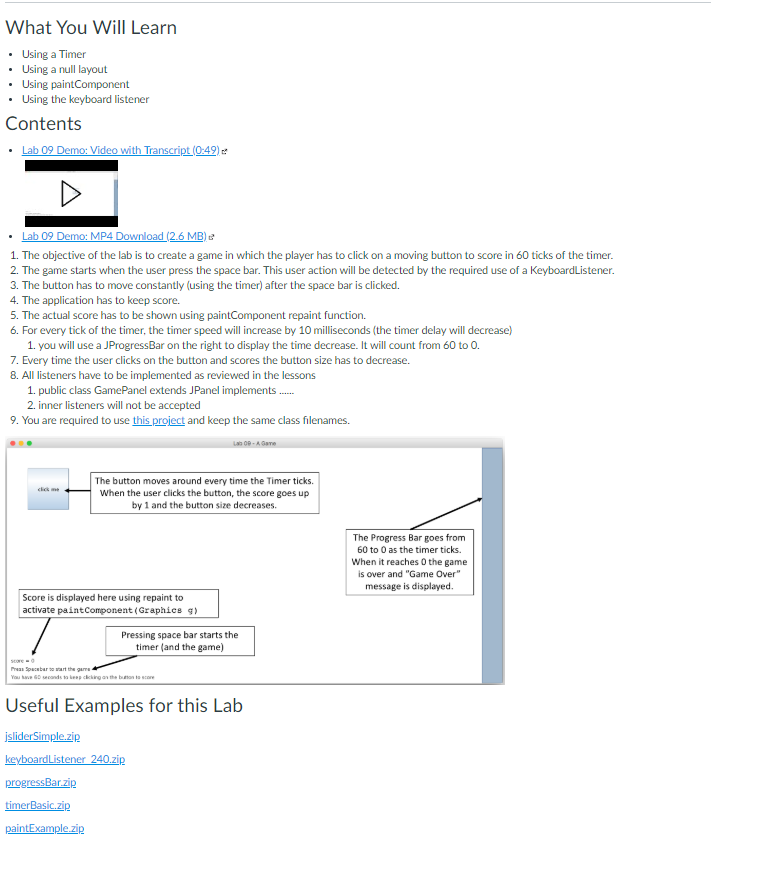
What You Will Learn .Using a Timer .Using a null layout .Using paintComponent .Using the keyboard listener Contents . Lab 09 Demo: Video with Tr 0:49) 1The objective of the lab is to create a game in which the player has to click on a moving button to score in 60 ticks of the timer. 2. The game starts when the user press the space bar. This user action will be detected by the required use of a KeyboardListener. 3. The button has to move constantly (using the timer) after the space bar is clicked. 4. The application has to keep score. 5. The actual score has to be shown using paintComponent repaint function. 6. For every tick of the timer, the timer speed will increase by 10 milliseconds (the timer delay will decrease) 1. you will use a JProgressBar on the right to display the time decrease. It will count from 60 to 0. 7. Every time the user clicks on the button and scores the button size has to decrease. 8. All listeners have to be implemented as reviewed in the lessons 1. public class GamePanel extends JPanel implements 2. inner listeners will not be accepted 9. You are required to use this project and keep the same class filenames. The button moves around every time the Timer ticks. When the user clicks the button, the score goes up by 1 and the button size decreases. The Progress Bar goes from 60 to 0 as the timer ticks. When it reaches 0 the game is over and "Game Over" message is displayed. Score is displayed here using repaint to activate paintComponent (Graphics Pressing space bar starts the timer (and the game) Useful Examples for this Lab jsliderSimple.zip progressBarzip timerBasic.zip
Step by Step Solution
There are 3 Steps involved in it

Get step-by-step solutions from verified subject matter experts
 Study Help