







Question: Please answer it by python program (Ex. Pycharm...) Part II: Wolfie Numerals Arabic Numerals Converter (20 points) Write a function wolfie2arabic) that takes one string
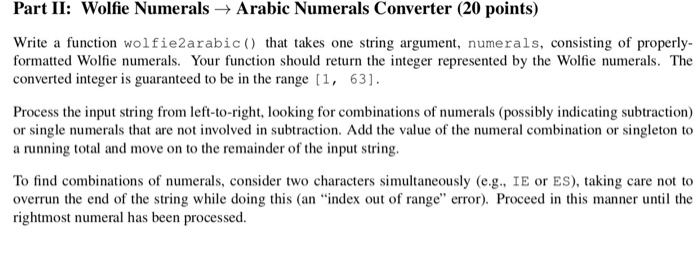
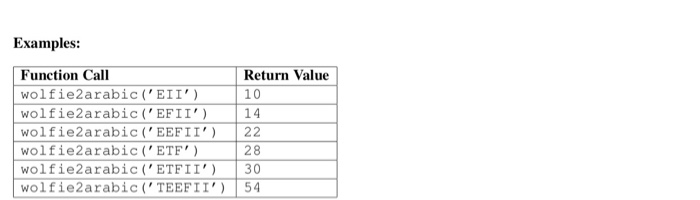
Part II: Wolfie Numerals Arabic Numerals Converter (20 points) Write a function wolfie2arabic) that takes one string argument, numerals, consisting of properly formatted Wolfie numerals. Your function should return the integer represented by the Wolfie numerals. The converted integer is guaranteed to be in the range [ 1 , 63 ] . Process the input string from left-to-right, looking for combinations of numerals (possibly indicating subtraction) or single numerals that are not involved in subtraction. Add the value of the numeral combination or singleton to a running total and move on to the remainder of the input string. To find combinations of numerals, consider two characters simultaneously (e.g. IE or ES), taking care not to overrun the end of the string while doing this (an "index out of range" error). Proceed in this manner until the rightmost numeral has been processed. Part II: Wolfie Numerals Arabic Numerals Converter (20 points) Write a function wolfie2arabic) that takes one string argument, numerals, consisting of properly formatted Wolfie numerals. Your function should return the integer represented by the Wolfie numerals. The converted integer is guaranteed to be in the range [ 1 , 63 ] . Process the input string from left-to-right, looking for combinations of numerals (possibly indicating subtraction) or single numerals that are not involved in subtraction. Add the value of the numeral combination or singleton to a running total and move on to the remainder of the input string. To find combinations of numerals, consider two characters simultaneously (e.g. IE or ES), taking care not to overrun the end of the string while doing this (an "index out of range" error). Proceed in this manner until the rightmost numeral has been processed
Step by Step Solution
There are 3 Steps involved in it

Get step-by-step solutions from verified subject matter experts
 Study Help