







Question: Please answer the following question in Python properly. I have asked this question four times and gotten it wrong so please try to get the
Please answer the following question in Python properly. I have asked this question four times and gotten it wrong so please try to get the right answer! I will provide an existing code that still provides 1 error, thank you very much. Please try to fix the error without messing up the other output. It is ok to provide different code as long as it follows the directions.
This program will store roster and rating information for a soccer team. Coaches rate players during tryouts to ensure a balanced team.
(1) Prompt the user to input five pairs of numbers: A player's jersey number (0 - 99) and the player's rating (1 - 9). Store the jersey numbers and the ratings in a dictionary. Output the dictionary's elements with the jersey numbers in ascending order (i.e., output the roster from smallest to largest jersey number). Hint: Dictionary keys can be stored in a sorted list. (3 pts) Ex:
Enter player 1's jersey number: 84 Enter player 1's rating: 7 Enter player 2's jersey number: 23 Enter player 2's rating: 4 Enter player 3's jersey number: 4 Enter player 3's rating: 5 Enter player 4's jersey number: 30 Enter player 4's rating: 2 Enter player 5's jersey number: 66 Enter player 5's rating: 9 ROSTER Jersey number: 4, Rating: 5 Jersey number: 23, Rating: 4 Jersey number 30, Rating: 2 ...
(2) Implement a menu of options for a user to modify the roster. Each option is represented by a single character. The program initially outputs the menu, and outputs the menu after a user chooses an option. The program ends when the user chooses the option to Quit. For this step, the other options do nothing. (2 pts) Ex:
MENU a - Add player d - Remove player u - Update player rating r - Output players above a rating o - Output roster q - Quit Choose an option:
(3) Implement the "Output roster" menu option. (1 pt) Ex:
ROSTER Jersey number: 4, Rating: 5 Jersey number: 23, Rating: 4 Jersey number 30, Rating: 2 ...
(4) Implement the "Add player" menu option. Prompt the user for a new player's jersey number and rating. Append the values to the two vectors. (1 pt) Ex:
Enter a new player's jersey number: 49 Enter the player's rating: 8
(5) Implement the "Remove player" menu option. Prompt the user for a player's jersey number. Remove the player from the roster (delete the jersey number and rating). (1 pt) Ex:
Enter a jersey number: 4
(6) Implement the "Update player rating" menu option. Prompt the user for a player's jersey number. Prompt again for a new rating for the player, and then change that player's rating. (1 pt) Ex:
Enter a jersey number: 23 Enter a new rating for player: 6
(7) Implement the "Output players above a rating" menu option. Prompt the user for a rating. Print the jersey number and rating for all players with ratings above the entered value. (2 pts) Ex:
Enter a rating: 5 ABOVE 5 Jersey number: 66, Rating: 9 Jersey number: 84, Rating: 7 ...
Existing Code with Errors
roster = {}
# Define a function to output the roster in ascending order of jersey number def output_roster(): print("ROSTER") for key in sorted(roster.keys()): print("Jersey number: {}, Rating: {}".format(key, roster[key]))
# Define a function to add a player to the roster def add_player(): jersey_number = int(input("Enter a new player's jersey number: ")) rating = int(input("Enter the player's rating: ")) roster[jersey_number] = rating print()
# Define a function to remove a player from the roster def remove_player(): jersey_number = int(input("Enter a jersey number: ")) if jersey_number in roster: del roster[jersey_number] else: print("Jersey number not found")
# Define a function to update a player's rating def update_rating(): jersey_number = int(input("Enter a jersey number: ")) if jersey_number in roster: new_rating = int(input("Enter a new rating for player: ")) roster[jersey_number] = new_rating else: print("Jersey number not found")
# Define a function to output players above a rating def output_above_rating(): rating = int(input("Enter a rating: ")) print("ABOVE {}".format(rating)) found = False for key, value in roster.items(): if value > rating: print("Jersey number: {}, Rating: {}".format(key, value)) found = True if not found: print("No players found above the given rating")
# Output the initial roster for i in range(1, 6): jersey_number = int(input("Enter player {}'s jersey number: ".format(i))) rating = int(input("Enter player {}'s rating: ".format(i))) roster[jersey_number] = rating print()
output_roster()
# Define the menu options menu = """ MENU a - Add player d - Remove player u - Update player rating r - Output players above a rating o - Output roster q - Quit """
# Prompt the user to choose an option option = "" while option != "q": print(menu) option = input("Choose an option: ") if option == "o": output_roster() elif option == "a": add_player() elif option == "d": remove_player() elif option == "u": update_rating() elif option == "r": output_above_rating()
Errors
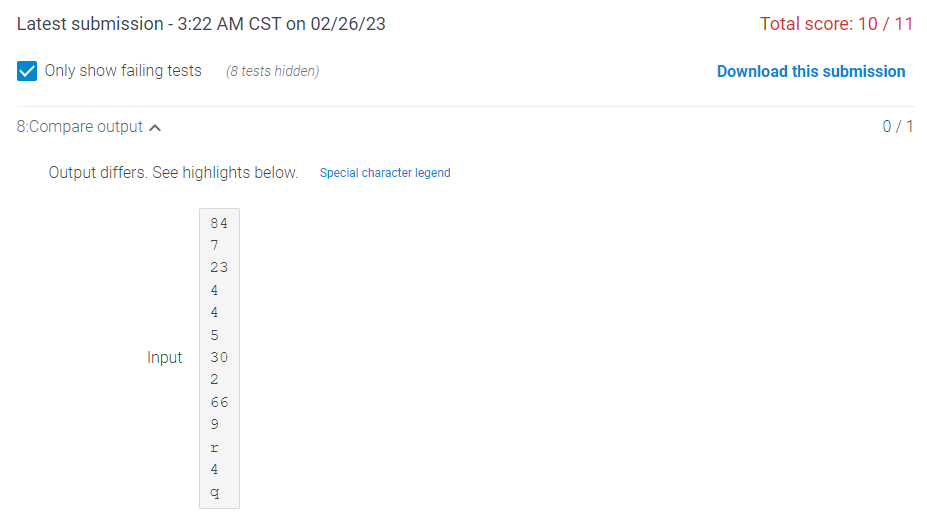
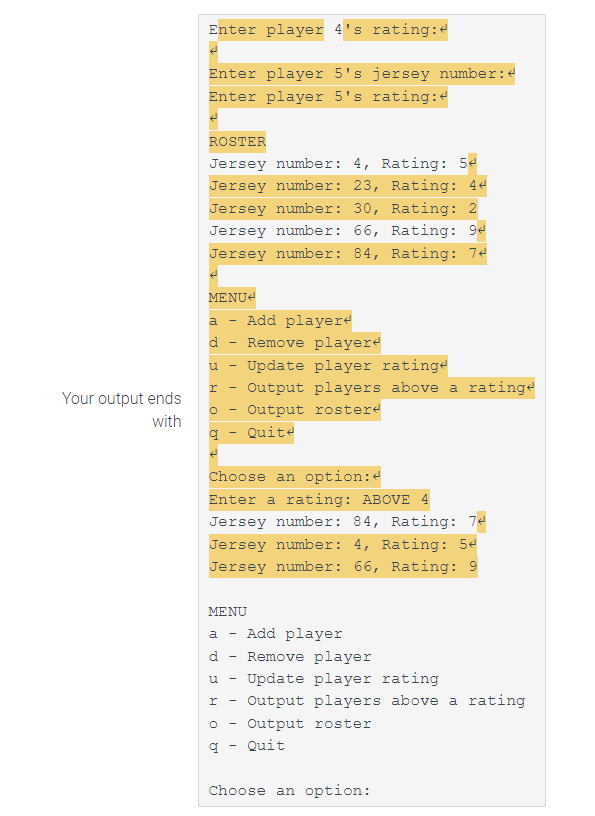
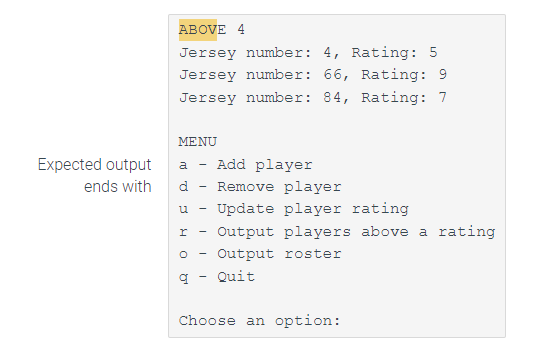
Output differs. See highlights below. MENU a - Add player d - Remove player u - Update player rating r - Output players above a rating - Output roster q - Quit Choose an option: ABOVE 4 Jersey number: 4, Rating: 5 Jersey number: 66, Rating: 9 Jersey number: 84, Rating: 7 MENU a - Add player d - Remove player u - Update player rating r - Output players above a rating - Output roster q - Quit Choose an option
Step by Step Solution
There are 3 Steps involved in it

Get step-by-step solutions from verified subject matter experts
 Study Help